• Skip to primary navigation
  • Skip to main content

My Lifestyle Dream

The journey of a thousand miles begins with one small step

  • Home
  • Print on Demand
  • Website Monetization
  • Dropshipping
  • Matched Betting
  • Social Trading
  • Blog
  • Travel
  • About

Make Money Online

Keyword Planner for Beginners

4th January 2016 By martinos74 Leave a Comment

Keyword Planner for Beginners

This article provides a useful keyword planner, to help you understand and the principles of keyword research and start you finding great keywords for your blog.

So, by now you have your site up and running, but before you head off at full steam writing blog posts and articles, there is one key step to think about first… How are you going to attract visitors to your site?

I’m no SEO expert, but have spent the past few weeks learning all about keyword research for my site, so this post is a summary of what I have learnt so far. Feel free to feedback and comment, but I’m, hoping this post will serve as a great keyword planner to help you do perform your own keyword research, find some useful keyword planning tools and give you a few SEO hints and tips along the way.

  • What is Keyword Research?
  • Why is Keyword Research Important?
  • Martinos Keyword Planner
    • Step 1 – Choose your ‘Seed’ Keywords
    • Step 2 – Create a short list of commercially valuable keywords
    • Step 3 – Evaluate the Keyword Competition

What is Keyword Research?

Lets face it, most users are going to get to your website via a Google search. They’ll type in a phrase,  keyword or even a set of keywords into the Google search box and a heap of search results will be returned to them.

You want your site to be as near to the top of that list as possible to attract the biggest number of visitors to your site. There are a number of factors that help you get to the top of this list such as the number of links to your site, the age of your site, the quality of your content, but we’ll save that for another day.

Keyword research is simply the art of choosing relevant keywords that you think your potential users would type into Google to come to your site.

Think of it a bit like fishing…. your keywords are the bait that you’re going to use to hook your users, and the closer to the top of the list you are, the more likely you are to reel them in!

Why is Keyword Research Important?

If you’re serious about running a blog or website, then you’re going to be spending many hours in front of a computer creating content for your potential visitors. But unless, you just like ranting at the wind, you want to make sure that your efforts are not in vain and that you have a captive audience willing to listen to you.

Remember that the more visitors you get to your site, the more potential you have to convert those visitors into money in your back pocket.

Before you go any further you need to do your keyword research to learn the size of your potential market and to target specific segments of that market to increase the potential amount of visitors to your site.

Martinos Keyword Planner

Let me start by saying that getting your head around this topic is not going to be easy, and you will no doubt be swearing at your computer like I have for a while, but it is a necessary pain, and your efforts will bare fruit later.

To ease your pain, I have but together a keyword planner with a series of steps that I went through over the last couple of weeks to help me understand better which keywords I should target for my blog and websites.

Martinos Keyword Planner Step 1 – Choose your  ‘Seed’ Keywords

Start by having a brainstorm session and write down 5- 10 keywords that you would use to describe your blog or site. I would recommend keeping these to 1-2 words rather than long keyword strings.

I’m going to use my sample site www.martinosrecords.com as an example for this exercise. I’m passionate about reggae music have always wanted to create a site related to this, but have never been quite sure which angle to take, so I wrote down the following keywords:

  • records
  • vinyl
  • music
  • roots
  • reggae

These are called ‘seed’ keywords, which we will take to help us find other keywords that may be useful for our site.

Martinos Keyword Planner Step 2 – Create a short list of commercially valuable keywords

Now we’re going to use a bit of magic and turn these 5 keywords into a much bigger list, which we will then be able to review and find which are the most valuable keywords with the help of something called Google Keyword Planner.

This is a free tool for you to use, and all you need is a Google account to get started.

Set up Google Keyword Planner and enter your keyword search criteria:

ACTION:

  • Goto: https://adwords.google.com/KeywordPlanner
  • Login with your google account
  • IMPORTANT : Make sure you click the ‘skip the guided set up’, otherwise you won’t be able to access this tool without putting your credit card details in (this took me a few hours to get right!!!)
  • Goto the tools menu and select ‘keyword planner’
  • Fill out the following fields in the dialogue box that opens:
    • Your product or service
    • Your product category (you can fill this out but I prefer to leave it empty as it may give me some ideas that I hadn’t thought of before)
    • Targeting – Select United Kingdom
    • Keyword filter – Add ‘500’ for ‘average monthly searches’ and £0.50 for suggested bid. This tells you how many people did a search with this keyword each month and how much advertisers would pay if someone clicked on an ad on your site from this keyword.
    • Click on ‘Get Ideas’

Analyse the suggested keyword results

You’ll now be presented with a list of keywords that Google has generated for you, which were related to your original ‘seed’ keyword. You’re also provided some really useful information about these keywords, which will help you decide, which keywords you should target.

There are 3 key columns that you need to focus on:

  • Average monthly searches – Does what it says on the tin and says how many visitors search for that keyword each month
  • Competition – This is a metric that Google creates to show you how much competition there is amongst advertisers to promote their product/site with this keyword
  • Suggested Bid – This metric gives an indication of how much advertisers would need to pay, every time someone clicked on one of the ads (on your potential site)

For each of these metrics you want the score to be as high as possible, as that shows that both visitors and advertisers are interested in this keyword, which means it’s in demand.

Don’t forget to check out the ‘Ad group ideas’ tab as well as sometimes that has gems of suggestions for new keywords for you.

TOP TIP: What I usually do is go through the above steps with each ‘seed’ keyword and then download a csv file from Google Keyword Planner and combine all of the results into one master spreadsheet. This will help you to filter through the results more quickly so that you can arrive at your first set of keyword options.

Remember that this exercise is helping you to pick high volume, high value keywords that you can tailor your content around and will help you to shape your site. This is a great exercise for finding new angles to your business. For example through doing this exercise I notice that ‘record players’  or ‘record exchange’ receive a high volume of traffic, so it would probably be worth my while creating a section on the best record players for vinyl records or a forum to exchange records.

There are a bunch of other tools that will help you to find suitable keywords for your site such as soovle.com, ubersuggest.org, scrapebox.com etc, but I’m going to save them for a later post.

Martinos Keyword Planner Step 3 – Evaluate the Keyword Competition

We should now have a list of 5 – 10 keywords, which are both high in search traffic and are commercially valuable search terms.

That’s great, but you now need to understand whether there is an icecube’s chance in hell of ranking on the first page of Google for these keywords, otherwise you will be wasting a lot of time and effort creating content that will sit on the lower pages of Google and no one will ever review.

A listing on the first page of Google’s search results accounts for nearly 90% of all the click-throughs and the following numbers show how important it is for you to rank well up the charts for your chosen keywords:

  • Position 1 – 31.2%
  • Position 2 – 14.04%
  • Position 3 – 9.85%
  • Position 4 – 6.97%
  • Position 5 – 5.5%
  • Position 6 – 10 – 3.73%
  • All of the results on the second page total only 3.99%
  • The third page only 1.6%
  • and the rest is barely worth talking about

Now just by doing a simple search for your keyword in Google you will get a feel for whether the results page is full of big brands and top ranking site like the BBC, but luckily there are couple of other tools that can help us with our decision making.

ACTION: You’ll need to now enable 2 browser extensions:

  • SEO Quake – http://www.seoquake.com – (Chrome, Firefox, Opera or Safari)
  • Mozbar – https://moz.com/tools/seo-toolbar (Chrome and Firefox only)

Then type a search keyword into Google eg ‘record player’ and you will have a standard results page returned from Google with 2 helpful toolbars giving you great information about the results:

From these 2 toolbars you need to focus on the following:

  • Page Authority (PA) – This is Moz’s metric to measure the predictive ranking strength of a single page ie how likely is it that the page will show up in search engines
  • Domain Authority (DA) – This measures how important Moz ranks the domain. Sites like Twitter or BBC will always have a score of 100
  • Page Rank (PR) – This is a metric developed by Larry Page for Google, which measures the importance of web pages
  • Backlinks – Both toolbars also feature a count of the number of links to the page and to the domain in general

From what I have read the 2 most important factors are the Page Rank and Page Authority, so you want these to be as low as possible.

TOP TIP: Make sure that in the top 10 results there are sites with a PA of less than 30, which gives you a chance of pushing them off of the first page, if you play your cards right.

For each keyword I would recommend you make a list of:

  • Local Search volume
  • CPC
  • Advertiser Competition
  • Pages with exact match keyword
  • Pages with PA below 30
  • Pages with less than 30 juice links
  • Pages with site less than 1 year

Summary

Knowing your audience is extremely important if you are starting a new blog or website, however, understanding how to get your audience to your site is even more important.

  • Think carefully about the keywords that you are going to target
  • Check that the keywords are commercially valuable if you are planning to use your site as a revenue stream
  • Evaluate the competition and make sure that you are confident you can find yourself nudging up to the top of those search results pages

You can always go back and re-optimise your content later on, but my advice would be to think about this and try to head in the right direction to start with. It can be pretty frustrating as you are chomping at the bit, to get writing, but it can save you a lot of time in the long run.

Filed Under: Website Monetization Tagged With: Beginners, CMS, SEO

My Website Dream : Chapter 2 : WordPress Setup

24th December 2015 By martinos74 Leave a Comment

Website Dream WordPress Setup

So most of my time this month has actually been taken up with WordPress and getting www.mylifestyledream.com set up properly. It is amazing how much time you can sink into tinkering with WordPress or tools that you need to learn to power your website, and you constantly find yourself falling down rabbit holes. However, some of those holes are important, and spending the time to build a site on a solid foundation will pay dividends in the long term.

Anyway, here are just a few of the rabbit holes I fell down this month:

Choosing a WordPress Theme

Wowwwwwwww, there are soooo many themes out there how do I know where to start?

I initially started with a free WordPress theme called Atomic, which I chose because I liked the clean design and font styles. However, I read many articles this month about why you should really invest in a Premium WordPress theme.

The main reason for this is that most of the free WordPress themes are made by individuals, who can at any time decide not to support the theme any more. This means that sooner or later, when you upgrade your version of WordPress, you’re going to break your theme, leaving you in a whole world of pain.

There are lots of great premium themes out there costing as little as £20 – 30, so it’s worth investing the time and money to choose the right one. I was looking for a theme that had the following credentials:

  • Offered good support
  • Fully Responsive
  • Optimised for SEO
  • Quick Page Loads
  • Offered a variety of layouts
  • Could add custom headers
  • Ideally was available for a one off fee only, rather than an annual subscription

After doing lots and lots of research I came down to 2 candidates, which were completely different solutions to each other but both had things I wanted:

Elegant Themes – Divi Theme

This is basically a drag and drop, build your own theme kit, which has great reviews. This was a really attractive option to me as it required no coding and would give you a great looking theme, with loads of cool modules, however, the downsides were:

  • Creates bloated code = slower page performance
  • Once you have created your theme in divi, it adds lots of short codes, which means if you ever wanted to change themes in the future you would have a big problem
  • You have to pay a recurring fee for access to all of the available Elegant Themes

The Genesis Framework

Rather than just buying a theme, this is a whole framework that makes it really easy for developers to create their own ‘child’ themes from the sample theme. This is definitely a favourite amongst coders and has the following advantages:

  • Very lightweight code and little use of shortcodes
  • Uses the concept of a child theme, which means that when WordPress is upgraded, you won’t be able to break your site so easily
  • Has a big community and support network
  • Is one of the best options for SEO
  • Is relatively inexpensive at $49

The main issue with the themes that came with this framework was that they have very few modules or template combinations that come with them and you can do very little customisations, without coding. This is definitely something I wanted to avoid as I don’t want to spend hours getting back into coding.

In the end, however, I decided that it was better to go with a framework that can be extended rather than tying myself into one theme forever, as that could be a very costly mistake. I then did a little hunting around and found some free child theme options that go with this framework and found the ‘Winfield Theme‘ , which gave a look and feel to what I wanted.

Without much hassle at all I made a few adjustments and now have this on my site.

WordPress Posts vs Pages

Again, setting up the structure of your site is key to start with is key as changing it further downstream is going to take a lot of work.

The main thing that I’d been stressing about and actually spent hours deliberating was whether I should use WordPress ‘Posts’ or ‘Pages’ for most of the content on my site.

Using pages gives you a more traditional approach to a website, for articles which aren’t time-based and you would organise your content through your navigation elements. Your URLs would then be structured something like: www.mylifestyledream.com/make-money-online/social-trading/content

As you can see, using this approach would result in massive URL’s (although you could install a permalink shortener module to get around this)

With WordPress ‘posts’, however, you organise everything through your taxonomy using ‘categories’ and ‘tags’ rather than navigation. This allows the user to read an article and then they easily get led onto related articles, or click on the category or tag. The URL’s will then be simply: wwwmylifestyledream.com/content

I first opted to use pages, then switched to a combination of the two, then switched everything to using posts!!! I think it’s a more modern approach and means your content can easily be syndicated as well so I’m going to stick with this now. I’ve also figured out that I can create some custom menu’s with the top posts in anyway, so I can still get my traditional secondary navigation!

Niche Websites

I’ve spent a lot of time recently looking into the concept of Niche websites. These sites are usually built by internet marketeers, specifically with the intent to make money via either affiliate links such as Amazon or through Pay Per Click Advertising.

The standard approach is to do keyword research to find keywords that have a high cost per click value, with a lot of search traffic and most importantly, are easy enough for you to rank in the top 10 listings, with minimal effort.

There are a number of great resources out there, but I’ve been avidly studying the Niche Pursuits blog, and they have just launched the Niche Pursuits 3.0 Project.

This is a project where 3 experts take 3 aspiring users through a 6 month project to set up a successful Niche website. They give out weekly coaching calls, and you can follow step by step as these websites get set up.

The overall goal for these websites is to be able to earn $500 a month in recurring passive income, which is really in line with my overall goals, which would help me travel and cultivate my dream lifestyle.

Niche websites really rely on strong Keyword research, so I’ve spent this month trying to understand this better and using some of the tools like Long Tail Pro and SE Cockpit to do this research.

Adobe Premiere Pro 2.0

As part of my website I have been taking screen captures and will definitely need to know how to create great looking video content in the future.

I tried a few free video editors like Windows Movie Maker, which is great for simple movies and VSDC Video Editor, which is more advanced but a little bit clunky. Then I found that Adobe are giving out free downloads to some of their older products that they no longer support.

One of these products was Adobe Premiere Pro 2.0, so I jumped at the chance to get a free version of this and installed it right away.

Admittedly it is a little bit old, and a little bit buggy, however, it’s an amazing bit of kit to have for free. If you know how to use Photoshop then Adobe Premiere Pro 2.0 is the perfect companion.

I spent most of the day yesterday playing around with it and am really excited about using this in the future. I even made my first video with it: Google Keyword Planner Tool Set Up

DOWNLOAD ADOBE PREMIERE 2.0 FOR FREE HERE

Next Month’s Goals

  • Choose a niche for my website
  • Publish 5 more articles
  • Create a backlinking strategy

Last Month’s Tasks

  • Finalise structure of website – COMPLETE
  • Choose a theme – COMPLETE
  • Understand backlinking – COMPLETE
  • Learned Adobe Premiere Pro 2.0 basics – BONUS
  • Set up local test version of my WordPress site – BONUS

Tools and Sites Used

  • Genesis Framework 
  • Adobe Premiere Pro 2.0 
  • Niche Site 3.0 Project

Filed Under: Website Monetization Tagged With: niche websites, WordPress

My Social Trading Dream : Chapter 2 : Shortlisting eToro Traders

24th December 2015 By martinos74 Leave a Comment

Social Trading Dream Shortlist etoro traders

Well, it has been one of the worst starts to a year in trading history with stocks plummeting to levels from 4 years ago, so a lot of the traders in eToro took big hits this month, particularly those who hold a high percentage of their portfolio in stocks.

However, every cloud has a silver lining, and this proved to be a useful time to see how traders reacted to these losses and how much this impacted their accounts. This helped me to remove a couple of traders from my shortlist who made big losses, and gave me more confidence in some traders who (even though most of their portfolio was made up of stocks), only made minor losses.

Of course, when everything goes down, this also presents another buying opportunity, so I am looking to invest in the next month.

I’ve got my account verified on eToro and am torn between investing $1000, which will give me a $300 eToro bonus, or if I invest $2500, then I will get a bonus of $1000. The only thing is that these bonuses are paid in the way of eToro points, which can only be withdrawn after you have made a certain amount of trades. I’m not 100% sure of how this works, but I think the amount you can withdraw gradually increases over time.

eToro Trader Shortlist

eToro Best Traders Shortlist
My Shortlist of the best traders to copy on eToro

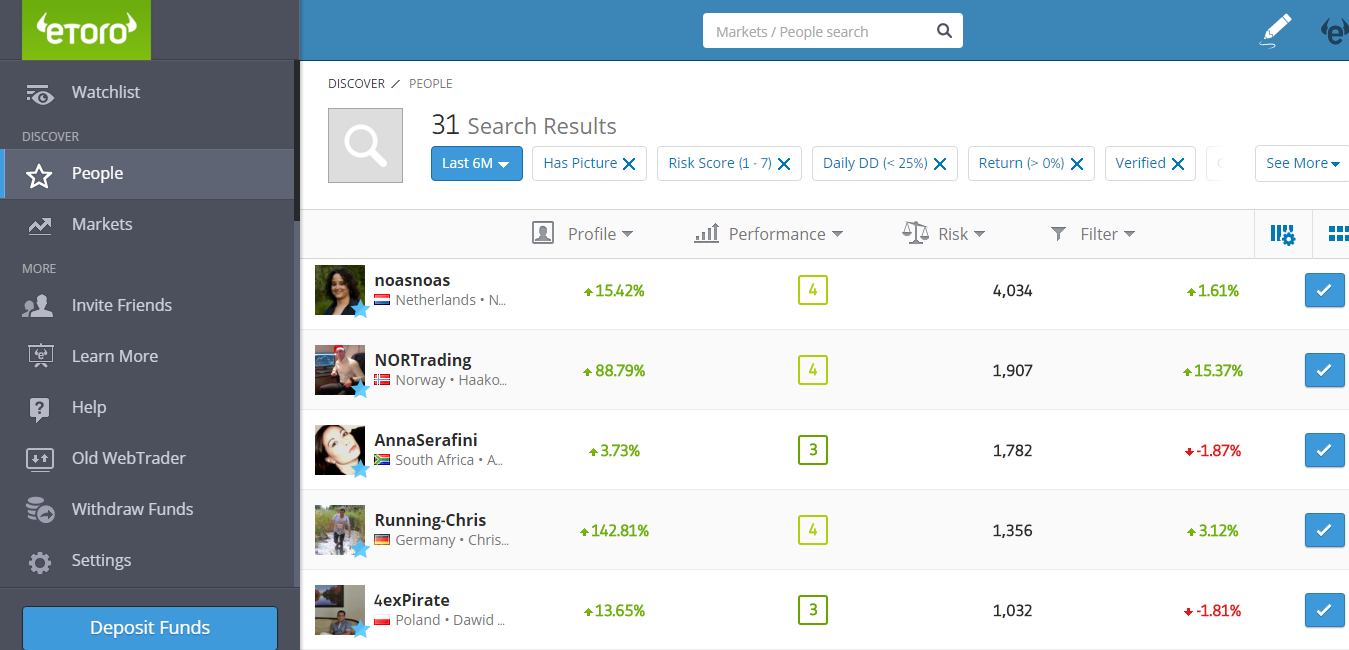
Finding the right eToro trader to invest in can be a bit daunting at first, especially for the newbie. There are thousands of traders to choose from, some with incredible percentage gains, but you really need to be careful and spend a bit of time interrogating their statistics.

eToro gives you a great search filter which helps you to choose who to invest in and using a few simple filters you can start to find traders who match your risk profile.

TOP TIP : Some key things you should look at:

  • History of the trader, did they make any huge losses during a single month
  • How long have they been trading for… the longer the better
  • What is their risk level.
  • What do they invest in.. commodities, stocks, forex
  • How many open trades do they have. Often if they have lots of trades open, this may mean they are chasing the loss, hoping it will come back one day, rather than taking the loss. This is bad, because you will then take on these bad investments if you invest in them.

Remember it’s good to have a balanced portfolio of at least 5 traders, investing at different risk levels and across different markets in case something goes wrong with one of them.

You can have a look at my eToro Trader Reviews here and look at some of the criteria I used to select them.

All I need to do now is take the plunge and make an investment!

LAST MONTH’S TASKS

  • Choose 10 traders to invest in – COMPLETE

NEXT MONTH’S GOALS

  • Make the initial investment
  • Undestand etoro points

TOOLS AND SITES USED

  • eToro

Filed Under: Social Trading Tagged With: etoro

Chapter 2 : More Free Bets and Rollovers

24th December 2015 By martinos74 1 Comment

Matched Betting Dream Free Bets

Well, I’m not a matched betting expert yet, but I’ve been steadily putting bets on every weekend and working my way through the free offers over the past month and am getting to grips with the whole Matched Betting technique.

I’ve gone through most of the easy and medium difficulty sign up offers and this month I completed offers with the following bookmakers:

  • 188bet
  • Totesport
  • Betdaq
  • Betway
  • StanJames
  • 32Redsport

Bet365 Offer

Things are starting to get a little more complex now and I need to make sure I pay attention to detail with each offer that I sign up with an thoroughly understand the terms and conditions.

For example I have just signed up for the Bet365 introductory offer, where they will match your deposit up to a total of £200 bonus

This offer and a lot of the more complex offers come with something called a ‘Rollover’. The Bet365 offer has a rollover of 3 times the value of your deposit and bonus, before you can withdraw the bonus. This means that you must place bets of £200 (deposit) + £200 (bonus) x 3 = £1200 within a period of 90 days, before you can withdraw your money.

Now we’re starting to talk bigger sums of money so it’s important to get this right and choose the right matches. For this offer the odds need to be greater than 1.5, and so far I have placed 3 bets of £200 at just over these odds. The bad news as I have discovered is that because these odds are quite low, it is quite likely that this event will happen, so all of the money is being added to my Bet365 account. This unfortunately means that I have to keep re-depositing in my Smarkets Booking Exchange account to lay the bet against this.

In general I’m losing about £7 per bet so should hopefully be able to make about £150 from this offer.

Matched Betting Facebook Groups

There is still a lot to learn about Matched Betting especially when it comes to the more complex offers, betting on horseracing and things like accumulators, but I’m going to bide my time and come onto them later on.

In the meantime, however, I have found that there are loads of Facebook groups around Matched Betting such as:

  • Matched Betting Support
  • Matched Betting 101
  • Matched Betting for Free

and I also found the Matched Betting Guru and Matched Betting Blog Websites really useful.

Ultimatcher Spreadsheet

The other thing that you need to do with Matched Betting is keep track of your winnings, as there are lots of calculations to be made and your money will be distributed around many different Bookmakers.

In Month 1, I was using my own spreadsheet to keep a track of this and calculated I’d made a total of just under £200, however, I wasn’t confident in this number and it was quite an arduous process to update.

After doing a bit of digging around I found that most Matched betting professionals use the Ultimatcher Spreadsheet to keep a track of their winnings. On first glance this seems like a really complicated spreadsheet, however, after a quick read through the instructions it is actually a really useful tool to use.

All you need to do is to set up bookmakers and exchanges that you have accounts with and for each match that you bet on record your stake and the odds that you put your bet on, as well as the type of bet (free or qualifying) and it will do the maths for you and give you a running total.

The other nice thing is that it gives you detailed statistics of things like where your most profitable bets were made, which could prove fruitful in the longrun. Best of all is it is entirely free to use and available to download here

The only drawbacks I found is that if you make a mistake it is difficult to undo it and I don’t really know how to record bets where there are rollovers and you just get a bonus instead of a free bet, but I’ll get to grips with that soon.

Overall, it is proving a little more time consuming than I had imagined, but I think if you focused solely on matched betting then it would be easy to get to grips with.

I think I’ve made around £350 over the 2 months since I started, but I need to do a little bit of work on my numbers to be totally confident.

How much have I earned from Matched Betting so far?

XXXXXXX

What Free Bets did I complete?

    • 188bet
    • Totesport
    • Betdaq
    • Betway
    • StanJames
    • 32Redsport

Next Month’s Goals

  • Complete Bet365 Offer
  • Place an Inplay bet offer
  • Get an accurate balance sheet

Last Month’s Tasks

  • Complete the free offers for the next 10 bookmakers – 6 Offers COMPLETE
  • Understand how to use the ultimatcher spreadsheet – COMPLETE
  • Create an article on 5 easy offers – INCOMPLETE

Tools and Sites Used

  • Ultimatcher
  • Bet365
  • Matched Betting Support
  • Matched Betting 101
  • Matched Betting for Free
  • Matched Betting Guru
  • Matched Betting Blog

Filed Under: Matched Betting Tagged With: Matched Betting Dream

My Website Dream : Chapter 1 : Making a Website

24th November 2015 By martinos74 Leave a Comment

Website Dream Making-a website

Wow, I have to admit, that was one heck of a month and I feel that I have learnt an awful amount of stuff around my key topic of how to make money online. I also gave up drinking for a month as part of ‘Go Sober for October’, so I had an incredible amount of energy and ideas flowing, that it was actually difficult to try and focus on my core themes.

Focus

Well, I’ve obviously taken the first few steps and started up www.mylifestyledream.com and even though I’ve worked in Digital Media for the past 15 years, I’ve realised this month that there is soooo much to learn and that if you want to do things well, then you’re going to have to invest a lot of time into it.

The other thing I’ve learned is that even though there is a lot to learn, it is actually really exciting stuff, and you find that because all of your efforts are going towards your own business, you will have a lot more drive and enthusiasm to learn and create. In fact, the hardest thing that I have found this month is deciding what to focus on as there are so many things I want to learn and master right now!!!

WordPress Set Up

Getting WordPress up and running was really simple and painless and I’ve described the process in my article: Setting up a Website – 3 Simple Steps

It was really tempting to start messing around with lots of different plugins, themes and bells and whistles, but for now my goal was to get the basics in place and move on to more valuable things. My thoughts were that I can easily come back and make changes once I have the core of the site up and running.

Keyword Research

After going through and setting up the basics of this website, the main curve ball that has taken up most of my time this month has been keyword research.I hadn’t actually thought about this much before at all, and the more I read about it, the more valuable I realise this subject is. The key learning that I have taken away from this month is that you really, really should try to understand your market before you head off writing articles and basing your whole business on a whim that you might have had.

Doing detailed keyword research really helps you to understand whether there is a market at all, how many visitors you think you could get for a potential market and most importantly what your potential returns will be. You’ll probably find that the market that you thought you could enter is already saturated with high ranking sites, that you’re never going to compete with, so you need to look at alternative strategies.

The best approach that I have found this month is focused on ‘Long Tail Keywords’. These are keywords that have less traffic and less competition for them, but means that you are more likely to be able to rank well for them. Rank well for a number of these long tail keywords and your site will start making money.

For example, you might be passionate about ‘Basket weaving’ but you will find that this keyword is heavily competitive and will be difficult for you to get onto the first page in Google. The long tail approach would mean that you would curate articles specifically around similar topics but your keywords (typically 3+ words) would be things like “A beginners guide to basket weaving” or “What are the most popular basket weaves”.

I’ve written an article on this, but have to say that my head nearly exploded this month, trying to figure out what I should target for both this website, and other website ideas that I have.

All of this keyword research led me on to the concept of ‘Niche Websites’, which I hadn’t really come across before either, but is another great way to make money online. This all backs off of the idea of doing keyword research to uncover niche markets that have a decent amount of traffic, low competition for the Top 10 slots on Google, and are sought after by advertisers.

The idea is that you then set up a basic website specifically targeted at that niche and make money through the Adwords banners that you put on the site. This is a really exciting angle that I am dying to get started on soon, but will probably need to focus on this a little further down the line. If you’re interested in learning more about this then I’d recommend heading over to http://www.nichepursuits.com/ and following the Niche Site Project 2, where you are taken through a series of tutorials on how to set up a Niche website that makes you over $500 a month.

There are some great tools out there as well that can help you with your keyword research and I signed up to trial versions of Long Tail Pro and SECockpit, both of which can give you invaluable data that you need to start your websites, but be warned, you are likely to sink hours of your life into this activity, which is often compared to sifting for gold to find the right keywords.

Website Hacked!

The other key thing that I’ve learned this month is about WordPress security. I previously ran another website for many years on Drupal, that never had any issues, but to my surprise one of my test sites got hacked last week. I’m still not really sure what happened, as I just set up a test instance of WordPress on one of my domains in my hosting account and then got alerted from my hosting company that I may be involved in some kind of phishing scam! Needless to say, I deleted my test accounts as soon as possible and then beefed up the security on my other sites.

Summary

I definitely see potential online income streams from setting up niche sites in the future, which looks like a great revenue model  to help me with my lifestyle dream of travelling the world and working as little as possible. I like  the concept of doing some  hard work up  front to set up something  that  will  continually reap you rewards for months after. Feels a little bit like digital gardening!

The only downside at the moment  is that there is  sooo much to learn and it is so time-consuming, without providing any short-term financial reward. Some potential other online income streams that have come out this  month are  looking at affiliate sites for Amazon products and the concept of drop shipping…. But we’ll save them for a later date

Next Month’s Goals

  • Finalise the structure of www.mylifestyledream.com (At the moment I can’t decide whether to have a site based on posts which are structured by categories and tags, or a more traditional page based site)
  • Choose a suitable theme (I need to understand more about themes and how they can be customised, because I can already see the limitations of my simple ‘Atomic’ theme that I am currently using)
  • Understand backlinking strategy (As soon as I have got the core of my site together I am going to need to start generating traffic towards it)

Tools and Sites Used:

  • Long Tail Pro
  • SE Cockpit
  • www.nichepursuits.com
  • www.smartpassiveincome.com

Filed Under: Website Monetization Tagged With: SEO

My Social Trading Dream : Chapter 1 : A Look at eToro

24th November 2015 By martinos74 1 Comment

Social Trading Dream etoro

My second dream of of making money online was based on the concept of Social Trading and it has been an interesting first month as well.

There are plenty of social trading platforms out there like Zulu Trade, Ayondo and Signal Trader, but I wanted to start by looking at the most popular and probably the most accessible platfrom, eToro.

Again, there is loads to learn and I have had to stop myself from jumping  in and investing  my money, especially when I have seen  the potential returns that some traders were making. However, I’m glad that I have  actually taken a much more measured approach.

My original plan this month was to understand how the platform worked and start to look at the profiles of some of the traders on the network. I wanted to shortlist 20 traders, who I would then observe for this month to look at:

  • Their monthly earnings
  • Their risk profile
  • How responsive they were to comments on their trading profile

There are  thousands of potential traders out there so choosing who to  follow and  potentially invest your money  in can be a long  process, but you definitely want to weed out traders who don’t match the profile you’re looking  for.

eToro Chosing A Trader
How to Choose an eToro Trader to invest in

My approach was fairly simple, where I just looked at the top 40 popular investors and went through one by one looking at things like:

  • Risk level
  • How long they had been on the platform
  • Percentage profits over the previous years
  • Activity on their social stream
  • What they wrote about  in their profile

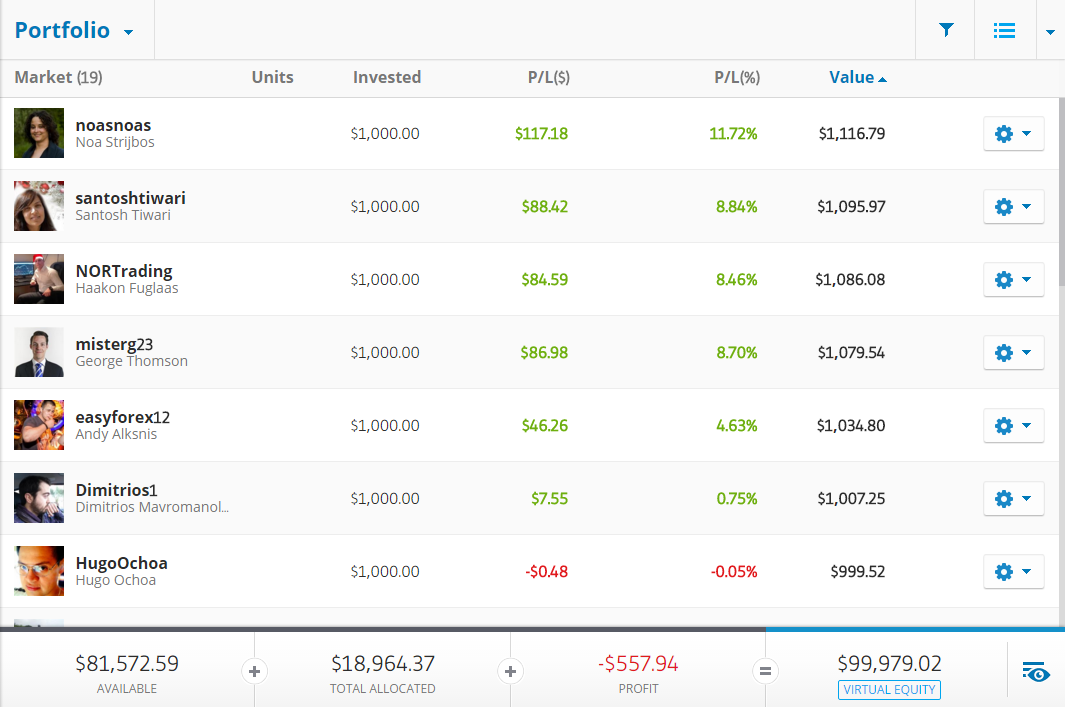
After a while you get a general feel from what the traders are like so I managed to whittle  this list down  to 20 traders who I wanted to ‘follow’. Then in my virtual portfolio I invested $1000 in each of the traders, and since then I’ve just been sitting back and watching their activity, although unfortunately, I didn’t get to spend as much time as I wanted on this activity.

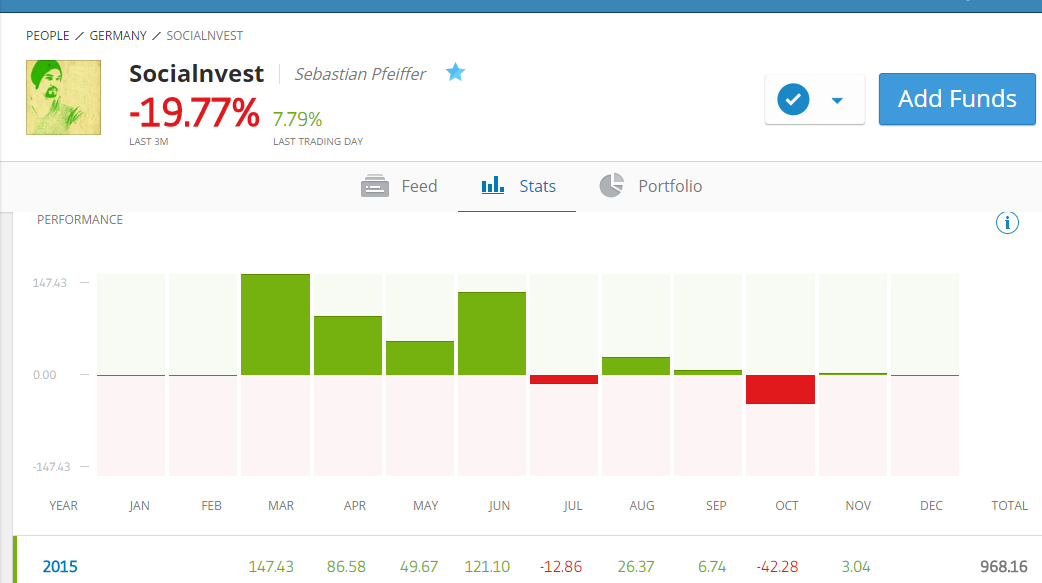
Overall, things were moving in the  right direction, however, thanks  to one  trader ‘SociaInvest’ I learned a valuable lesson, which was that the traders who  are making the crazy percentage profits and  have high risk  profiles, have a high risk profile for a good reason:

eToro's Trader 'Socialnvest' statistics
eToro’s Trader ‘Socialnvest’ statistics

This guy Sebastian for example, had been making profits of over 100% in some months, which is an incredible return over the past few months and  had accumulated over 2000 people copying him. My initial feeling was not to put this guy on my list, as he wasn’t very responsive in the community and had a high risk level, however, most of the  other traders I chose had a risk level of 7 or below, so I thought I’d take a punt on him.

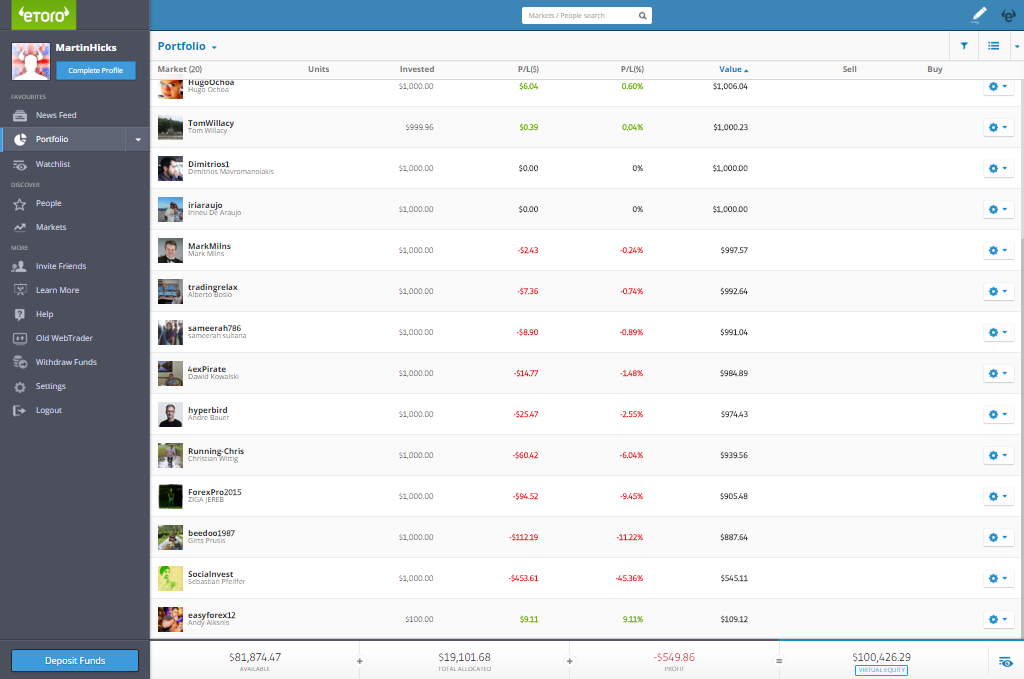
eToro Bad Day
A bad day’s eToro trading

All was going well,  until  one day when  I checked my account I noticed there was a $500 dollar loss. I couldn’t quite understand what had happened then I saw that this ‘Socialvest’ had managed to blow over 50% of the value of his account in  one day. Wowsers! Luckily for me this was only 50% of $1000 dollars of fake money, and  my virtual portfolio was spread ovoer 20 traders, so the hit  wasn’t too bad, but a lot of people lost huge amounts of money. This trader was managing over £300k of other peoples money so there were a lot of angry people commenting on his profile this month! But to be honest, more than anything this was a great lesson in knowing the risks involved and how steady low risk growth is a lot better than going for quick win high profits.

eToro Month1 Portfolio

Summary

Whilst doing my research there has been a lot of bad press about Social Trading and I think this is an area where you need to be  very careful and not try to grab the big rewards. However, I still think this is something worth pursuing so am going to continue to look into this and will extend my research period by a month so I can invest in the New Year.

Next Month’s Goals

  • Choose 10 traders to invest in
  • Write a detailed article on how to select traders

Filed Under: Social Trading Tagged With: etoro

« Previous Page
Next Page »

Martinos Digital Ltd - Dyne Road, London, England