• Skip to primary navigation
  • Skip to main content

My Lifestyle Dream

The journey of a thousand miles begins with one small step

  • Home
  • Print on Demand
  • Website Monetization
  • Dropshipping
  • Matched Betting
  • Social Trading
  • Blog
  • Travel
  • About

martinos74

Shirtly Review – The Personal Print on Demand Experience

12th April 2020 By martinos74 1 Comment

Shirtly Review

In this in depth Shirtly Review I’ll take a look at one of the new kids on the block in the print on demand world and review their products and services. I’ll also give you a walkthrough of the Shirtly interface and take a look at the good and bad points to this Print on Demand newbie!

What is Shirtly?

Lets say you own a brand, or you’ve got a large following in a niche somewhere or you’ve got an interest in eCommerce and selling apparel on the internet then it would be a good idea for you to open a shop and try to sell some products to your captive audience.

In order to do this, you’re going to need to find some products that you’d like to sell and find someone who can create these products…. Which is where Print on Demand providers like Shirtly come in handy.

This is how it works…

Shirtly How it Works

Ok, so that looks pretty cool right, so lets take a quick look at how you go about creating and selling products in Shirtly, so you can judge if this is something for you.

Shirtly Walkthrough

Step 1 – Retrieve your Orders
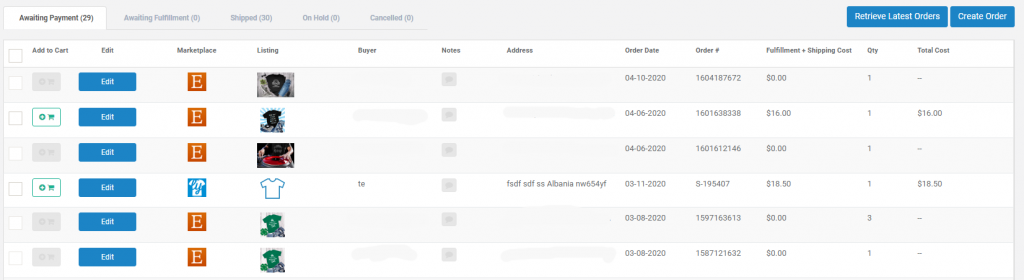
Shirtly Orders

Shirtly works slightly differently to the other Print on Demand providers, because you don’t create any of your product listings within Shirtly itself.

Instead Shirtly uses a ‘pull’ approach where it pulls down the orders from your shop, which you can then fulfil.

We’ll talk about integrations later, but lets assume you’ve set up an Etsy shop, then all you need to do on the first step is click on ‘Retrieve Orders’ and it will pull down all of your latest orders into the Shirtly interface.

Step 2 – Configure Your Order

In this step you need to choose your product, the size and it’s color:

Shirtly Print on Demand

Step 3 – Upload your Image

Here you just need to upload an image and place it on the canvas either by dragging it or using the preset positions that Shirtly has chosen:

The other thing that Shirtly does is if you have already processed the same product before they will prepopulate the image for you.

Step 4 – Choose your Shipping

Shirtly either uses the flat rate $4 per item fee, or an express option which is around $20.

Shirtly Print on Demand

Of course the more products you add to the order the lower the per price item will be.

Step 5 – Review your Order

Before submitting the order you get a chance to review the product details and make sure you’ve added the correct shipping address:

Shirtly Print on Demand

Step 6 – Pay for your Order

This is something slightly different with Shirtly, because you need to add you orders into a cart to start with and then pay for them. It’s pretty easy to do and as soon as you’ve paid for the order it will get sent to their production team.

Shirtly Print on Demand

What happens next?

On the order info page, you can see the state that the order is in and as soon as the order is sent out, Shirtly will automatically send out the shipping tracking number to your customer and update the status of the order in the shop you took the order from originally.

Shirtly Integrations

At the moment Shirtly only has direct integrations with Etsy and Shopify, but an integration with Amazon Seller Central is coming soon.

Ok, so if you’re still not convinced that this looks like something for you, lets take a look at some of the good and bad points…

Shirtly’s Bad Points

Range of Products

At the moment Shirtly covers all of the basic products such as shirts, hoodies, tank tops and sweatshirts, but they don’t have a lot of different options within these categories.

I think their approach is to focus on quality rather than quantity which is why the product range that they have chosen is so small.

Price

The cheapest shirt that Shirtly offers is a $10 Gildan shirt and the cheapest premium shirt is the Bella and Canvas 3001 comes in at $13, both of which have a $4 shipping fee on top of this. Both Printful and Printify have the same shirts but priced more competitively.

No Automation

The way that Shirtly is set up at the moment is that you have to manually process all of your orders. This only takes a few minutes per shirt to do, however, if you were looking for larger scale automation this isn’t something that Shirtly currently offers.

Border Issues

Whilst I personally haven’t experienced it I have heard instances where shirts are getting held at the US Border Customs for a few days to be processed. Shirtly is based in Canada so this could occasionally impact deliveries, but only a very small percentage.

Shirtly’s Good Points

Speed

For me the biggest advantage to using Shirtly is their turnaround times. Most shirts will be turned around in 1 – 2 days, but on a lot of occasions I’ve had shirts printed and sent to shipping within hours.

Compared to some of the other Print on Demand providers who can take over a week to process your products this is a massive advantage with Shirtly and means that you can confidently lower your handling times without the risk of having late deliveries for your customers.

Customer Service

The guys at Shirtly have a great approach to customer service and really try and put the customer first. If there are any issues with your order then they will refund you with no questions asked.

As they are a relatively small business, they are still open to listening to feedback with regards to product ideas and how to improve the platform which is also great to hear. It feels with Shirtly that you are a lot closer to the people who actually create the shirts for you rather than a big faceless company.

Print Quality

Whilst I don’t have any direct data to compare with, the reviews that I have heard from within the Print on Demand community are that Shirtly have one of the best print qualities for their products. Again, maybe this is due to the fact that they have a smaller team and are more focused on the details such as the end quality of the product.

Sample Orders

This is a nice little bonus that you get with Shirtly. When you create an order you can choose whether you create this as a normal order or whether this will be a sample. If it’s a sample they will give this to you at cost price and you get to see what the product actually looks and feels like!

Product Bundling

Because of the way that Shirtly is set up it makes it a lot easier to fulfil product bundles. Lets say you want to create a listing on Etsy that has as dog shirt and a shirt for a dog mom, well you can easily combine this into one order within Shirtly and cut back the postage costs, which a lot of the other providers don’t offer.

Dog Shirts

Even though Shirtly have a small range of products they are selling Dog Shirts!!! This is quite a unique product in the market and will help you tap into a massive audience.

Gift Message

I haven’t tried this feature yet but there is the option to add a gift message with your product. This is an awesome feature to have as I’ve had loads of orders from Etsy where they have asked for a custom gift message to be added and I haven’t been able to do this!

Shirtly Review Summary

Generally if you are looking for a Print on Demand provider who has more of a personal touch and is concerned more with quality than quantity then I think Shirtly is a fantastic option. I’d say they are more suitable for smaller sellers on Etsy than bulk sellers.

The price is a bit of a problem because it will affect your bottom line profit, however, on the flip side you’ll be able to reduce your handling time to 1 – 3 days without a problem, which is another massive boost to your listing.

Shirtly Review Video

Ok, so if you’d like to see a few more details about Shirtly then you’ve got 2 choices:

1 – You watch my walkthrough video on Youtube:

2 – You bite the bullet and register for Shirtly anyway:

It’s free to use and join so you’re not going to lose anything from looking at it!

Filed Under: Print on Demand Tagged With: merch by amazon

Printful Review – Print on Demand Made Easy

10th April 2020 By martinos74 Leave a Comment

Printful Review

In this in depth Printful review we take a look at one of the leading Print on Demand providers in the industry, check out their products, services and have a walk through of the workflow to create product listings.

What is Printful?

Printful is a Print on Demand provider who will take care of all of your inventory and shipping requirements for you. This means you no longer need to hold any stock or spend hours going to the Post Office to send out your products as they act as the middle man:

Printful Explained

They have a huge catalog of products, which means all you need to focus on is creating unique designs and creating the product listings.

Here’s just a sample of some of the products they offer:

  • T-Shirts
  • Coffee Mugs
  • Hats
  • Jackets
  • Stickers
  • Leggings
  • Phone Cases
  • Dresses
  • Backpacks

Printful Walkthrough

So, what’s it actually like to use Printful? Here’s all you need to know:

Step 1 – Choose your Product

The first thing you need to do is choose which product you want to add your design to and for each product type they have a range of different options.

For example on the screen below you can see the range of T-Shirts they have available which vary in price, quality and style:

Step 2 – Configure Your Product

Here you simply need to upload your design and place it how you’d like on the canvas. There are also options to print on the back, the sides and on the labels.

This is also where you choose your color and size options.

Step 3 – Choose your Mock Ups

This is a pretty cool feature of Printful that other providers don’t give you. You get to choose the type of mock up you would like to use on your product listings and they have a range of options from simple flat lay images, to images with models and lifestyle shots:

Step 4 – Write your Product Listing

This is where you get to add your product title, description and tags all of which will get pushed to your platform where you are selling the shirt.

Another nice feature here is that Printful automatically generates a size chart image for the product listing.

Step 5 – Set your Prices

In this step you get to set your prices, which you can change per size and color if you like. The other neat feature that Printful has is the ability to mark up all of your prices by a certain percentage. For example I usually add a 70% markup to make sure all my costs are covered:

And that’s it…

Once you’ve gone through these steps the product will be created in your source platform eg Etsy, Amazon Sellers Central and as soon as an order is made, this will be printed by Printful and distributed to your buyer.

All you have to do is sit back and count the cash… well actually there’s a bit more to it than that as you’ll have the occasional customer service issue, but it’s pretty simple really.

Printful Integrations

You can fulfil all of your orders manually, so any time you get an order you could go into the Printful interface and create an order, choose the product and add your customer address etc, however, you can also fully automate this, which is where the integrations come in handy.

Printful offers a big range of integrations, the main ones being:

There’s a little bit of work to set these integrations up in the first place but once you’ve done this, it takes away so much of the pain of processing orders manually.

Printful’s Bad Points

Out of Stock Products

I’ve had it a few times when their products go out of stock, which means you’ve got a bit of a problem when someone purchases a product from your shop.

Thankfully this doesn’t happen too often.

Express Shipping is a Crazy Price

Occasionally you’re going to get someone who needs their product as soon as possible. There is an option with Printful for expedited shipping but usually it costs something crazy like $20 per item, which most of your customers won’t go for unless they are really desperate!

Production Times

This is probably the most annoying issue I have with Printful. For some orders they will send the product out within the first day or two but other orders can take up to 7 – 10 days, which is really frustrating and not a lot you can do about this either.

The only way to protect yourself is give your products longer delivery times, which will reduce your competitiveness.

Price

Even though Printful have a pretty awesome range of products, the baseline cost of some of these products make it difficult for you to be able to sell this and make a decent margin as well.

For example, a standard Truckers cap will cost you about $20 + Shipping from Printful. If you take into account the fees from your selling platform as well, you’re looking at a baseline cost of almost $30 for a simple cap, so it’s going to be difficult to make a lot of money from some products.

Printful’s Good Points

Usability

Personally I prefer the Printful interface over any of the other Print on Demand providers. As we’ve seen it’s pretty clean and easy to use and you can quickly upload products.

Customer Service

One killer feature they have is a live chat, which seems to be in operation most of the time. Whenever I’ve had an issue with a missing order, or a question about my account then they have usually responded within minutes and have been able to resolve the issue.

Amazon Integration

I use Amazon Seller Central to sell some of my products and Printful has an integration directly with them which makes selling products via Amazon really easy to do.

Printify for example, don’t have this integration.

Gildan 64000

If you’re looking for a low cost shirt to start selling your designs on then you can’t get a lot better than the Gildan 64000 which they sell at $8 a shirt + about $3 for shipping. That’s a pretty competitive price and I’ve had no issue with the quality of the shirt.

Mock Up Generator

The mock up generator is a really useful feature and they keep adding new options to this as well. This means that you don’t need to mess around creating your own mockups for each product you create and will save you a heap of time.

You can have a play around with their mock up generator here

My Printful Review Summary

I think if you are new to the Print on Demand world and you want a really easy to use low barrier to entry provider then Printful is an excellent choice.

Be careful which products you choose, and make sure you really understand your margins before you start adding loads of products.

I’ve used Printful for years selling the Gildan 64000 T-shirt, which I would still highly recommend as an entry level shirt.

Printful Review Video

If you’d rather watch a video with bit more info and a full walkthrough then check out the vid below:

Filed Under: Print on Demand

Printify Review | Is this the Cheapest Print on Demand Provider?

9th April 2020 By martinos74 Leave a Comment

Printify Review

Printify is one of the leading Print on Demand providers in the market and in this article we’ll take a deep dive into their products and services and and give you a full walkthrough and review of their interface to help you decide if they’re the right POD for you!

What is Printify?

Lets say I want to set up an online shop on a platform like Etsy and I want to sell products like T-Shirts. If someone buys a shirt from my store then I’d either have to print the shirts and distribute them myself or I can find a partner to work with who takes away all of that hassle….

This is where Printify comes in…

Print on Demand providers like Printify are used to produce my products and send them to the end customer.

This means that I never need to hold any stock and I don’t get the hassle of distributing any of the products… this is all managed by the Print on Demand provider.

Printify offers a wide range of products from T-shirts and mugs to Iphone cases and backpacks. Pretty much any high street apparel product that you think of is going to be available.

Printify Walk Through

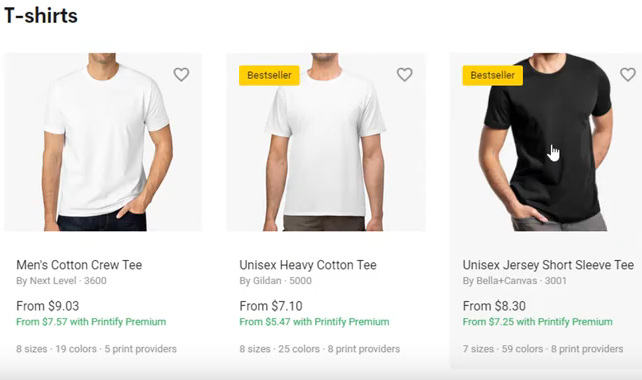
Step 1 – Choose Your Products

The first thing you need to choose is the product you want to sell from their huge catalogue.  For example for T-Shirts alone there are 22 different products to choose from:

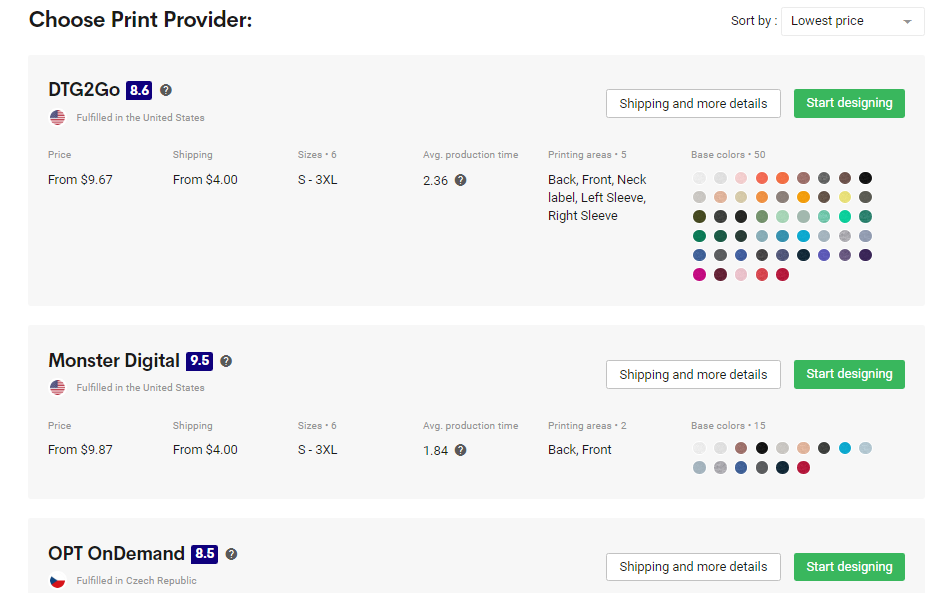
Step 2 – Choose Your Print Provider

Not all of the products will be provided by each print provider, however, to help you choose you’ll get a list of details from review score, delivery times and price to the different product options they have available:

Step 3 – Upload Your Design 

Find the image that you want, drag it onto the T-Shirt, where you can re-size and position the image as required. In this section you can also choose which colors you’d like to offer the product on as well as different print areas including back, sleeves and inner label:

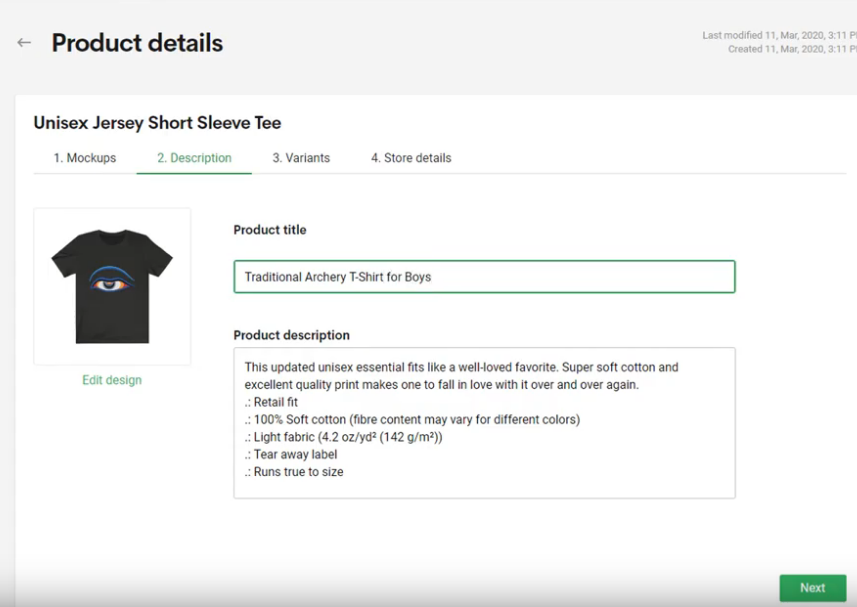
Step 4 – Add Your Product Details

In this step, you just need to add your title and the description for your product:

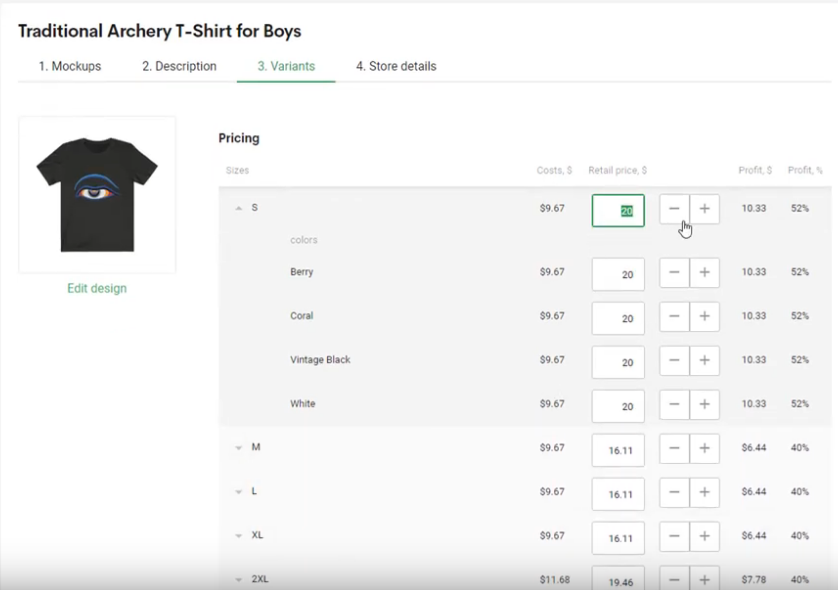
Step 5 – Configure Pricing

In this step you set your prices for your product and can add in different prices per color / size option:

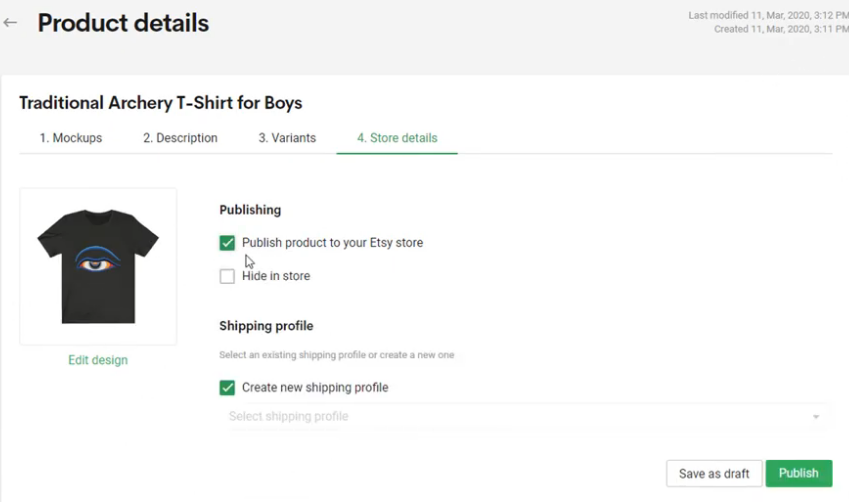
Step 6 – Publish Your Listing

In this section you choose where you want to publish your listing. In the example below I have already set up the integration with my Etsy store so if I select the checkbox here, then it will publish it directly to Etsy and will sync any orders that come in from that platform:

Printify Integrations

Within the Printify interface you can set up integrations with the following providers:

  • Etsy
  • Shopify
  • Wix
  • Ebay
  • WooCommerce

The benefit of doing this is that when you create a product listing, you can push the product directly into your store and do not need to create a separate product listing.

The other advantage of these integrations is if you sell a shirt on one of these other platforms, it will automatically push the product into Printify, who will print the shirt, ship it to the customer, send out shipping details and update the order status.

This means you can pretty much take a hands off approach after you have set up these integrations and you will only need to focus on customer service issues, and just checking that your order gets pushed through.

Printify’s Bad Points

Customer Support

Because you are dealing with an intermediary rather than the Printers themselves there is an extra step in the way of being able to resolve any issues.

You’re basically contacting someone to contact someone else, which inevitably slows down the whole process and makes it really difficult ot make any changes to your orders once they have been submitted.

I made mistakes on a couple of orders and the problem with Printify is that as soon as you click the ‘submit order’ button it is very difficult for you to stop this order as they’ve already sent this into someone elses system. Printful is a much better option in this respect as their customer support is awesome and can turn things around really quickly.

There is also no online chat facility which is a major pain.

Order Times

I had a few large orders that I needed to get out for St Patricks Day and when I looked at the average production times that were quoted I thought I had plenty of time to get the orders out.

However, that wasn’t the case and a couple of my orders were held up and completely missed the deadline. It was really difficult to get any information about what was happening with the order as per my previous point.

In the end I found out that because one of my orders have shirts of different sizes, they weren’t all printed in the same batch and they also had to reprint a couple of the shirts, so they held up the entire order… this could have cost me over $200 but my customer was really understanding and St Patricks Day was canceled anyway due to COVID-19!!!

Processing Manual Orders

I might be missing a trick here but I find the process you need to go through to process new orders, quite laborious as you have to create a brand new product listing every time, which seems kind of pointless.

I’d been selling a lot of personlized shirts so it would have been much easier to just create one product listing and swap the design out each time, but that wasn’t particularly easy to do.

Printify’s Good Points

Price

The biggest advantage for me and the main reason to use Printify will be its price.

For example if I take one of the most popular T-Shirts as an example, The Bella + Canvas 3001, then Printify is offering this for less than $10 per shirt + $4 postage.

This comes in $4 cheaper than Printful and is a lot cheaper than any other Print on Demand provider I could find, and because margins are so tight in this business, this has to be a compelling reason to choose them as your provider.

Choice

So, here’s the thing… Printify is not technically a Print on Demand provider themselves, they are more of an intermediary who use other Printers to fulfil their products.

When you choose which product you’d like to sell in your store you are given a range of print providers to choose to fulfil your product. Each print provider has a different price range, production times, range of colors and printing options, as well as a feedback score which will help you decide which printer to use.

I really like this feature because I can choose different printers depending on how fast I need the product and how much of a risk I want to take that the product will be a quality print and arrive on time!

Range of Products

Because Printify uses a collection of different printers the range of products that they have is simply huge. In fact there may actually be too much choice.

For example they have 22 different types of T-shirts that you can choose from!!!

My Summary

I recently made the switch from Printful to Printify, mainly because I wanted to offer a better quality shirt to my customers, yet I still wanted to keep my prices competitive and make a good enough margin per shirt.

This is why I switched to selling the Bella + Canvas 3001 shirt from Printify, which I can buy from them for less than $12 a shirt including shipping fees. On Etsy I can sell these shirts for $25, which gives me a pretty healthy profit per shirt.

So far things have worked well and my deliveries have been fairly smooth apart from some orders I tried to squeeze in for St Patricks Day. I think in general if you’re using Printify give yourself enough time and flexibility in your shipping times in case orders go wrong and you need to go through their customer support.

Printify Review Video

If you’d like to see Printify in action, here’s a little video I put together of the platform:

Filed Under: Print on Demand Tagged With: print on demand

Orbitkit Review – The Ultimate Print on Demand Uploader

7th April 2020 By martinos74 Leave a Comment

Orbitkit Review Header

In this article we’re going to do a walkthrough and review of Orbitkit, which could be the piece of software you need to rapidly expand your Print on Demand business.

What is Orbitkit?

The Print on Demand business has many different providers that you’ll want to upload your designs to in order to maximize the potential sales from your designs.

However, each different Print on Demand provider has different requirements, different ways to upload your designs and different ways to curate your product listings.

In short uploading it is a massive pain in the ass…

Uploading individually to each platform and often the time needed to do this versus the potential reward in sales, means that you just won’t bother uploading to many platforms.

This is where Orbitkit comes in..

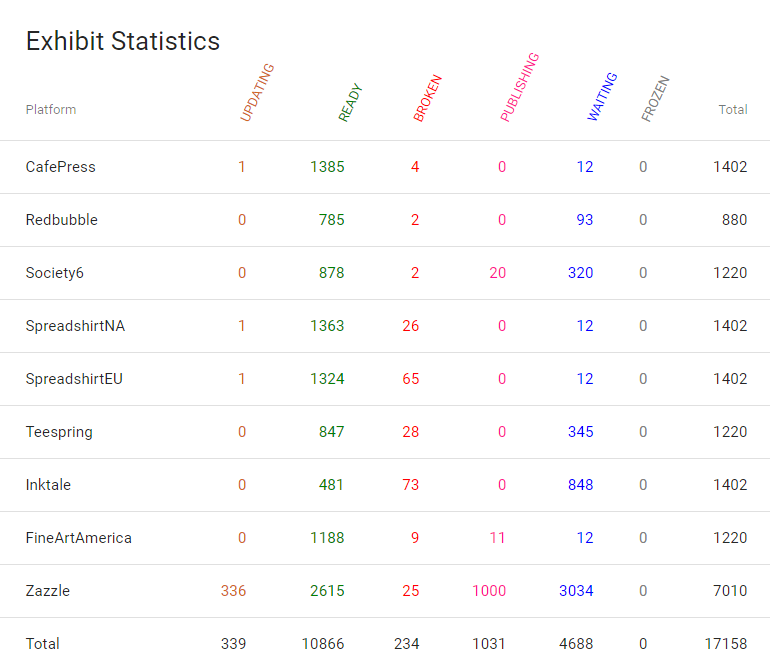
Orbitkit provides a central platform where you only need to upload your design once and only curate your product listing once then at a click of a button it will be pushed to the following Print on Demand providers:

  • Redbubble
  • Spreadshirt North America
  • Spreadshirt Europe
  • Teepublic
  • Printify
  • Zazzle
  • CafePress
  • Society6
  • Inktale
  • Fine Art America
  • Teespring
  • Designs By Humans

How Does Orbitkit Work?

Setting up Orbitkit

The first time you get to use Orbitkit it can be a little overwhelming as you have to set up the links with your different Print on Demand providers, but the good news is that you only need to do this once.

Basically the process involves you going into one of your  providers eg Spreadshirt and creating a sample listing. Then all you need to do is copy this listing URL into Orbitkit and this template will then be used for any future designs that you add.

Once these templates are set up you can then create your own collections or themes of templates. For example, you may have designs that only work on dark backgrounds so you would create a collection of ‘Dark Themed’ shirts.

This means that when you upload new designs you can choose which collection you wish to send them to.

Uploading Designs

Once you are set up and running all you need to do is drag and drop designs into the system and curate your listings:

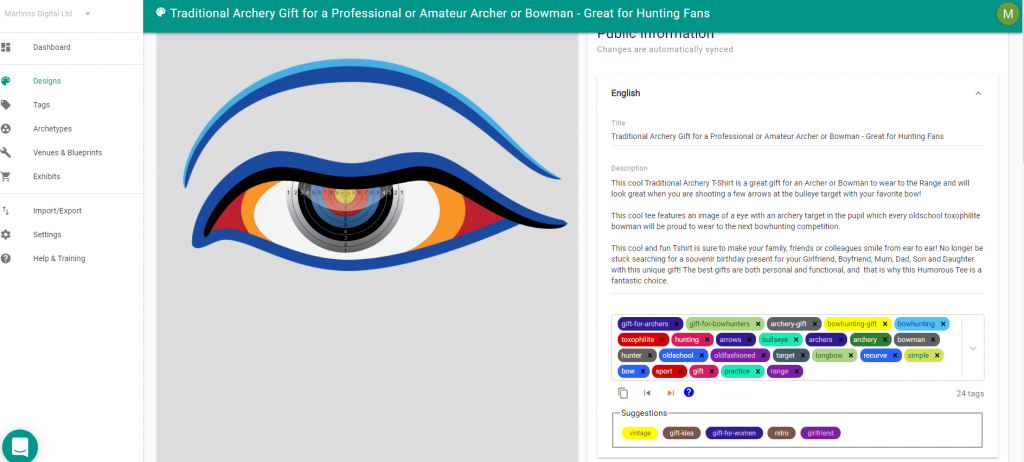
Orbitkit Design Interface

The above image shows the interface in Orbitkit where you get to addthe following information:

  • Title
  • Description
  • Keywords/Tags

Once you’re happy with your listing, just choose which collection you want to send this to and sit back and relax and watch your designs upload:

My Orbitkit Dashboard
Do you want to upload in one hit to
Orbitkit Logo

30 Day Moneyback Guarantee

If you're interested in giving Orbitkit a try then click on the link below and you'll be entitled to a 30 day moneyback guarantee!

YES, I want to a 30 days moneyback guarantee

Orbitkit’s Bad Points

Tag Management

Orbitkit saves all of your tags that you upload into one big hierarchical list. It does this so it can easily assign the top keywords to your listings to different PODs who have different limits to the number of tags they allow.

This means that if you place ‘Traditional Archery Shirt’ higher in the hierarchy than ‘Womens Traditional Archery Shirt’ that it will always be applied in this order to all of your listings, where both of these keywords are used. If you change the order around, it will update all of your listings.

This is a bit of a pain but I understand why they have to do it.

The other downside is that the Orbitkit interface for tags is just one huge list and after you’ve uploaded lots of designs this becomes pretty hard to manage and is something I hope they’ll find a better solution to in the future.

Some Integrations have Stalled

The Zazzle integration was working originally when I signed up but they haven’t focused on fixing this for over a year now so I can’t add any more products, which is frustrating.

Some Integrations Aren’t Worth the Effort

This is only my personal point of view but some of the integrations really suck eggs… particularly Teespring where I haven’t had a single sale yet out of over 3000 products!

CafePress, Society6 and FineArtAmerica also are really not worth the effort for me.

Redbubble Account

I set up a new Redbubble account and after I uploaded 10 designs manually I started using the Orbitkit integration. This was fine for a few months but after a while my account got closed down with no explanation.

I did get it restored once and they said my account was flagged as ‘Spam’ but then a few months later it was closed again and I haven’t been able to restore it. I’m pretty sure that’s because  I’m in the UK and because Orbitkit is pushing products via its US server it looked suspicious to Redbubble so they closed my account!

I think most people are fine, especially if you have a long standing account, but just go slow and steady with your uploads to start with and you should be fine.

Scattergun Approach

Because all of the PODs have different requirements and different algorithms, the one size fits all aproach that Orbitkit takes means that your listings won’t be very well targetted to that POD and therefore you’ll have less chance to rank well and therefore slower sales.

On the flip side, however, you will be getting a lot more designs out there and uploaded to other PODs so it’s a fine balance to get right.

Orbit Kit’s Good Points

Rapidly Expand to other PODs

The beauty of Orbitkit is that once you are set up and running then adding new designs to the platform isn’t a lot of hassle.

You would already have set up your keywords and product listing somewhere else so your workflow really only involves upoloading the images, choosing which PODs to send them to and making sure your tags have been correctly assigned. 

Import / Export

Personally I keep all of my design descriptions and keywords in a big spreadsheet, and fortunately there is an import/export function in Orbitkit that will allow you to import spreadsheets with all of this data to save you manually adding this to each listing. This is a massive time saving for my workflow.

Amazing Technical Support Team

Any time I have had an issue the team at Orbitkit have jumped on it and been more than supporting. They always respond really quickly to my requests and have dedicated hours to fixing issues.

They are also really open to feedback and have a great pride in what they do, so full respect to the team there!

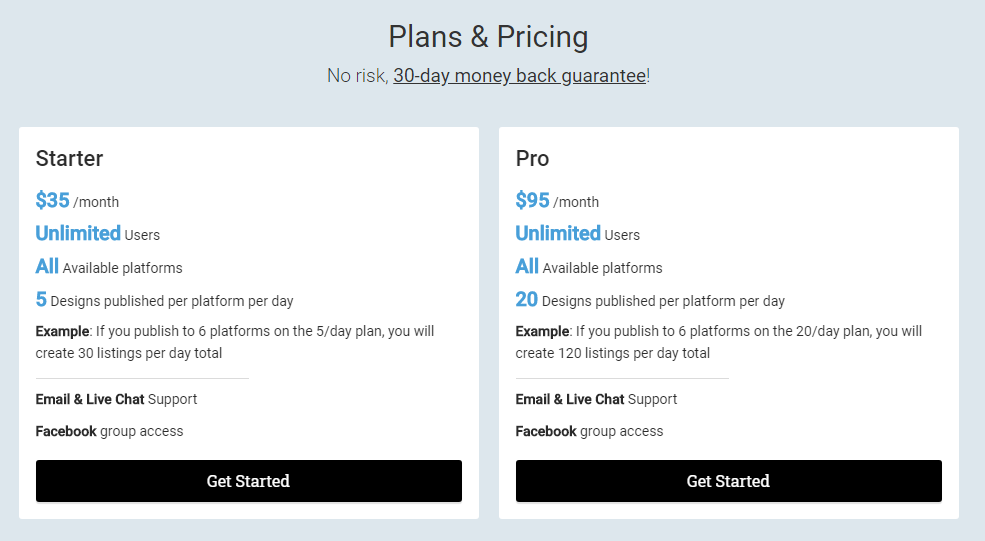
How Much Does Orbitkit Cost?

Orbitkit Pricing

Orbitkit might not look that cheap on the face of it, however, I still think it’s a good investment if you want to expand your Print on Demand Portfolio and save yourself some precious time.

Lets do some math…

  • A 2 month subscription will cost you $190
  • If you sign up to the 10 PODs that will be 200 designs a day you can create
  • That’s a whopping 12000 designs over 2 months
  • That works out at a cost of 1.5 cents per upload….

Sounds like a bargain to me!

I don’t know anywhere in the world where you’d get a VA to be able to work as quickly or as cheaply as this and if you tried to do this yourself you would surely go out of your mind with boredom!

To me it’s a no brainer, and will really help you grow your Print on Demand Business.

Orbitkit Review Summary

I’ve been using Orbitkit for a couple of years now and if you asked me whether it’s worth the money or not then I would give you a resounding YES.

It is not going to make you rich for sure, however, you will definitely make your monthly/annual subscription back each month and this is just another income stream to add to your Print on Demand Arsenal!

Orbitkit - The Ultimate Uploader

Save time and leave the hard work to Orbitkit and their awesome multi POD provider uploader tool

30 DAY MONEY BACK GUARANTEE

Orbitkit Review Video

If you’d like to see Orbitkit in action, here’s a little video I put together of the platform:

Filed Under: Print on Demand Tagged With: print on demand

Design Pickle Review – How to Outsource Design Cost Effectively

6th April 2020 By martinos74 Leave a Comment

Design Pickle Review Header
5 Star Rating:
 Rated 5 out of 5

If you’re in the Print on Demand business then unless you’re a designer yourself and have plenty of time available you’re going to need someone to create designs for you. There are plenty of different options out there from finding freelancers to employing design students from the local college, but in this article we are going to do a deep dive Design Pickle review and check out the services they provide.

What is Design Pickle?

Design Pickle is a company who have a pool of creative resources who you can hire on a monthly or annual basis to work on a range of design briefs that you provide them. Just think of it as if you are employing an extra member of staff, without having the hassle of recruitment, screening, payroll, HR issues etc etc

Basically Design Pickle have snapped up a lot of the creative talent from the Philippines and they can now become part of your team.


How Does Design Pickle Work?

The basic concept is that you are assigned a designer to work on your account and they are given a certain amount of time each day to work on your deliverables.

You simply need to create a design brief for each deliverable and submit this via Design Pickle’s online system, which then goes into a queue for your allocated designer to work on.

What Kind of Designs can I Expect?

I mainly use Design Pickle for my Merch by Amazon designs and KDP covers but you can ask your designer to work on pretty much anything, apart from custom illustrations.

Typically the scope of their work is limited to manipulating source assets to create new unique versions based on your concept, rather than creating unique illustrations and artwork from scratch. For me this is perfect for Merch by Amazon where my strategy is more about having good ideas than spending lots of money on custom illustrations and perfect deliverables.

As you’ll see below, there is also a really cool integration with Getty Images for a small monthly fee, which means you can choose from an awesome range of source assets that a lot of your competitors won’t have access to, which gives you unique designs.

How Many Designs will I Receive a Day?

This question is really hard to answer because it depends on the complexity of the design that you are submitting.

However, as a guide I would say I typically get 1 – 2 completed design requests a day from my designer.

For each design request my designer usually provides 2 – 3 options, and a lot of the time I can then scale these designs out across multiple niches, so the value of these design requests increases.

To make it clearer lets take a look at what a typical design request would look like for me and how I would send that to my designer:

Design Pickle Workflow

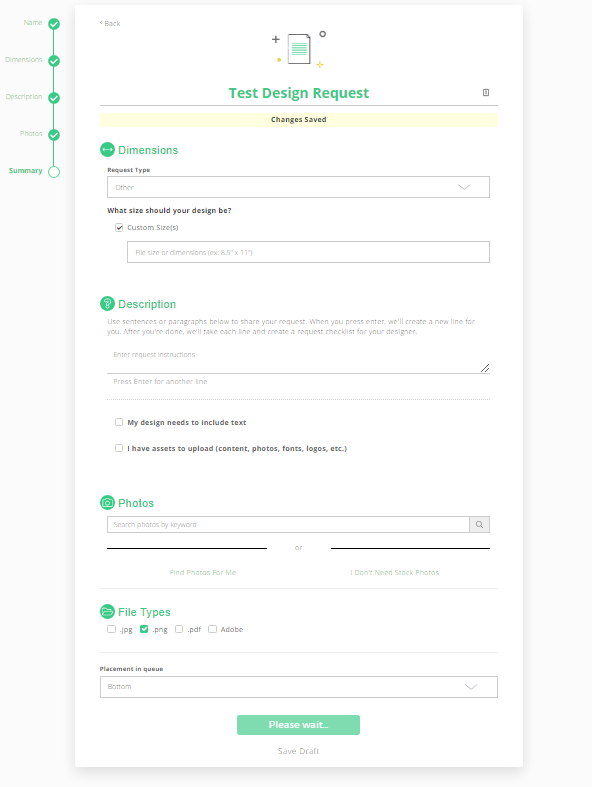
Submitting a Design Request

This is what the design request form looks like and it’s as simple as adding the dimensions of the assets that you want, a description of the deliverable, any source assets you want to reference and the file type that you would like the asset delivered in (Usually I get .png files and the source Adobe Illustrator files)

Getty Images Integration

One great option that the team at Design Pickle have added on to this service is an integration with Getty Images.

When you are submitting your design requests you’ll see the ‘Photos’ option which you can use to search for source assets for your designer to use.

I also find this a really useful place to find new ideas when I’m scrolling through the different images available and is a key part of my creative process.

Lets take the example below, where I’m doing a St Patricks Day design and have done a search for ‘leprechaun’ you’ll see that it brings a wide ragne of vectors that I can use for my design request:

Design Pickle Getty Integration

The one thing to note with this, however, is that although you are allowed to use these designs for commercial use the license is limited to a single use. That means you are allowed to use it only for this design concept, so you can’t take the source file and use it for other designs that you want to create, unless that is done as part of a separate design request.

Completed Design Requests

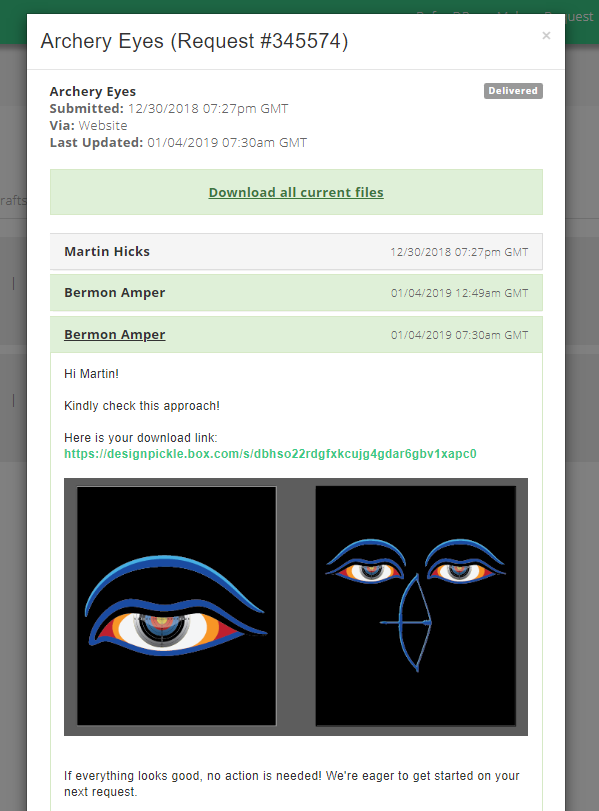
Each day your designer will work on the design requests at the top of their queue and when they have finished the request you’ll receive an email and a link to the files with any feedback from the designer which looks like this:

Design Pickle Completed Design Requests
A Completed Design Request

You can either submit feedback to your designer and ask them to make further tweaks and revisions or if you’re happy just download the final source files and give your designer the thumbs up or any feedback they should take into the next design request.

Allright, so that’s all pretty simple, right, so lets looks at the pros and cons of the Design Pickle Service.


Design Pickle’s Bad Points

Single Designer

Well, this is a weird one because it’s both a pro and a con of the Design Pickle service and that’s the fact that you are allocated a single designer on your account and that can have a massive impact on the quality of your deliverables.

If you end up with a designer that you don’t get on with, doesn’t quite understand your style or requirements or just simply isn’t good enough then you’re not going to receive the standard of work you’re looking for. 

The good thing with Design Pickle is if this does happen, then they will quite happily let you request to swap out your designer.

I’ve used Design Pickle for over 2 and a hald years and initially had an awesome designer who understood everything that I wanted and was a kick ass designer…. in fact he was so good that he got promoted into the illustrations department, which meant he left my account and was replaced by another designer who wasn’t up to scratch. 

I gave him a few months grace and then asked for him to be replaced and now I’ve got another kick ass designer instead!

No Custom Illustrations

Yes, unfortunately the designers are limited to manipulating images, adding text and creating their own versions of images and if you want custom illustrations done you’ll have to use their other services.

Occassionally I’ve snuck in a few simple illustrations to my designers but generally their line manager will stop these from going ahead.

Limited Getty License

As I mentioned before the Getty Image license is restricted to Single Use License, which means you can’t use this to create other designs from unless you send in another design request.

I think you can get away with scaling out the design to different niches, but that’s probably a bit of a grey area as well.

Design Pickle’s Good Points

Motivation

Because you’ve bought a subscription with Design Pickle this means that it;s up to you to make sure your designer has enough briefs to work through, otherwise you’re paying them to do nothing!

If you’re a tight ass like me then this keeps you super motivated to make sure they never get to a point where their queue is empty, which in turn means you’ve always got a steady stream of new designs for you to upload.

This was a massive factor in me being able to get up to Tier 8000 in Merch by Amazon relatively quickly and I now have over 4000 unique designs created.

Getty Integration Rocks

For me this is a killer feature as you have such a huge range of top quality vectors that you can choose from for pretty much any niche that it will really help your designs stand out from your competitors.

It’s also a way for you to get top level illustrations for really minimal prices… just search the image library, choose some awesome illustrations, add those to your design request, your designer makes a few amends then you have your own awesome graphic!

Relationship Building

Because you are allocated a single designer to your account it means that you get time to develop a working relationship with them.

If you give them constructive feedback on your design requests then it won’t be long before they really understand they style of design that you are looking for and will need less instruction on future design requests.

After a few months of working with my designers I could give them a very minimal design brief and usually they would hit the mark with it, which saves lots of time.

It’s also worth noting that their level of English is pretty good so mis-communication is not generally an issue.

Ok, so that’s my review of the  Design Pickle for you, so lets have a look at how much this is going to cost you…

How Much Does Design Pickle Cost?

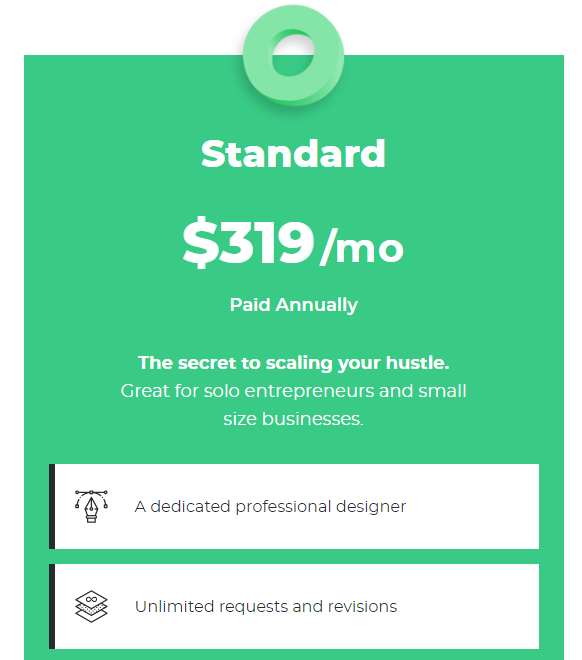
If you buy an annual subscription it works out at about $319 per month with another $25 on top for the Getty Image subscription.

Now, that might sound like a lot, however, lets break this down a little to see the true cost:

  • 21.62 = average number of working days per month
  • 4 Unique Designs per day minimum (2 design requests with 2 variations)
  • 83 Unique designs per month
  • $4.14 Cost per design (344/83)

If you take into consideration the fact that a lot of these designs can be scaled out into other niches as well, then your per design cost is really, really low.

To me it’s a no brainer, and will really help you grow your Print on Demand Business.

Design Pickle Review Summary

Like I say, I ‘ve been using this service for more that 2 years now and have for most of the time been extremely happy with the service.

For platforms such as Merch by Amazon I think Design Pickle is the perfect partner for creating low cost, good quality designs.

However, if you’re looking for top quality illustrations then I’d recommend a service like Penji instead of Design Pickle’s Illustration service (which I personally haven’t used yet).

Design Pickle Review Video

If you’d like to see Design Pickle in action, here’s a little video I put together of the platform:

Filed Under: Print on Demand Tagged With: print on demand

Merch By Amazon Tier 8000 : Scaling your Business

11th March 2020 By martinos74 2 Comments

Merch by Amazon Tier 8000

At the start of February I logged into my Merch by Amazon account and was extremely happy to see this little guy pop up on my screen:

This means that I’ve now sold over 6,000 shirts on the Merch by Amazon platform and now have a whapping 8,000 slots to fill.

I haven’t updated the blog for a while so I thought I’d share a couple of tips on how I made the leap to Tier 8000 so quickly and what I’m going to be looking at to get me to the next Tier.

Niching Down for Q4

Q4 always sees a massive bump in sales and this year was no exception, but rather than just relying on evergreen niches I thought I’d have a go at breaking into the Halloween and Christmas holiday trends.

Unfortunately, gone are the days when you can just design a silly Santa or Zombie shirt and hope for it to sell as the competition on Merch is bigger than ever.

However, there is definitely still room in the niches to make decent sales in any of the holiday periods by combining popular niches with the holiday theme.

For example you could do a range of sports based Halloween shirts with slogans such as ‘My basketball coach scares me more than any Zombie’ which can be scaled out to a huge number of niches. Mix this with a cool illustration, run a few ads to test the water and you will definitely reap the rewards.

Going Deep into AMS

I have to admin a large portion of my sales have come from AMS (Amazon Marketing Services) and running ads to my listings has been a fundamental part of my strategy until now.

I’ve spent way more than I would have liked to and my ACOS (Average Cost of Sale) is still at around 25% across my account.

This generally means that I’m making a loss through the ads that I’m running, so why keep doing this?

More Organic Sales

Even though I’m making a loss on the individual ads, this doesn’t account for the boost that I get in organic sales due to the increased BSR.

Put simply, this means that because the ads are generating sales of my shirts, my shirts are being listed higher up in the search results, which means more people get to see them and ultimately buy them… The only issue I have with this is that it’s really hard to measure how effective this technique is.

Generally, I think that as long as I’m not straying too far over an ACOS of 25% then overall I’m not losing out.

More Sales means Quicker Tier Ups

Merch is pretty much a numbers game. The more shirts you put up, the more money you’re going to make in the long term.

Running ads to my shirts simply means that I’m going to be selling more shirts, which means I can get tiered up quicker and have more slots available to sell more shirts.

Of course there are other strategies you can use and spend time curating amazing designs and focus on quality rather than quantity, but that’s not my approach.

My designs are definitely not works of art, but I think the designs that sell well on Merch are simple ideas whos messaging resonates well with the person who’s going to wear the shirt… and that can be as simple as a text based design.

Learning by Doing

AMS is as much a part of a successful Merch business as creating the designs, writing the listings and coming up with the original research and like all of these things… the more you do it the better you get at it.

WARNING: AMS is definitely not a passive game to play, because if you don’t keep an eye on your campaigns you can easily burn through your profits and see your ACOS spiralling.

I’ve been experimenting with AMS over the past year and continually tweaking my approach as I find different levers I can pull and here’s a few things I can recommend:

3 Top AMS Tips

  • Review Search Terms – This is a new introduction to AMS but shows you exactly the keywords that users have been using to get to your listings and helps you to find new keywords to add to your product listings pages
  • Use Negative Keywords – If you’re running automatic campaigns then you’ll find a lot of your spend going on keywords you’re never going to make a sale on. Take the example of the sports based Halloween shirts I mentioned earlier. If you look into your ad spend you’ll probably find a heap of cash spent on generic terms such as ‘Funny Halloween Shirts’, which you’re never going to make good returns on unless you have a super unique awesome shirt. Save yourself a few quid and add this to your negative keywords list.
  • Check your Targeting – This is a bit of a weird one, because it varies so much between different campaigns. You’ll find that in some campaigns ‘substitutes’ will perform absolutely terribly, but in other campaigns will be fine. Just monitor the campaigns and be sure to switch off the targeting type that doesn’t perform… for me usually substitutes is a poor performer more often than not.

Revised Keyword Strategy

One other realisation that has taken me a long time and a lot of hardship to get to is that you really don’t need to stuff your listings full of keywords.

I’ve found that targetting a smaller number of exact match keywords is really benefitial to rank both organically, but also to laser in my AMS campaigns.

The word on the street lately is that the Brand and the title are by far the most significant fields to optimise, so you should focus more on these rather than trying to stuff heaps of keywords into your bullets and description.

Previously I would have used Merch Informer to find the most popular keywords that were listed for the shirt eg “Halloween Basketball Shirt” and would have added lots of keywords like : players, teams, fans, coaches, college, high school, ball etc to my listing.

With my new approach I would simply list the following:

  • Brand: Halloween Basketball Shirts
  • Title : Halloween Basketball Shirt for Men| Scarey Basketball [T-shirt]
  • Bullet 1 : Halloween Basketball Shirt for Men xxxx
  • Bullet 2: Scarey Basketball T-shirt xxx

The idea is to try and rank for the longer tail keywords that are likely to be exact matches for terms users are searching with, and you should have a better chance of ranking for these keywords.

Planning Ahead – Content Calendars

The early bird definitely catches the worm and that is as true in Merch as anywhere. Making sure that you have your shirts loaded onto Amazon before the masses arrive means that you have less competition and can start to get your BSR decreasing before everyone else starts pilling in with their shirts.

The other advantage is that you should be able to advertise shirts with lower bids the earlier you get into the market, and if your ads perform well, then generally you will be able to keep a lower bid than for people who just join the market late (as your ads will have a proven track record already).

So how do you do this?

Preparation is the key and making sure that you have a calendar of key events / holidays that you are going to target for the year. I usually plan this out at the start of the year and start my process 3 months before the actual event, to give myself enough time to go through the entire Merch cycle and get my shirts live.

For example in early December I spent a day or two researching St Patricks Day shirts and coming up with ideas / slogans for how I would niche down this year.

I then had to create design briefs for all of these designs and send them to my designer. I currently use Design Pickle for all my designs, which means I get 1 – 2 design concepts back from my designer every day and by the end of December I had all my designs back ready to upload.

Next in my process was writing the listings and in early January I spent a day uploading all of these designs into Merch and in February already I started running ads to these designs.

You have to remember people are often buying shirts a long time before the event happens and you want to capitalise on the start of the spike in sales when competition is less.

Just use a tool like Google Trends and you can see when you want to start entering the market

Google Trends Graph for ‘St Patricks Day’

PRO TIP: Search in Google for an events calendar to give you a list of events for the year ahead eg https://www.timeanddate.com/holidays/us/. Just add this into a spreadsheet and skew the dates by 90 days ahead of time. This will then give you a clear focus on what you should be working on each week, to keep ahead of that curve!!!

What’s Ahead in 2020?

Repeat Sellers

My plan of attack this year is to really drill into my content calendar and test out different designs and hopefully build up a strong range of shirts for key holidays/events that will be repeat sellers in future years as well.

This means I’m not going to add any ‘year specific’ designs but go a little broader within my niches!

For each niche I’m going to create between 20 – 40 shirts and go heavy on ad spend so that I get eyes on these shirts, to help me decide which ones are likely to keep selling in the future.

Master AMS

I’ve been quite lazy with AMS up until this point. I do always try and tweak my ads each week, but have often let under performing ads run for longer than they should, so I need to get better at this.

I also spend quite a lot of money on ads at the moment, so I want to try and reduce that and really fine tune my process over the course of the year.

Tier Up

It may seem strange but even on Tier 8000 I don’t have a lot of slots available and I’m going to fill them up really quickly.

I probably have about 4000 designs so far, which means I still don’t have a lot of room for selling on different products other than the standard shirt, so I want to break into the next tier within the next couple of months to give me a bit more space to expand the products that I’m selling.

Filed Under: Make Money Online, Print on Demand Tagged With: merch by amazon

Next Page »

Martinos Digital Ltd - Dyne Road, London, England