• Skip to primary navigation
  • Skip to main content

My Lifestyle Dream

The journey of a thousand miles begins with one small step

  • Home
  • Print on Demand
  • Website Monetization
  • Dropshipping
  • Matched Betting
  • Social Trading
  • Blog
  • Travel
  • About

Website Monetization

Crowdfire Review : How to Boost your Instagram & Twitter Followers

2nd September 2017 By martinos74 Leave a Comment

Crowdfire Review 2017

This week we look at how to grow your Twitter and Instagram following using a free app called Crowdfire.

Lets be honest, creating a big audience on the different social media channels can be extremely time consuming and a major pain in the butt, however, it’s one of those things you really need to pay attention to. If you grow your audience in these different channels not only can you push traffic to your destination of choice, but you also have a fairly captive audience, who you know are at least somewhat interested in your topic.

Your social channels are also an excellent way to develop your network and build relationships within your niche, which you can reach out to for things like link building in the future.

What exactly is Crowdfire?

Think of Crowdfire as a central tool where you add all of your social media accounts and use this as a control panel to distribute content and grow your audience.

In short Crowdfire will do the following:

Suggest Content

Simply add the topics and niche that you are interested in and Crowdfire will suggest content to you that you or your audience may be interested in. If you’re interested in a piece of content you can simply share it to all of your social networks (Twitter, Instagram, Facebook and Pinterest) at the click of a button.

Post your Own Content

If you’ve just written a blog post then you can distribute this through the click of a button to all of your social networks as well. Even better than this, Crowdfire has a built in option where it will automatically post content for you at the best time (ie when your readers are most likely to engage with it)

Grow your Twitter Audience

In my experience Crowdfire works best with Twitter as it will:

  • Suggest who you should follow (users with similar interests or users who have followed you)
  • Suggest who you should unfollow (dormant accounts)
  • Show who has followed you
  • Allow you to create an automatic message for users who start to follow you

Daily Recipes

The nicest thing about Crowdfire is the principal that if you spend a few minutes a day using this tool then over time you will be able to massively grow your following. Each day it suggests to you a number of things that you should do, for example:

  • Share relevant content in your different channels
  • Share your own content
  • Post relevant images on Instagram
  • Which users to follow, unfollow

It also will give you a score card each day, showing you the number of followers, unfollowers, likes etc that you have created.

Overall I really like this app and the approach of slowly building your following. If you want to know more here’s a vid that goes into good amount of detail:

Filed Under: Website Monetization Tagged With: social media

Niche Site Motivation – Time to Step it Up!

9th June 2017 By martinos74 Leave a Comment

Niche Site Motivation

I first started looking into Niche websites over a year ago and since then I set one site up on my own and bought another one from the guys at Human Proof Designs.

So how has this worked out?

Avoid Boring Niches

Well, the first niche was a really dull niche and very hard to write articles about so I have kind of left that to fester after scraping about 10 articles together that didn’t rank at all well. I found it really frustrating as there were loads of low competition keywords, but my site got no traction at all so I lost encouragement. However, I’ve looked at the site again and have a couple of new angles I will take to build the site out in the future and link to Amazon affiliate products, but for now, I’ve put this site on hold.

Follow Your Passions

The second site, which I bought, is actually in a sports niche, which I really am interested in. I bought a premium site from Human Proof Designs, which came with about 15 articles pre-written, a list of keywords and a fully set up Word Press site, so it saves you a lot of the hassle of getting up and running.

Of course I spent a lot of time faffing around with the theme and have finally got the site looking how I want it to. Honestly, this isn’t the most important thing that you should be doing when you start a site, but I find that if your site looks good, you’ll be a lot more encouraged to work on it.

The downside with ordering a pre-made side was that you’re not setting the overall tone and direction of the site so have no real control over the initial content. This was a bit of a gamble, which backfired as the content, which was delivered originally was poorly written. Thankfully when I pointed this out, they rewrote all of the content for me, which improved it vastly, however, it still wasn’t anything like I wanted it to be, so I set about re-writing a lot of the articles and creating my own.

Because my ebay dropshipping  side business is ticking along quite nicely and I only need to spend a few hours a week on this at the moment, I’ve decided to dedicate more time to building out the niche site over the next few months, so that I have a good body of content (and hopefully some backlinks) in place, before I quit my job and head out to Thailand for 3 months.

This change of emphasis coincided nicely with the following…

Niche Site Training

Dom from Human Proof Designs has just started an over the shoulder case study, where you can follow his videos week by week as he builds out 2 different sites. His goal is to build these sites up to make $10,000 – check out the course here.

One site is a ready made site, and the other site is a ready made site, which has aged for at least 6 months so it’s out of the Google sandbox.

This was really great timing and I’ve been following exactly what he has been doing with his site for the past 4 weeks. For me this is a great way to learn as you can see exactly what he does, the reasons he is doing this and I figured that if I follow exactly what he does and I don’t succeed then at least I tried!

So what have we looked at so far?

  • The importance of getting a good base of links from comments
  • Creating a press release
  • The magical Keyword Golden Ratio
  • How to find forum keywords
  • How to structure your content hierarchy

If you want to know more about these techniques then check out my latest post on How to Get Free Instant Traffic to Your Site

New Team Member

The next thing that I’ve done is brought my 11 year old nephew on board the writing team and he’s written about 10 articles for me in my chosen niche!!! This is a great exercise, as I can teach him how to write properly, use a website, and his articles give the site a new angle.

On top of this, it’s great encouragement and motivation for me to work on the site.

The downside to this is that he has already quit 3 times in protest against things like getting a cooler username, but I’m sure we’ll work through the details!

Outsourcing

I’ve done some good keyword research and have a bunch of articles that I need to get written soon. I’m really tied with this one because I want to write them myself but, this is just going to take too much time so I’m going to have to find a writer to do this for me.

I think what I’ll probably do is get a writer to write the articles that I’m not particularly interested in such as product reviews so I can focus on the informational articles instead.

The only trouble is… how can I find a good quality writer?

I’ve got a few ideas on how I want to go about this, but I’ll save this for another update.


Filed Under: blog, Website Monetization

How to Get Instant Traffic to your Niche Site – 3 Unbeatable Tips

9th June 2017 By martinos74 4 Comments

Niche Site Traffic

You’ve finally chosen your niche and you’re ready to go and take action, but how can you really turn the dial and make rapid progress when you start?

The thing about working on niche websites is that you usually don’t get to see the benefits of your work for at least 6 months and usually not for over a year or potentially even longer. This is one of the main reasons why people give up, as they just can’t correlate the effort they are putting in with any type of reward, and in today’s ‘instant’ society, that’s just not good enough!

The good news is that I’ve found 3 shortcuts for you that will help you create a really solid base for your niche site and start to bring you your first traffic within weeks, if not days.

I’ve learned a lot of this from the training over at Human Proof Designs, so I’d definitely recommend signing up with their monthly membership, where you have access to over the shoulder video training as Dom builds out a couple of Niche sites, week by week.

For now, however, lets focus on these 3 massive tips:

Tip #1 – Blog Commenting

Now, you’ve probably heard that blog commenting is an old hat way of getting links and traffic to your site, and to a large extent that is still true. However, personally I still think this has massive benefit…

  • Firstly, you are building up a relationship with other blogs, who you may want to work with and outreach to at a later date.
  • Secondly, you are diversifying your link profile, so that it looks more natural to Mr Google.
  • Thirdly, you’ll probably get a tiny bit of traffic coming from the sites, where you left your comments

My advice would be write really detailed comments and if possible ask questions, rather than just saying something like “I really like your blog!” as this will give you a much greater chance of getting your blog published.

Make sure that you are commenting on blogs that are either in your own niche or in a related niche, so for example if you had a niche site promoting juicers, then you could comment on other blogs in the whole wider health niche.

The other thing that you want to do is make sure that the blogs have been updated fairly recently, as it would be a bit strange commenting on a blog that had its last comment in 2012.

How do you find blogs to comment on?

Niche Site Tip 1Well, you can either use a tool such as dropmylink.com but I found that a bit hit and miss.

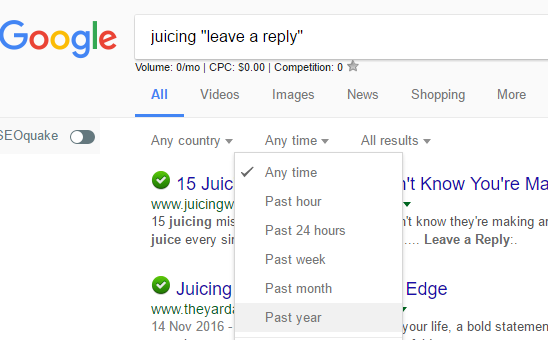
Instead I would add the following search criteria into Google : ‘Search term + “Leave a Reply“‘ so you would enter ‘Juicing + “Leave a Reply”‘

If you then goto ‘Tools’ you can select the time frame that the comments would be from:

I wouldn’t overdo this, but really think it’s a good way to start to get a bit of traction on your site.

Most of the links that you will get will be nofollow links, however, if you can get some dofollow links that would be a bonus.

Tip #2 – The Keyword Golden Ratio

This really is a gem of a tip, which was developed by Doug Cunnington over at Niche Site Project, which focuses on finding long tail keywords that are really low competition, which means you’ll be able to rank for a lot of them relatively easily.

So what’s the secret to this magical potion?

  • Look for Keywords that have less than 250 searches per month
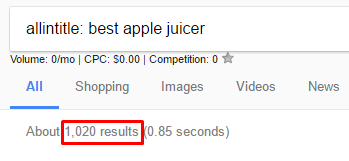
  • Find out how many search results in Google have the exact search term in the title – Do this by using the following criteria: “allintitle: searchterm“
  • Divide the #of exact search terms in the title by #searches
  • If this number is less than 0.25 then you are in business and if it is less than 0.5 then it’s worth targeting as well

If you don’t have any Keyword Finding Software such as SECockpit then you can use the free Google extension ‘Keywords Everywhere‘  to find search volume

Example: ‘best apple juicer’

Niche Site TipsHas a search volume of 40 per month and looking at the below screenshot has 1,020 results with this keyword in the title

1020/40 = 25.5 so this is clearly not a good keyword to target using this technique

However, if you searched for ‘best juicer for apple cider’ this has only 10 searches per month and only 7 exact matches, so has a KGR value of 0.7 – this still isn’t great, but you get the idea.

The downside with this approach is that you’ll need to do a lot of manual work to plug the keywords into Google, however, the results are well worth it.

What do I do with the KGR Keywords? Once you have found a bunch of these keywords, then all you need to do is write an article of 600 – 1,000 words and maybe include a video and you’ll find that you’ll go straight to the top of the rankings for this keyword, as well as a bunch of other keywords that you might not even have though of before.

What is this so great? Well, within a very short space of time you’ll see visitors coming to your site from these search terms, and that really is encouragement in a bottle right away!!!

Tip #3 – Finding Forum Keywords

Last, but not least of our killer tips today is a technique where we will help you find keywords where forums are ranking on the first page in Google.

Why is this important? Well, a forum really is an easy target in the search results and something that you can easily beat with a half decent article.

To this you’ll need to

  • Find a list of forums that are in your niche, which you can do with a simple Google search with ‘keyword + “forum”‘
  • Get access to Semrush.com. Usually, this is a really expensive tool, however, if you do a quick search online you’ll usually find places where you can get a free 30 day trial and can use this time to do all your intense keyword research
  • Add the URL of the forum into Semrush.com and see the list of keywords that it is ranking for
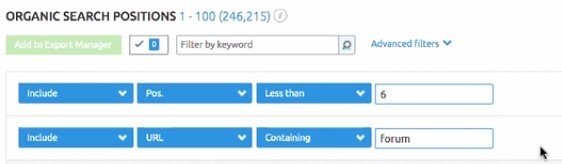
  • Use the advanced filter to filter down the keywords so that they are on the first page of Google and have the word ‘forum’ in the URL like this:Niche Site Tips

BOOM, there’s a list of great keywords that you can easily target and get instant traffic with.

To make this even better, use this in combination with Tip #2 to find a sure way of getting traffic to your site easily, whilst your site is still in the sandbox

Summary

If you use these 3 techniques then for sure you’ll be attracting visitors to your site in no time at all, and if you are clever with your keyword research this will be traffic, which is related to your niche and will potentially lead to sales further down the line!

Filed Under: Website Monetization

SECockpit Review : Keyword Research and SEO Heaven

18th November 2016 By martinos74 Leave a Comment

SECockpit Review

SECockpit is an SEO and keyword research tool that dreams are made of. I used a 30 day trial of the product recently and this is my full review of SECockpit and it’s killer features.

Because this is a fairly long article we’ve given you 3 choices:​

Read the article:What is SECockpit?​SECockpit Key Features REviewedHow Much Does SECockpit Cost?What Do I need to Use SECockpit?SECockpit Review Summary

Watch the Video:

Try the software:

SECockpit by SwissMadeMarketing

What is SECockpit?​

Keyword Research Evolved

Anyone who is serious about blogging or making money online through websites will be interested in doing a decent amount of keyword research. Without this, you are just guessing at what is popular, valuable and easy to rank for.

There are a number of free tools that you can use to help you source keywords, gauge traffic volumes, find the cost per click and drill into the ranking of any site in the Google listings.

Usually you would use a combination of things like Google Keyword Planner, Mozbar, SEO Quake etc but you need to go through and arduous manual process to get the information that you are looking for, and this can take hours upon hours.

In this review you’ll see that SECockpit takes the pain away from these tasks and automates a lot of this process into a simple to read and easy to use interface, where you can quickly analyse the results and get detailed information on your keywords.

SECockpit Key Features REviewed

gENERATING kEYWORDS

The first cool feature that SECockpit gives you is the ability to generate a list of keywords from your seed keyword and allows you to control some of the inputs.

You start off every keyword search with the following dialogue box:

SECockpit Review Seeding Keywords

Seeding Keywords

  • Countries and languages – Allows you to do a local or global search
  • Google Adwords Synonyms – Will return a large number of results related to your keyword unless you check the ‘Only show ideas closely related’ checkbox, which refines this search.
  • You can choose to include or exclude terms from your search, for example you might want to add words like ‘best’ or ‘review’ to your search
  • Min monthly allows you to set the minimum number of searches that your keywords should have
  • Tag Results – You can use this feature to colour co-ordinate your search results

Analyse Keywords

You will then be taken to a search results page that looks something like this:

SECockpit Review Search Results

SECockpit Search Results Page

Now this is where it gets exciting because there are a huge number of columns that you can add to your search results page, to help you gauge the value of that keyword to you.

I wont go through every option available in SECockpit, but the key metrics that you have are:

Niche rating – This is a really cool feature, unique to SECockpit that gives you a rating of that keyword based on a simple calculation (Number of monthly searches / Top 1 – 10 Competition Bar). The fuller this bar is, the better for you. This is a great initial indicator, however, you really need to use that as a guide only and interrogate the rest of the data before you decide to try to rank for that keyword or not.

Monthly Searches is your standard measure, which is brought back from Google Keyword Planner

Rank 1 – 10 – this is a really useful measure and tells you how easy it is at a glance to rank in the top 10 for this keyword. The lower the bar, the better in this case. Will look at how this is calculated in a minute, but this feature alone makes SECockpit a great tool to use and in my opinion worth the money.

Domains – Lets you know whether the .net opr .com domain is available for that keyword

Adwords – Here we have the standard CPC value and advertisers competition value, but there’s also a ‘Adsense Value’ column, which multiplies these 2 together to give you a simple gauge. In this section you can also add other columns to see how many ads are displayed in the top, right and bottom section of the search results to give you a clear indication of the strength of the advertising competition for this keyword

Top 10 Sites – Again, this is another great feature where it will display an icon if any of the top 10 results for that keyword have a site which is either: Youtube, Ebay, Ezine, Squidoo, Hub Pages or Amazon. This is another good indicator for you to determine whether there’s any chance of you getting on that Top 10 list for that keyword

Analyse the Competition

Once you’ve found a keyword that you like the look of you’ll probably want to dive into a bit more detail and look at the sites that are ranking for that keyword.

All you need to do is click on the keyword and you’re taken to the following screen:

SECockpit Review Keyword Competitivenes

Keyword Competitivenes

Again, you can find most of this information elsewhere, but this compiles it quickly and neatly into one simple interface.

You’ll see that the SECockpit gurus have even colour coded the results for you so at a glance you can see if it is easy to knock any of those sites off of the top 10 (green being the easiest/lowest value)

The standard measures are all displayed here:

  • MozRank
  • Page Authority
  • Domain Authority
  • Juice Links
  • Total Links
  • Internal Links
  • FB Likes
  • FB Shares

If you scroll down the page as well, you’ll see that it pulls in the info about that keyword from Google Trends.

SE Cockpit Review Google Trends Data

Google Trends Data

Calculate Your Returns

SECockpit Review Conversion Calculator

Conversion Calculator

The final feature that I found really useful in this review was the SECockpit Conversion Calculator.

This simple tool takes the Traffic volume and cost per click for the keyword and allows you to play with a number of other inputs to help you gauge the revenue returns on your keyword, depending on:

  • How well you rank for the keyword
  • How well you convert from your site
  • Whether you are selling a product or earning money through Adwords

Any Other Features

SECokpit - Keyword Research Done Right

There are a load of other features available within SECockpit, but this review is only focusing on the keyword research and analysis functionality.

If you want to find out more hop on over to the SE Cockpit Site​

How Much Does SECockpit Cost?

OK, so the downside to this product is going to be its price, which is going to make it seem unaffordable to a lot of part time / amateurs.

The basic entry package, which limits you to 10 searches a day comes in at $40 a month, which goes all the way up to $120 a month for unlimited use.

However, my honest opinion is that if you are writing a lot of articles, want to have a bit of an edge over your competition and are really trying to push hard to get onto the top 10 results, then this tool really is worth every penny, as it’s going to save you hours and hours of time and if you use it correctly will reward you with more than the monthly fee in sales/commissions on your site.L

Latest Pricing structure:

Secockpit Pricing

What Do I need to Use SECockpit?

To use SECockpit you will need:

  • Google Adwords Keyword Planner Account
  • Paypal Account
  • SECockpit Login
  • Basic Understanding of Keyword Research

SECockpit Review Summary

SECockpit is an essential tool for any budding SEO enthusiast, blogger or anyone trying to make money online and monetize their website.

It has a number of cool features which help you to generate and analyse keywords and gain an understanding of how easy it will be to rank for those keywords and what your potential revenue will be.

Because it’s cloud based, SECockpit is incredibly fast and it also means you don’t need to install anything on your computer.

Features:

Ease of Use:

Price:

SECockpit Keyword Research Tool

Filed Under: Make Money Online, Website Monetization Tagged With: keyword research, niche websites, review, SEO

A Year Learning Website Monetisation

31st October 2016 By martinos74 Leave a Comment

Learning Website Monetisation

I remember that I read somewhere that it would be easy to set up a travel blog and make money from it, which kind of got me started on this whole adventure in the first place.

​So over this last year, I’ve been furiously looking into what it takes to monetise a website or a blog and the different strategies you can employ to create an ongoing stream of revenue.

3 Things I learned about Website Monetisation in 2016

I was really keen to find out how that’s possible and whether I could do the same thing, so here are the key things I’ve learned this year

Keyword Research Is Key

Keyword Research

If you’re going to start a blog or a website then you have to remember that this is a huge investment of your time, so you really need to get an idea of whether this is going to make you any money at all before you head off writing content.

The first thing that you’re going to need to do is to research a niche.

I’ve written about this in detail before, but they key is finding a niche that:

• You’re interested in

• Has low competition and high volume keywords

• Is a broad enough niche that you can potentially expand this into an authority site in the long term

Get any of these things wrong and you’re going to end up with a blog that is going to be nothing but hard work giving you very little in return.

For any website venture that you’re about to start on I would recommend that you invest up to a month in planning the growth of your website.

• Create a keyword matrix and identify long tail keywords that you will target initially and higher volume keywords that you might want to target in the future

• Consider how your site is going to generate revenue. Are you going to be using Adsense, Amazon Affiliates or other affiliate programmes to earn your bucks?

• Check out the competition in your niche and look at how you could potentially improve what they have created

• Think about how much time your website will take to manage in the future and whether this could be outsourced. The worse thing is that if your site becomes really popular and you have set up systems where you need to be involved in all parts of the business, then the more popular it gets, the more of your time it will use

You can’t Take Shortcuts

Unfortunately, there are no real shortcuts that you can take to building up a successful website.

I’ve read a lot about Grey and Black Hat SEO tricks such as using Private Blog Networks, however, whilst these might get you success in the short term, in the longer term you’re likely to get banned from Google, and ruin your business.

If something looks too good to be true like a gig on Fiverr promising 50 top quality links for $5, then you know it’s going to be dodgy so steer clear.

Yes, there is nothing for it, but hard work and putting in the hours initially.

You’re going to need to write a lot of your content to develop your own voice, manage your own website and then most importantly learn how to market your website and generate traffic, all of which can be hugely time-consuming.

On top of this, you can’t expect instant results as your new website will go into Google’s sandbox and won’t start ranking for 3 – 6 months anyway.

Content is King and Links Are the Queen

Content Is King

The days where you could just throw up an article of a few hundred words for niche keywords and expect to rank easily are long gone.

Now you’ll need to put a lot more work and thought into this.

​

The content that you generate will need to be:

• Unique (Either a fresh idea or a vast improvement on existing content)

• Interesting (Needs to be made shareable)

• In-depth (Minimum of 1000 words per article)

• Answer a question / Solve a problem

The digital landscape is now so crammed full of content for every conceivable subject, you’ll even find in depth 2000+ word reviews of toilet seats, so you have to make sure your content sticks out somehow.

Once you’ve written this killer content, the hardest part is generating links to this content, which seems to be the biggest single factor in 2016 for ranking your content.

There are plenty of strategies all over the internet on how to do this, but once again, this will just consume a lot of your time.

What Did I Achieve?

On a positive note I have to say that I achieved a great deal in this sphere over the last year:

• I set up 2 websites, www.mylifestyledream.com and a niche website

• I have learned a good understanding of SEO and different tactics

• I’ve learned a lot about internet marketing

• I’ve learned about affiliate marketing and the different tactics that people use to monetize websites

Overall I’ve got a great foundation now in both my knowledge and my websites to build on over the next year.

I haven’t been able to focus as much of my time as I wanted to on the niche website, but plan to switch focus back on to this next year.

Low Light of the Year

I think I’ve found a great niche with low competition keywords, however, it’s not the most exciting niche and is quite hard to write articles for.

I’ve written about 8 so far, however, have kind of lost heart a little bit, because even though some of the keywords that I am targeting are sub 20 Keyword Competitiveness, I still don’t rank in the top 100 for these keywords, which I find really bizarre.

I think the answer to this problem, is that I just need to put in more work, build out more articles and start my link building activities then the site should start to grow in traffic.

Highlight of the Year

The best thing for me with building out these sites has to be the amount that I have learned about SEO.

I find this dark art really interesting and is definitely something that I want to learn more about and spend more time perfecting in the future.

How much Time did I spend?

With a full time job in front of a computer screen, I’ve also needed to research and practice these 3 ways to make money online as well as write about them, all of which takes a huge amount of time.

In reality I’ve needed to just focus on one thing at a time, or free up more time, which I intend to do next year.

How much Money Did I make?

A big fat £0

In fact, by the time I take hosting and themes and domain names into account I’ve probably invested about £150 so far.

However, I feel that I’ve put in a lot of the groundwork with which to monetize these sites in the future.

Was It Worth the Effort?

Yes, absolutely. I feel that I’ve started a new path that I’m interested in and could potentially reap rewards in the future.

Out of all the things I’ve looked at this is most likely to be the idea that comes closest to giving me real passive income in the future.

Filed Under: Make Money Online, Website Monetization Tagged With: Affiliate Marketing, Amazon, content, keyword research, niche websites, PPC, SEO

Streamlining your Content Creation Process

13th April 2016 By martinos74 Leave a Comment

Content Creation Process

This month I have managed to refine my content creation process so that it is a lot more efficient than previously. This is particularly useful when I’m writing articles for things that I know nothing or very little about, which will be a common occurrence for a lot of niche site builders.

​For each article that I am writing I find it helps enormously to run through these following logical steps:

STEP 1 – CREATE A LIST OF ARTICLE TOPICS

I’ve got a spreadsheet where I list out all of the potential ideas that I may have for articles in my niche. Whenever an idea pops into my head I just collate the ideas into this spreadsheet.I’ll usually then do a bit of keyword research using Long Tail Pro and list out the Keyword Competitiveness and the Monthly Search volume next to the article.

STEP 2 – PICK AN ARTICLE

Whenever, I have a bit of free time I’ll go to this list and pick out an article topic, that I feel like writing at the time. Some articles are going to be harder to write than others so it’s best to have a range of articles for me to choose from depending on how I feel.

STEP 3 – CREATE SUB HEADINGS

Before I start writing the article I’ll do a 10 minute brainstorm to flesh out some ideas for things that I could write about in the article. Then I’ll try and place these in a logical structure, thinking about the best way to make the content flow.

What I usually find is that the items that I list out here, become the sub-headings on my actual article.

STEP 4 – RESEARCH IN GOOGLE

I’ll simply type the keyword, the sub-heading or the article topic into Google and scan through the results. Any articles that I think look interesting I’ll open in a new tab.

STEP 5 – REVIEW OPEN TABS

Next I’ll simply work through the tabs one by one, discarding the ones with low value or unrelated content and copying the info from pages that I think contain useful information into a new Word document.

STEP 6 – ORGANISE CONTENT

At this stage I’ll have a massive 20 page word document, full of all the source content in different fonts and styles, which will look and feel like a complete mess, so lets get organised!I simply start to cut up the content and group relevant bits from each article into the sub-headers that I had written at the start. During this process you’ll find that you start to discard some more unrelated content and end up with a pretty big document still, with the benefit that it is now grouped into related content items

STEP 7 – REWRITE THE CONTENT

I usually just make a copy of the word document then work my way through the different sections of content, taking the key points, facts and figures from the source content and rewriting in my own style. This has the benefit that it applies your own voice to the content and you won’t get into any trouble with plagiarising content!

STEP 8 – TOP AND TAIL

Make sure you write a good introduction to the topic, and if it’s a long article add jump links to the relevant sections.At the end of the article try to write a summary of what you have found and pull out some of the key learnings. Both of these places are good locations to bring in your keywords.

STEP 9 – WRITE A KILLER HEADLINE

It’s always good to try and get your keyword into your headline, but creating a title that sticks out can also make the difference. Remember that your site will be sitting in the search results competing against many other sites, so if you can make a heading that stands out and are position 9 on the page, you could end up getting more click throughs than position 3 if their title is written poorly.

There is a great free tool that you can use to help you ensure that your title is up to scratch : http://coschedule.com/headline-analyzer

STEP 10 – REVIEW YOUR ARTICLE

Leave the article for a day or so, before you come back to it, and you’ll be surprised at the things you spot with a fresh pair of eyes. I usually then try to read the article out loud to myself and make final edits to the content, before preparing this for publication on my site.

Of course after these steps, there are another series of things you need to go for before publishing you article such as:

  • Make sure your content has been properly optimised for SEO
  • Format your content correctly
  • Add in a decent amount of outbound and internal links
  • Check how this will look on Social accounts

However, I’ve found that running through these 10 steps has made my approach to content a lot more systematic, logical and of course time saving.

Filed Under: blog, Website Monetization Tagged With: content

Next Page »

Martinos Digital Ltd - Dyne Road, London, England