• Skip to primary navigation
  • Skip to main content

My Lifestyle Dream

The journey of a thousand miles begins with one small step

  • Home
  • Print on Demand
  • Website Monetization
  • Dropshipping
  • Matched Betting
  • Social Trading
  • Blog
  • Travel
  • About

keyword research

SECockpit Review : Keyword Research and SEO Heaven

18th November 2016 By martinos74 Leave a Comment

SECockpit Review

SECockpit is an SEO and keyword research tool that dreams are made of. I used a 30 day trial of the product recently and this is my full review of SECockpit and it’s killer features.

Because this is a fairly long article we’ve given you 3 choices:​

Read the article:What is SECockpit?​SECockpit Key Features REviewedHow Much Does SECockpit Cost?What Do I need to Use SECockpit?SECockpit Review Summary

Watch the Video:

Try the software:

SECockpit by SwissMadeMarketing

What is SECockpit?​

Keyword Research Evolved

Anyone who is serious about blogging or making money online through websites will be interested in doing a decent amount of keyword research. Without this, you are just guessing at what is popular, valuable and easy to rank for.

There are a number of free tools that you can use to help you source keywords, gauge traffic volumes, find the cost per click and drill into the ranking of any site in the Google listings.

Usually you would use a combination of things like Google Keyword Planner, Mozbar, SEO Quake etc but you need to go through and arduous manual process to get the information that you are looking for, and this can take hours upon hours.

In this review you’ll see that SECockpit takes the pain away from these tasks and automates a lot of this process into a simple to read and easy to use interface, where you can quickly analyse the results and get detailed information on your keywords.

SECockpit Key Features REviewed

gENERATING kEYWORDS

The first cool feature that SECockpit gives you is the ability to generate a list of keywords from your seed keyword and allows you to control some of the inputs.

You start off every keyword search with the following dialogue box:

SECockpit Review Seeding Keywords

Seeding Keywords

  • Countries and languages – Allows you to do a local or global search
  • Google Adwords Synonyms – Will return a large number of results related to your keyword unless you check the ‘Only show ideas closely related’ checkbox, which refines this search.
  • You can choose to include or exclude terms from your search, for example you might want to add words like ‘best’ or ‘review’ to your search
  • Min monthly allows you to set the minimum number of searches that your keywords should have
  • Tag Results – You can use this feature to colour co-ordinate your search results

Analyse Keywords

You will then be taken to a search results page that looks something like this:

SECockpit Review Search Results

SECockpit Search Results Page

Now this is where it gets exciting because there are a huge number of columns that you can add to your search results page, to help you gauge the value of that keyword to you.

I wont go through every option available in SECockpit, but the key metrics that you have are:

Niche rating – This is a really cool feature, unique to SECockpit that gives you a rating of that keyword based on a simple calculation (Number of monthly searches / Top 1 – 10 Competition Bar). The fuller this bar is, the better for you. This is a great initial indicator, however, you really need to use that as a guide only and interrogate the rest of the data before you decide to try to rank for that keyword or not.

Monthly Searches is your standard measure, which is brought back from Google Keyword Planner

Rank 1 – 10 – this is a really useful measure and tells you how easy it is at a glance to rank in the top 10 for this keyword. The lower the bar, the better in this case. Will look at how this is calculated in a minute, but this feature alone makes SECockpit a great tool to use and in my opinion worth the money.

Domains – Lets you know whether the .net opr .com domain is available for that keyword

Adwords – Here we have the standard CPC value and advertisers competition value, but there’s also a ‘Adsense Value’ column, which multiplies these 2 together to give you a simple gauge. In this section you can also add other columns to see how many ads are displayed in the top, right and bottom section of the search results to give you a clear indication of the strength of the advertising competition for this keyword

Top 10 Sites – Again, this is another great feature where it will display an icon if any of the top 10 results for that keyword have a site which is either: Youtube, Ebay, Ezine, Squidoo, Hub Pages or Amazon. This is another good indicator for you to determine whether there’s any chance of you getting on that Top 10 list for that keyword

Analyse the Competition

Once you’ve found a keyword that you like the look of you’ll probably want to dive into a bit more detail and look at the sites that are ranking for that keyword.

All you need to do is click on the keyword and you’re taken to the following screen:

SECockpit Review Keyword Competitivenes

Keyword Competitivenes

Again, you can find most of this information elsewhere, but this compiles it quickly and neatly into one simple interface.

You’ll see that the SECockpit gurus have even colour coded the results for you so at a glance you can see if it is easy to knock any of those sites off of the top 10 (green being the easiest/lowest value)

The standard measures are all displayed here:

  • MozRank
  • Page Authority
  • Domain Authority
  • Juice Links
  • Total Links
  • Internal Links
  • FB Likes
  • FB Shares

If you scroll down the page as well, you’ll see that it pulls in the info about that keyword from Google Trends.

SE Cockpit Review Google Trends Data

Google Trends Data

Calculate Your Returns

SECockpit Review Conversion Calculator

Conversion Calculator

The final feature that I found really useful in this review was the SECockpit Conversion Calculator.

This simple tool takes the Traffic volume and cost per click for the keyword and allows you to play with a number of other inputs to help you gauge the revenue returns on your keyword, depending on:

  • How well you rank for the keyword
  • How well you convert from your site
  • Whether you are selling a product or earning money through Adwords

Any Other Features

SECokpit - Keyword Research Done Right

There are a load of other features available within SECockpit, but this review is only focusing on the keyword research and analysis functionality.

If you want to find out more hop on over to the SE Cockpit Site​

How Much Does SECockpit Cost?

OK, so the downside to this product is going to be its price, which is going to make it seem unaffordable to a lot of part time / amateurs.

The basic entry package, which limits you to 10 searches a day comes in at $40 a month, which goes all the way up to $120 a month for unlimited use.

However, my honest opinion is that if you are writing a lot of articles, want to have a bit of an edge over your competition and are really trying to push hard to get onto the top 10 results, then this tool really is worth every penny, as it’s going to save you hours and hours of time and if you use it correctly will reward you with more than the monthly fee in sales/commissions on your site.L

Latest Pricing structure:

Secockpit Pricing

What Do I need to Use SECockpit?

To use SECockpit you will need:

  • Google Adwords Keyword Planner Account
  • Paypal Account
  • SECockpit Login
  • Basic Understanding of Keyword Research

SECockpit Review Summary

SECockpit is an essential tool for any budding SEO enthusiast, blogger or anyone trying to make money online and monetize their website.

It has a number of cool features which help you to generate and analyse keywords and gain an understanding of how easy it will be to rank for those keywords and what your potential revenue will be.

Because it’s cloud based, SECockpit is incredibly fast and it also means you don’t need to install anything on your computer.

Features:

Ease of Use:

Price:

SECockpit Keyword Research Tool

Filed Under: Make Money Online, Website Monetization Tagged With: keyword research, niche websites, review, SEO

A Year Learning Website Monetisation

31st October 2016 By martinos74 Leave a Comment

Learning Website Monetisation

I remember that I read somewhere that it would be easy to set up a travel blog and make money from it, which kind of got me started on this whole adventure in the first place.

​So over this last year, I’ve been furiously looking into what it takes to monetise a website or a blog and the different strategies you can employ to create an ongoing stream of revenue.

3 Things I learned about Website Monetisation in 2016

I was really keen to find out how that’s possible and whether I could do the same thing, so here are the key things I’ve learned this year

Keyword Research Is Key

Keyword Research

If you’re going to start a blog or a website then you have to remember that this is a huge investment of your time, so you really need to get an idea of whether this is going to make you any money at all before you head off writing content.

The first thing that you’re going to need to do is to research a niche.

I’ve written about this in detail before, but they key is finding a niche that:

• You’re interested in

• Has low competition and high volume keywords

• Is a broad enough niche that you can potentially expand this into an authority site in the long term

Get any of these things wrong and you’re going to end up with a blog that is going to be nothing but hard work giving you very little in return.

For any website venture that you’re about to start on I would recommend that you invest up to a month in planning the growth of your website.

• Create a keyword matrix and identify long tail keywords that you will target initially and higher volume keywords that you might want to target in the future

• Consider how your site is going to generate revenue. Are you going to be using Adsense, Amazon Affiliates or other affiliate programmes to earn your bucks?

• Check out the competition in your niche and look at how you could potentially improve what they have created

• Think about how much time your website will take to manage in the future and whether this could be outsourced. The worse thing is that if your site becomes really popular and you have set up systems where you need to be involved in all parts of the business, then the more popular it gets, the more of your time it will use

You can’t Take Shortcuts

Unfortunately, there are no real shortcuts that you can take to building up a successful website.

I’ve read a lot about Grey and Black Hat SEO tricks such as using Private Blog Networks, however, whilst these might get you success in the short term, in the longer term you’re likely to get banned from Google, and ruin your business.

If something looks too good to be true like a gig on Fiverr promising 50 top quality links for $5, then you know it’s going to be dodgy so steer clear.

Yes, there is nothing for it, but hard work and putting in the hours initially.

You’re going to need to write a lot of your content to develop your own voice, manage your own website and then most importantly learn how to market your website and generate traffic, all of which can be hugely time-consuming.

On top of this, you can’t expect instant results as your new website will go into Google’s sandbox and won’t start ranking for 3 – 6 months anyway.

Content is King and Links Are the Queen

Content Is King

The days where you could just throw up an article of a few hundred words for niche keywords and expect to rank easily are long gone.

Now you’ll need to put a lot more work and thought into this.

​

The content that you generate will need to be:

• Unique (Either a fresh idea or a vast improvement on existing content)

• Interesting (Needs to be made shareable)

• In-depth (Minimum of 1000 words per article)

• Answer a question / Solve a problem

The digital landscape is now so crammed full of content for every conceivable subject, you’ll even find in depth 2000+ word reviews of toilet seats, so you have to make sure your content sticks out somehow.

Once you’ve written this killer content, the hardest part is generating links to this content, which seems to be the biggest single factor in 2016 for ranking your content.

There are plenty of strategies all over the internet on how to do this, but once again, this will just consume a lot of your time.

What Did I Achieve?

On a positive note I have to say that I achieved a great deal in this sphere over the last year:

• I set up 2 websites, www.mylifestyledream.com and a niche website

• I have learned a good understanding of SEO and different tactics

• I’ve learned a lot about internet marketing

• I’ve learned about affiliate marketing and the different tactics that people use to monetize websites

Overall I’ve got a great foundation now in both my knowledge and my websites to build on over the next year.

I haven’t been able to focus as much of my time as I wanted to on the niche website, but plan to switch focus back on to this next year.

Low Light of the Year

I think I’ve found a great niche with low competition keywords, however, it’s not the most exciting niche and is quite hard to write articles for.

I’ve written about 8 so far, however, have kind of lost heart a little bit, because even though some of the keywords that I am targeting are sub 20 Keyword Competitiveness, I still don’t rank in the top 100 for these keywords, which I find really bizarre.

I think the answer to this problem, is that I just need to put in more work, build out more articles and start my link building activities then the site should start to grow in traffic.

Highlight of the Year

The best thing for me with building out these sites has to be the amount that I have learned about SEO.

I find this dark art really interesting and is definitely something that I want to learn more about and spend more time perfecting in the future.

How much Time did I spend?

With a full time job in front of a computer screen, I’ve also needed to research and practice these 3 ways to make money online as well as write about them, all of which takes a huge amount of time.

In reality I’ve needed to just focus on one thing at a time, or free up more time, which I intend to do next year.

How much Money Did I make?

A big fat £0

In fact, by the time I take hosting and themes and domain names into account I’ve probably invested about £150 so far.

However, I feel that I’ve put in a lot of the groundwork with which to monetize these sites in the future.

Was It Worth the Effort?

Yes, absolutely. I feel that I’ve started a new path that I’m interested in and could potentially reap rewards in the future.

Out of all the things I’ve looked at this is most likely to be the idea that comes closest to giving me real passive income in the future.

Filed Under: Make Money Online, Website Monetization Tagged With: Affiliate Marketing, Amazon, content, keyword research, niche websites, PPC, SEO

How to Find a Niche Market in Less than a Day

4th February 2016 By martinos74 4 Comments

How to Find a Niche Market in a Day

Choosing a niche for your online business can seem complicated, however, this guide will show you how to find a niche market right for you.

In this guide I’m going to give you the tips and the tools that you need to select your niche in less than a day!

Quick NavigationStage 1 – Creating a Shortlist of NichesStage 2 – Find a Niche Product Using Amazon SearchStep 3 – Find the Best Keywords for Your Niche Using Keyword ModifiersStep 4 – Sample Your Keywords for Keyword CompetitivenessSTEP 5 – Analyse the CompetitionStep 6 – How to Choose a Niche Market?SummaryTools Used

Stage 1 – Creating a Shortlist of Niches

Task Time : 1 Hour

If you’re looking to make money online, then finding potential online business ideas and understanding how to find a good niche are critical to your success. There are so many potential niches out there for you to choose from and getting started is going to be your biggest barrier.

My main advice to you is start with something that you’re interested in. After all you’re going to spend a lot of time researching, writing and being part of that niche community so it’s best that you are in some way interested in the subject.

Some of the most profitable niches are going to be hobby or passion niche’s where people are emotionally attached with the product so are a lot more willing to spend money, and therefore advertisers will be a lot more willing to pay for space on your site!

I had a number of ideas for niches that I was thinking of entering but wanted to broaden my reach a bit before entering into keyword research so I started with our good old friend Wikipedia. They have a really useful list of hobbies page, which lists pretty much every hobby you can think of.

My process was to simply run through this list and make a shortlist of niches that I was interested in. This took me about an hour to do but was a really useful brainstorming exercise as well as it generated a lot of potential online business ideas.

Once you’ve created a list of potential niches that you’d like to set up a business in you want to see what kind of keywords are available for that niche so you can interrogate them and see if there really is a business there.

In general we can split the keywords into 2 distinct groups:

  • Product Keywords – These will be useful for your website monetization strategy
  • Information Keywords – These will be useful to drive traffic to your website

Both sets of keywords are equally as important as they can bring revenue and traffic to your site.

Stage 2 – Find a Niche Product Using Amazon Search

Task Time : 10 Minutes per niche

If you’re going to make any money online you need to know how to find a niche product or a service to either sell or recommend. Without products in your niche, your bank account is going to remain very empty.

For each of the niches on you shortlist, spend 5 minutes brainstorming some products that are related to that niche. For example, if you’re really into walking then your first list of product keywords would be something like

  • Hiking boots
  • Hiking poles
  • Backpacks
  • Fleeces

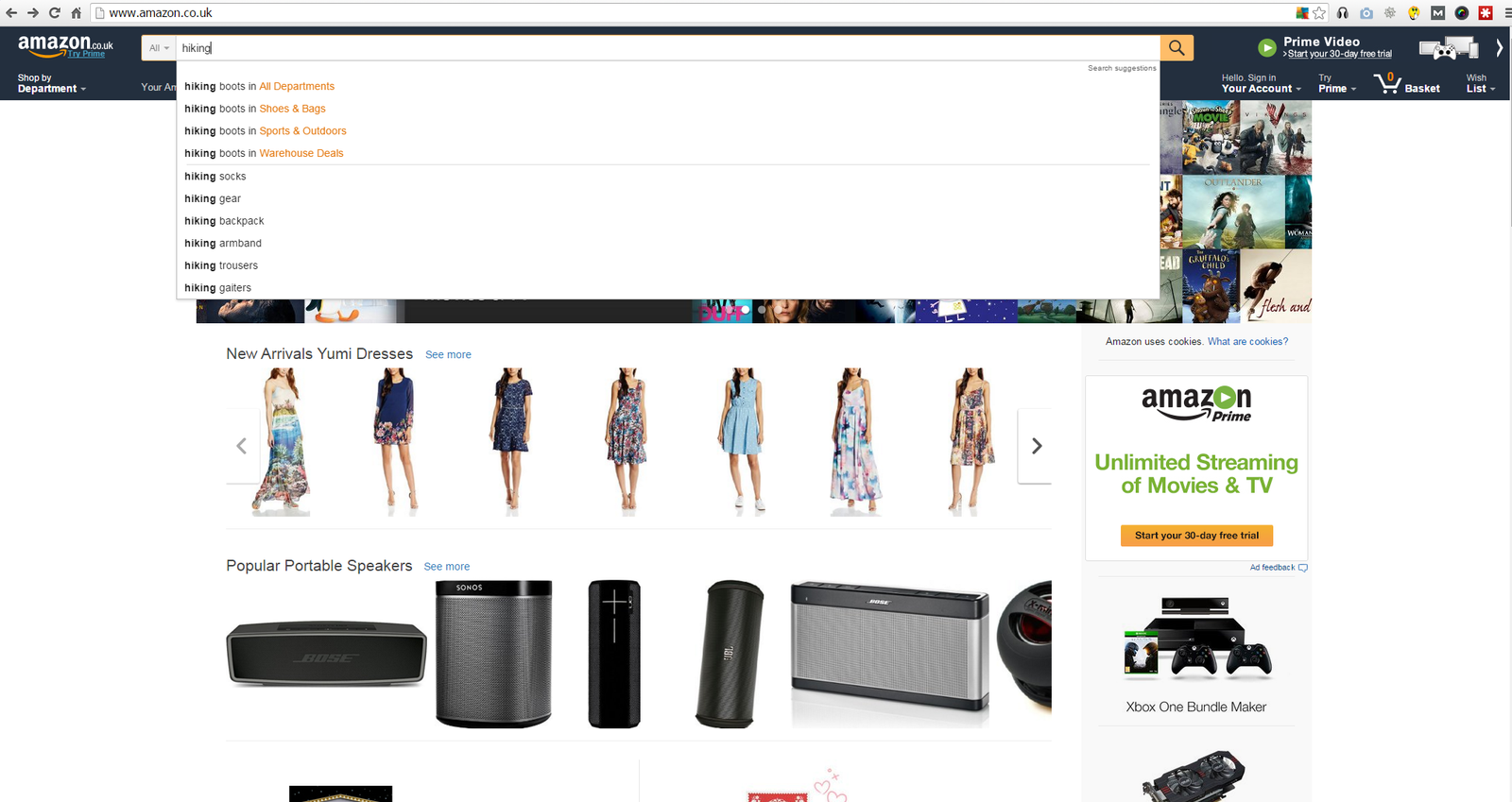
Once you’ve got a small set of keywords together then I’d simply jump on over to Amazon.com and type these keywords into the search bar:

How to find a niche product using Amazon auto suggest

How to find a niche product using Amazon auto suggest

What you’ll find is that the auto-suggest kicks in and shows you a load of other related product keywords that you might not have thought about before.

In the case above we can now add the following keywords to our list:

  • Hiking socks
  • Hiking armband
  • Hiking trousers
  • Hiking gaiters

I also recommend clicking around the categories as well and you’ll probably find another few related products that you could add to your list.

Step 3 – Find the Best Keywords for Your Niche Using Keyword Modifiers

Task Time : 10 Minutes Per Niche

The next trick that we are going to use is a combination of keyword ‘modifiers’ and a free tool atUbersuggest.org to help you find profitable niche keywords.

Keyword modifiers are simply additional words that you put either before or after your keyword to help you find keywords in your niche with a stronger buying intent.

Examples of these are

  • Best eg ‘Best hiking boots’ or ‘best hiking boots for’
  • Reviews eg ‘hiking boot reviews’
  • Top eg ‘Top hiking boots’
  • where to buy eg ‘where to buy hiking boots’
  • versus eg ‘hiking boots vs sports shoes’
  • brand names eg ‘North Face hiking boots’

You can find a full list of these types of modifiers here

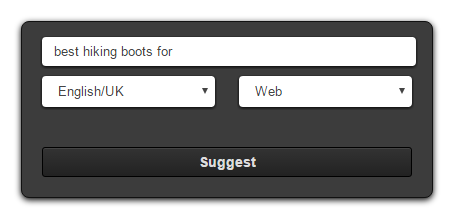
You should then take some of these sample keywords that you think will work and plug them in to the free ubersuggest tool. Ubersuggest basically uses Google’s autocomplete function and goes through every letter of the alphabet trying to find related search terms.

Ubersuggest Search Box

Ubersuggest Search Box

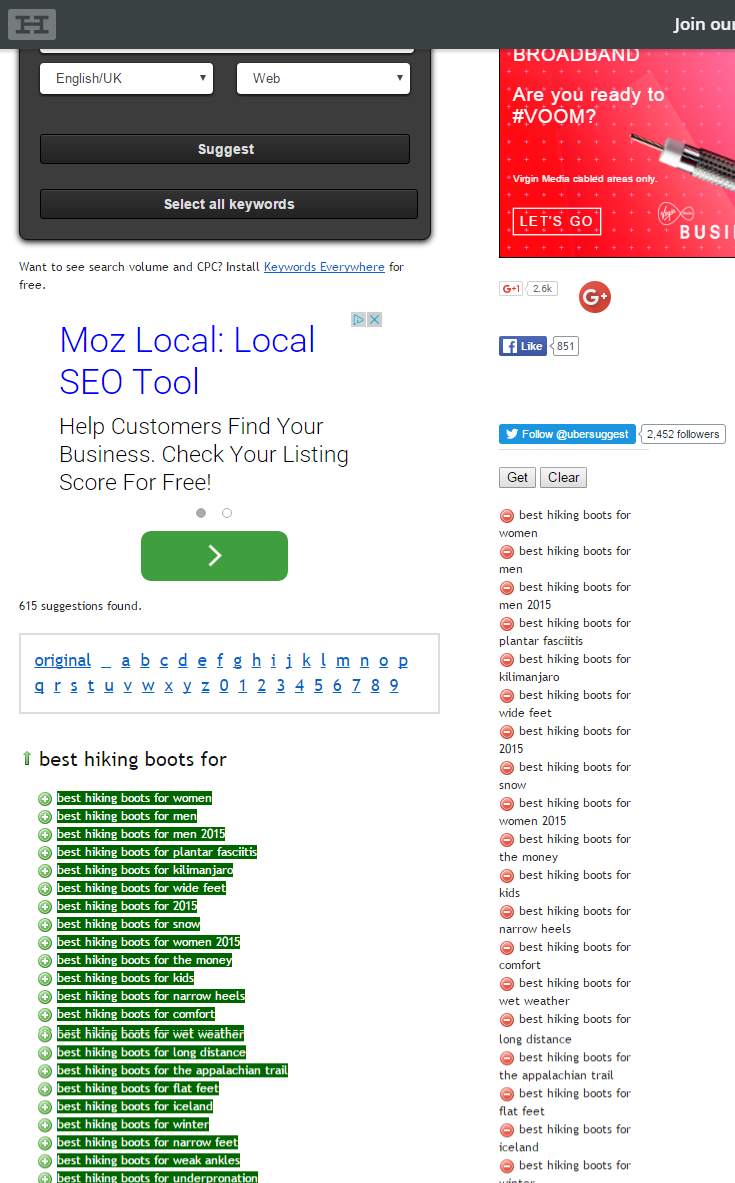
This won’t work in all cases but if you put open ended strings into the search box, then you’ll get better results back eg ‘best hiking boots for’ or ‘where to buy hiking boots for’ will bring you back much better results than ‘North Face hiking boots’:

How to research keywords for a niche

Ubersuggest provides a list of related keywords

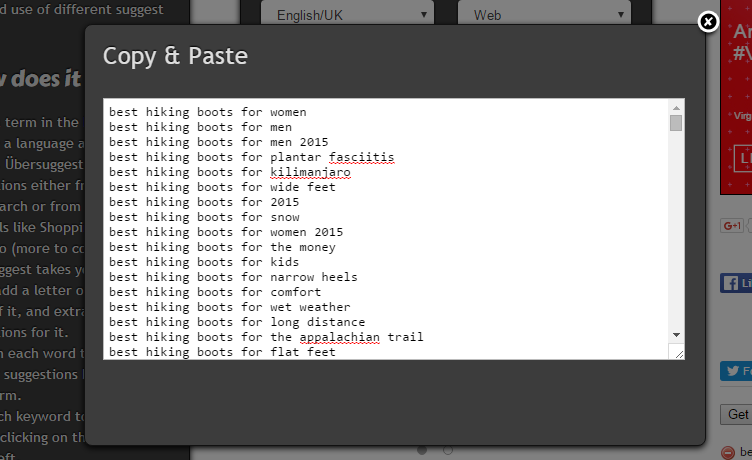
All you need to do next is to click on the ‘Select All keywords’ button and copy the keywords that you’ve created into a master list of keywords for that niche. I usually keep these in a spreadsheet, which has a tab for each of my niches like this one: How-to-Choose-a-Niche-Workbook

how do i find keywords for my website

Ubersuggest Keyword Suggestions

Step 4 – Sample Your Keywords for Keyword Competitiveness

Task Time : 20 Minutes Per Niche

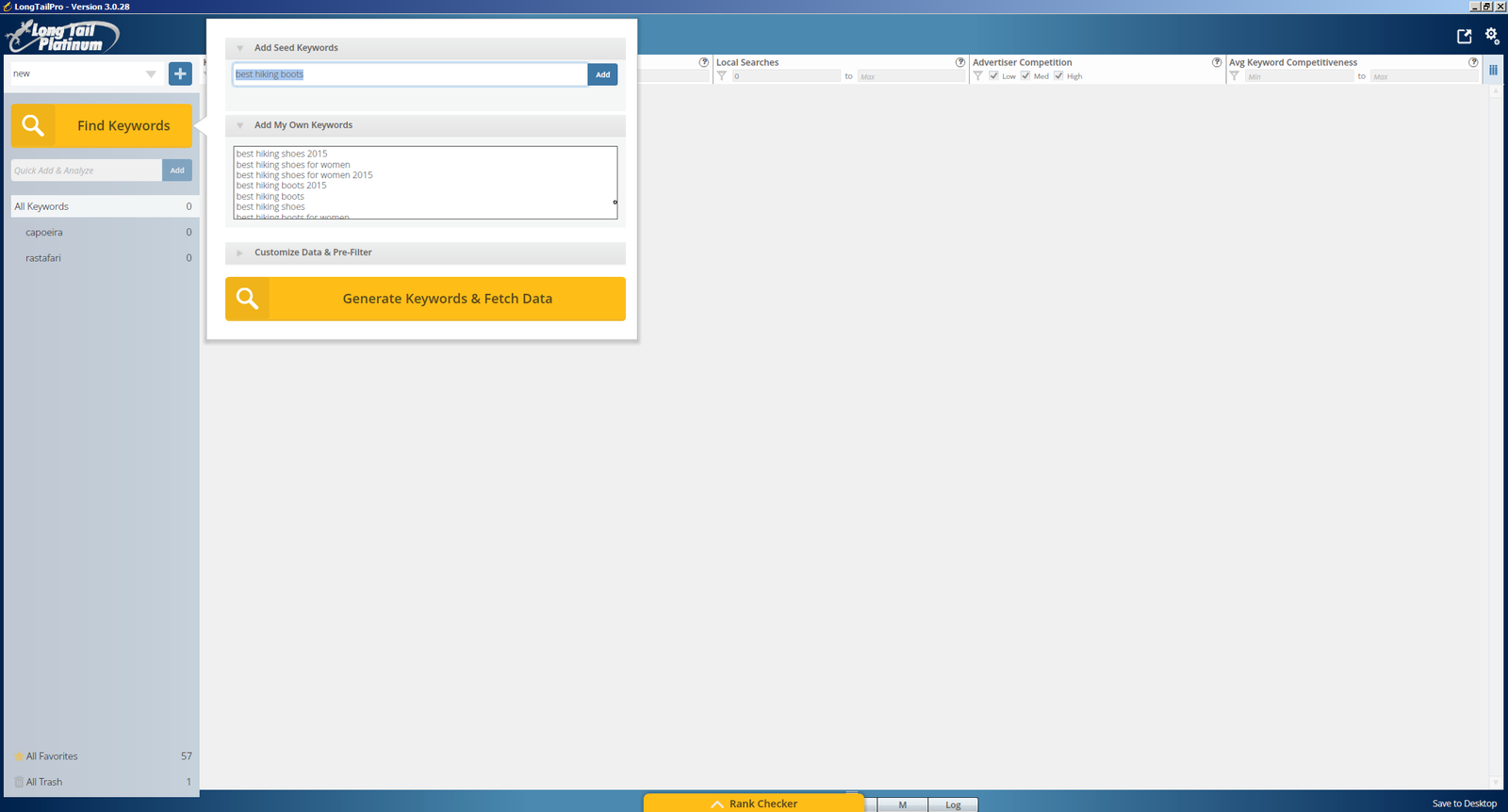
When you’ve gone through this process a few times in Ubersuggest, copy all of your keywords and add them into Long Tail Pro. Add one of your main keywords like ‘best hiking boots’ as your seed keyword and add all the other entries into the ‘Add My Own Keywords’ section then just click the ‘Generate Keywords’ button and sit back and relax for a bit:

how to choose a keyword for website

how to choose a keyword for website

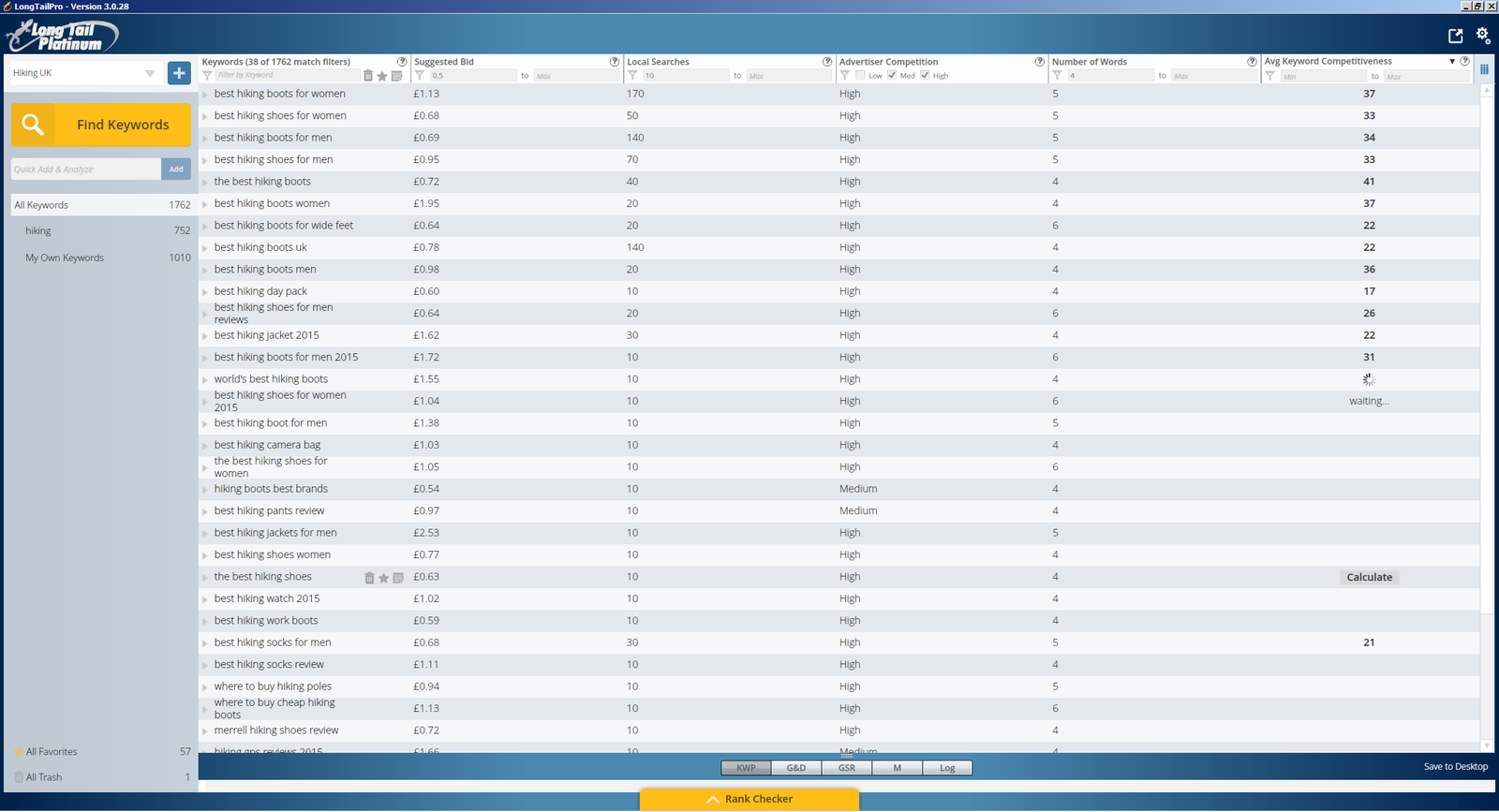
You’ll then be returned with a huge number of results from Long Tail Pro but to help you filter this list I would recommend the setting the following filters in Long Tail Pro

  • Suggested bid : £0.50
  • Local Searches : 10
  • Advertiser Competition : Set to Medium/High
  • Number of words : 4

Once you’ve done this then you’ll have a much smaller list that you can go through and check out the Keyword Competitiveness scores. Usually I’ll try this across a range of keywords, starting with the higher value and higher traffic keywords but sampling all the way down to keywords that have low CPCs and low traffic.

In the process that I went through I tried to sample about 50 keywords for each niche, which really gives you a good idea of how competitive the niche is. If there are hardly any keywords with a KC of under 30, then it’s going to be really hard for you to enter that niche, so probably best to move on to the next one in your list.

Here’s a real example of hiking boots that I looked at:

what are the best keywords for my website

what are the best keywords for my website

For each of your niches when you find a good keyword then add this to your favourites, which will help you when you come back to review them later on.

STEP 5 – Analyse the Competition

Task Time : 10 Minutes Per Niche

The next thing to do is to analyse some of the keywords in that niche, to see if you are going to be able to push your way onto that elusive first page of Google. You want to start by looking for keywords that have a high traffic, high competition and low KC score.

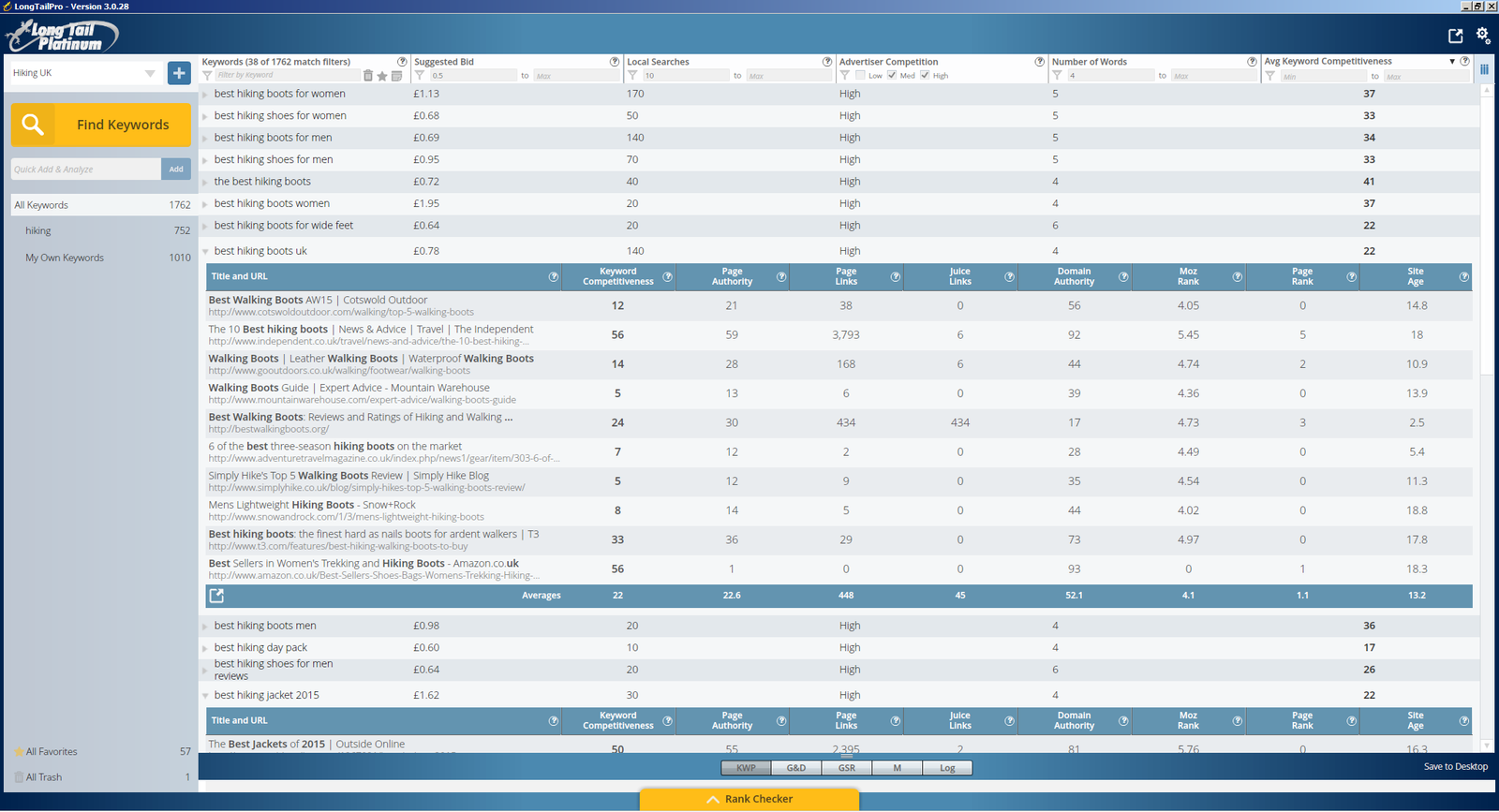
Click on the result and ideally you want to see a minimum of 2 sites that have a Domain Authority of less than 30, with a KC of less than 30. This gives you a good indication that if you write a good article and with a little bit of SEO loving you could probably get your site to rank in those top 10 results as well.

In the case of hiking boots I can see a keyword (best hiking boots UK) that gets 140 visits a month and has a KC of just 22 so lets click on that:

finding a niche in the market

finding a niche in the market

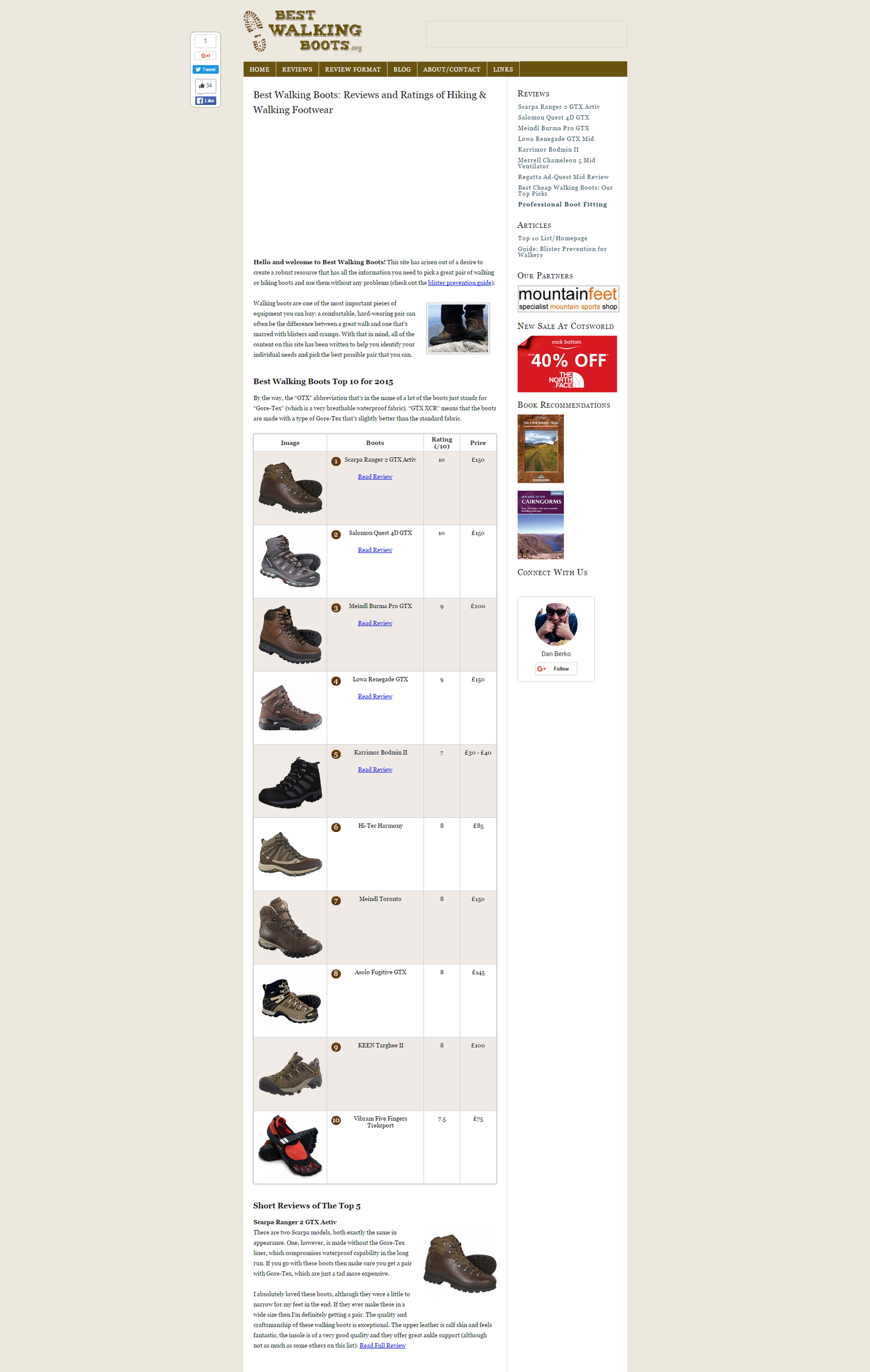
Unfortunately there’s only 1 site with a DA of less than 30, which has a pretty low KC of 24, so lets start by checking that site out. We can see straight away that it’s a niche site as it has a product comparison table, some reviews and a load of affiliate links : http://bestwalkingboots.org/

Best Walking Boots Reviews and Ratings of Hiking and Walking Footwear

Best Walking Boots Reviews and Ratings of Hiking and Walking Footwear

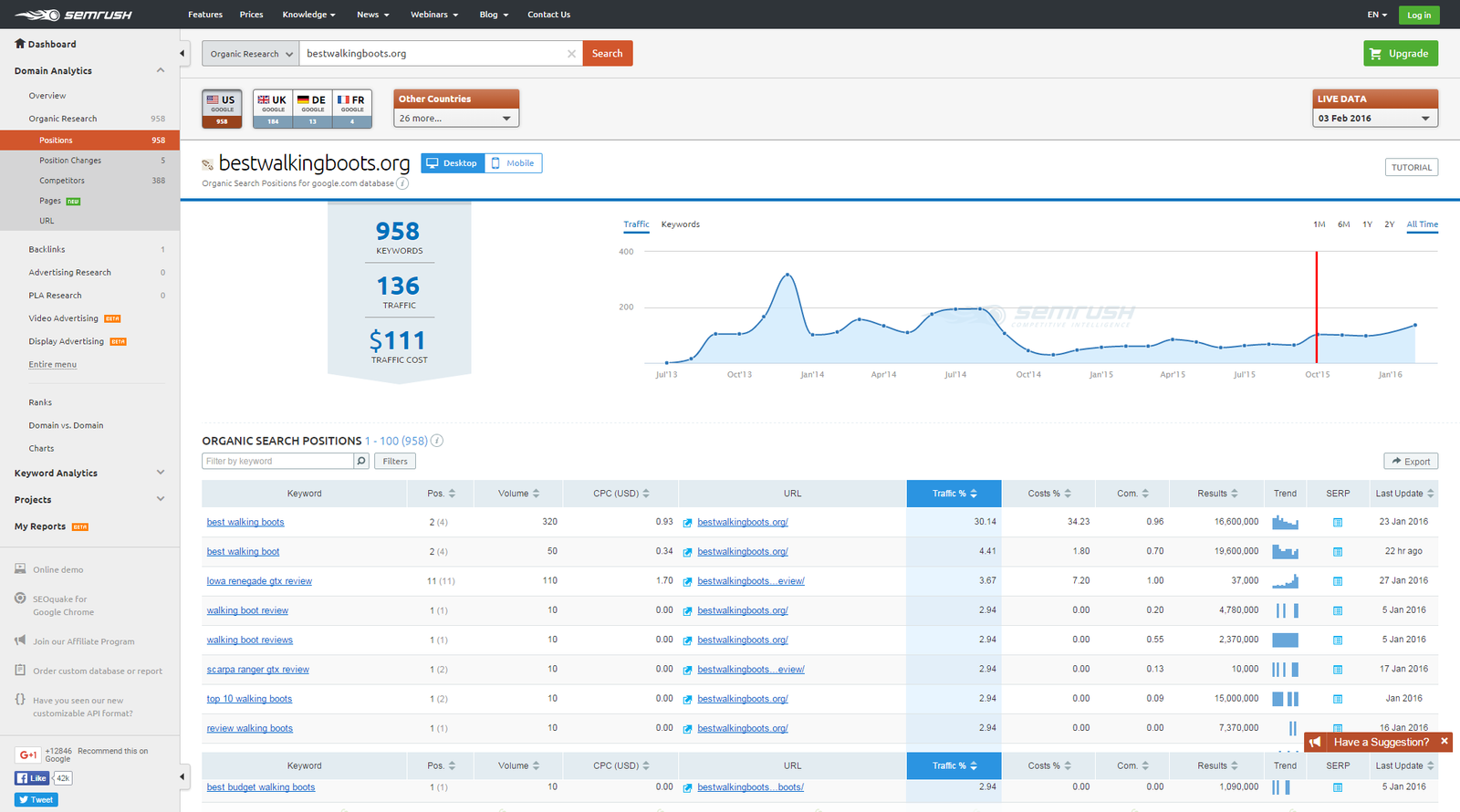
Now the next little trick uses a tool cool SEMrush, which really just helps you to spy on the competition, look at how much traffic they are getting and then eventually steal their keywords! After all, all’s fair in love and keywords!!!

You can get 10 free searches a day with SEMrush, so head over to semrush.com and plug the url of the site you’re looking at into the search bar:

SEMrush : Organic Search Positions

SEMrush : Organic Search Positions

Straight away you can see that SEMrsuh provides you with an estimate of the traffic the site is receiving, in this case 136 visitors a day, and then even better than this it shows you a complete list of the keywords that this site is ranking for and how much of their traffic volume this makes up. Simply click on the ‘export’ button and these keywords can be yours as well!!!

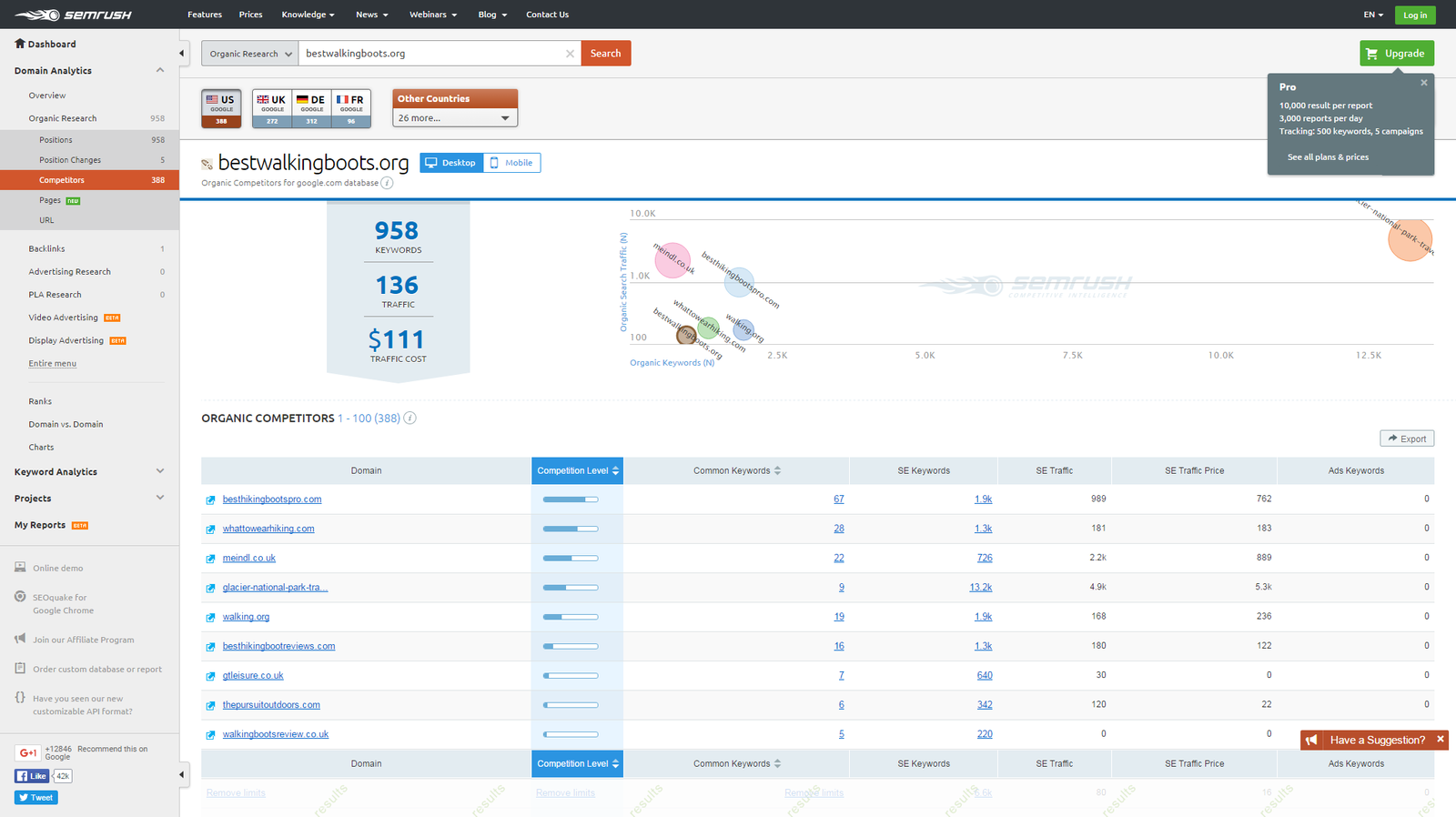
SemRush : Organic Competitors

How to get keywords from a website”

The other useful feature that you’ll see is the competitors graph, which gives you a list of related sites, and also plots them on a graph split between number of keywords and traffic. SEMrush has loads of great features and shows you how to find search volume for a keyword, how to find out keywords of a website and can really show you how to identify a niche market.

All of these things together give you a really useful insight into the competition and can help you understand whether this is a niche worth going into. When I went through this process it helped me to eliminate a number of niches, purely by the fact that the main competitors were getting so little traffic that it wouldn’t be worth my while entering that niche.

COPYCAT SITES

Another good tip is to try and find sites that are similar to how you imagine your site will become. If there are sites like this in the top ten then it’s a pretty good sign, so spend some time and analyse their sites as well.

Look at their traffic figures and check out their competition and keywords and this should give you a really good indication if you should go for this niche or not.

For each of your niches make a note of the number of sites that you found like this and jot down their traffic volume.

Step 6 – How to Choose a Niche Market?

Task Time : 10 Minutes Per Niche

Once you’ve gone through the above process for a number of different niches, you’ll quickly get a feel for whether there is any business value in the niche, whether it is easy to enter, and most of all whether it’s something you’re going to want to dedicate a lot of your time to in the next months.

My final check list for each niche that I looked at would be something like this:

  • Does the niche interest or excite me enough that I could commit a lot of my time to?
  • Are there a good range of products that I could create or promote in this niche?
  • Is there enough scope in the niche for me to write a decent amount of content about? (100 articles or more)
  • Out of my keyword sampling exercise, were there a decent number of keywords with KC scores of less than 30?
  • Did I manage to find a lot of copycat sites for keywords that had a KC of less than 30?
  • Was there a good volume of traffic in the market for my copycat sites?
  • How could I make my site stand out from others in this niche?
  • Is there potential to expand my niche into further markets/niches?
  • Would I be proud of talking about this niche to my friends/family?

Summary

  • Stage 1 – Create a shortlist of niches : 1 hour
  • Stage 2 – Finding Product Keywords using Amazon Search : 10 Minutes per niche
  • Step 3 – Use Keyword modifiers to expand your keyword list : 10 Minutes Per Niche
  • Step 4 – Sample your Keywords for Keyword Competitiveness: 20 Minutes Per Niche
  • Step 5 – Analyse the Competition: 10 Minutes Per Niche
  • Step 6 – Choosing a Final Niche : 10 Minutes Per Niche

Tools Used

  • How-to-Choose-a-Niche-Workbook
  • Long Tail Pro
  • http://ubersuggest.org
  • semrush.com

Filed Under: Website Monetization Tagged With: keyword research, niche websites, SEO

My Website Dream : Chapter 3 : Keyword Research and Choosing my Niche

24th January 2016 By martinos74 Leave a Comment

Website Dream Keyword Research

Through listening to the podcasts on Niche Pursuits and doing a lot of background reading, I’ve decided that I need to diversify my website monetization strategy. I had originally planned that I would focus my efforts on building out this website www.mylifestyledream.com and look at how I could monetize this site, however, I’ve switched my focus somewhat.

Through the initial keyword research that I’ve done it’s obvious that the ‘How to make money online’ niche is one of the most competitive niches out there and will take me a long time to rank for an ultimate build up an audience. Whilst I still want to pursue that avenue, I also want to try something that can bring back dividends in the shorter term, so I’ve decided that I also want to set up a niche site.

From what I’ve read so far, creating a niche site that brings back £500 to £1000 a month in recurring passive income, is not a dream, but actually a distinct possibility. There are loads of people out there doing this and making money from niche sites already, and most of them seem to be employing pretty similar methodologies and techniques. In the short term, I’m going to look at these approaches and start to apply them in practice as I build out my own niche site.

Detailed Keyword Research /  Choosing a Niche

I know I’ve banged on about it before but doing extensive keyword research before you start building a site is absolutely essential. There’s no point in spending hours and hours writing content that no-one reads, so this month my focus has been 100% on keyword research, evaluating market size and eventually, choosing a niche that I want to go into.

One of my money spinning plans has been to set up a niche website and monetize it with either Adsense or Amazon affiliate links. I’ve had a few ideas bouncing around in my head for months now, so I wanted to road test these ideas and find out whether there really was any business opportunity in developing a niche in those areas.

To come up with my shortlist of niches I simply went to Wikipedia and looked through their list of hobbies  to find potential niches that I might be interested in.

Then for each niche, I looked on Amazon for potential products and also used Ubersuggest to give me a list of keywords related to that niche.

I then plugged these keywords into Long Tail Pro and did a short sample of keywords to get an idea of keyword competitiveness in that niche. Some of these niches were clearly overly competitive with lots of keywords with keyword competiveness scores of over 30, so this helped me to start whittling down the list to about 5 niches.

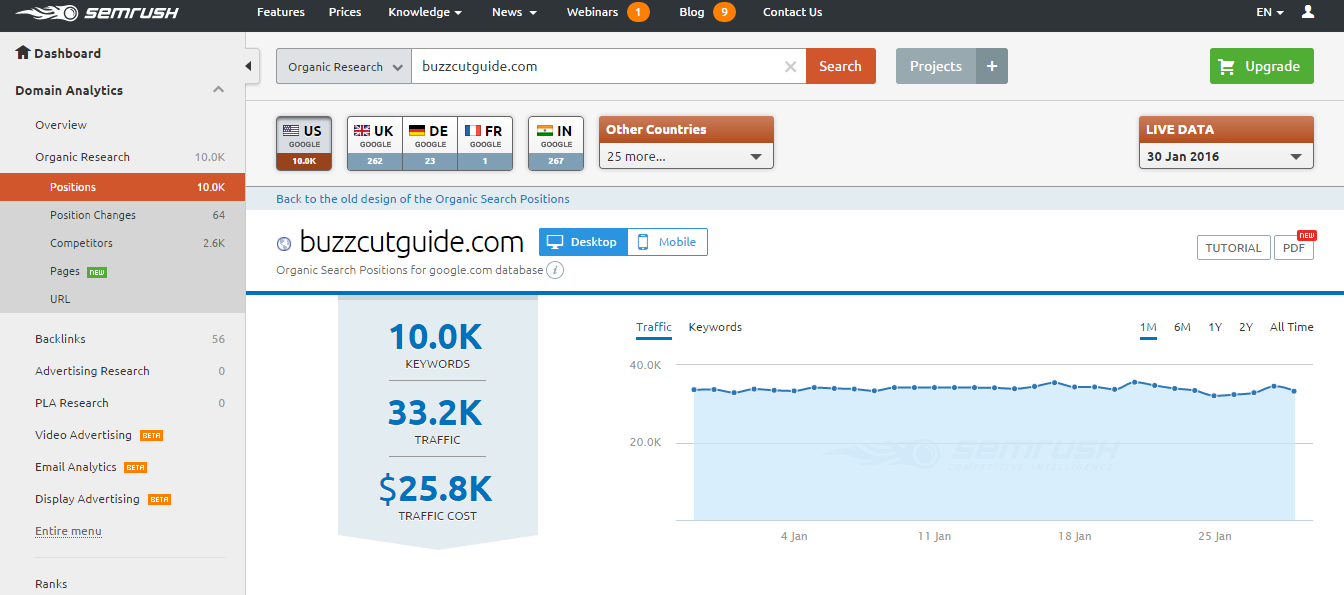
For each of these 5 niches I then used SEMrush to gauge how much traffic was in those markets. This was quite a simple process of looking at the top ten results for some of the keywords in the niche, and choosing sites, which were similar to what I would like to build ie Doppelgangers. I could then take their URLs and put into SEMrush, which gives you an indication of the traffic size:

SEMrsuh monthly traffic stats
Screenshot showing SEMrush monthly traffic stats

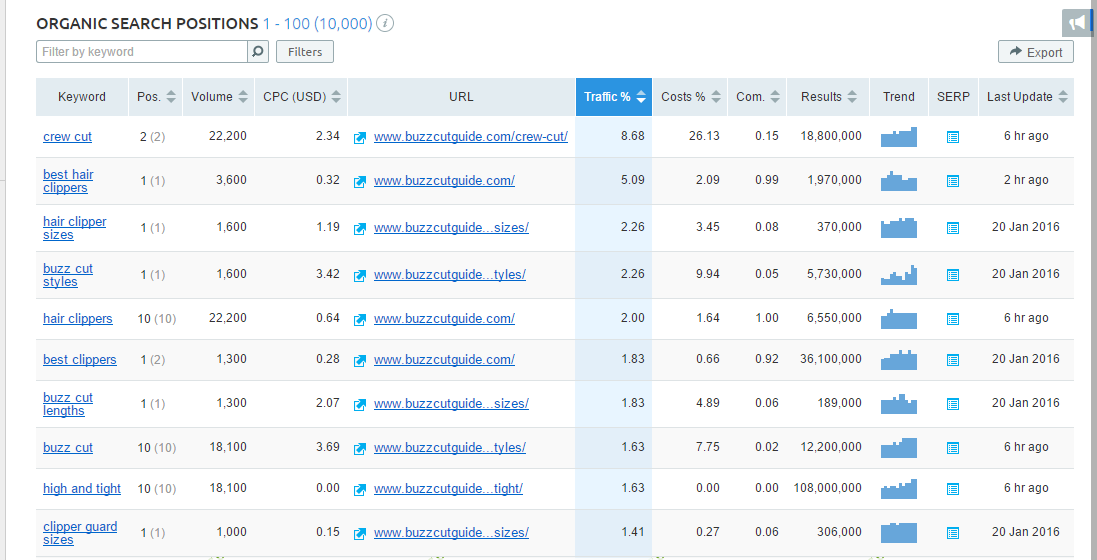
The other good thing about SEMrush, is that you can view the keywords that the specific site is ranking for and put these on your list of keywords you want to rank for:

SEMrush Competitors Keywords

This clearly showed that a couple of niches I was thinking of entering had very little traffic, so I removed them from my list.

In the end my choice was between 2 niches:

Niche 1 – This would be entering a sub-niche for a product that has taken off in the last few years, and I think will have great potential in the future. The sub-niche doesn’t have great traffic at the moment, however, is fairly easy to enter, and I think will grow in the future. I can also see potential that you could then expand into the main niche with time and become an authority site, even though that is quite a competitive niche.

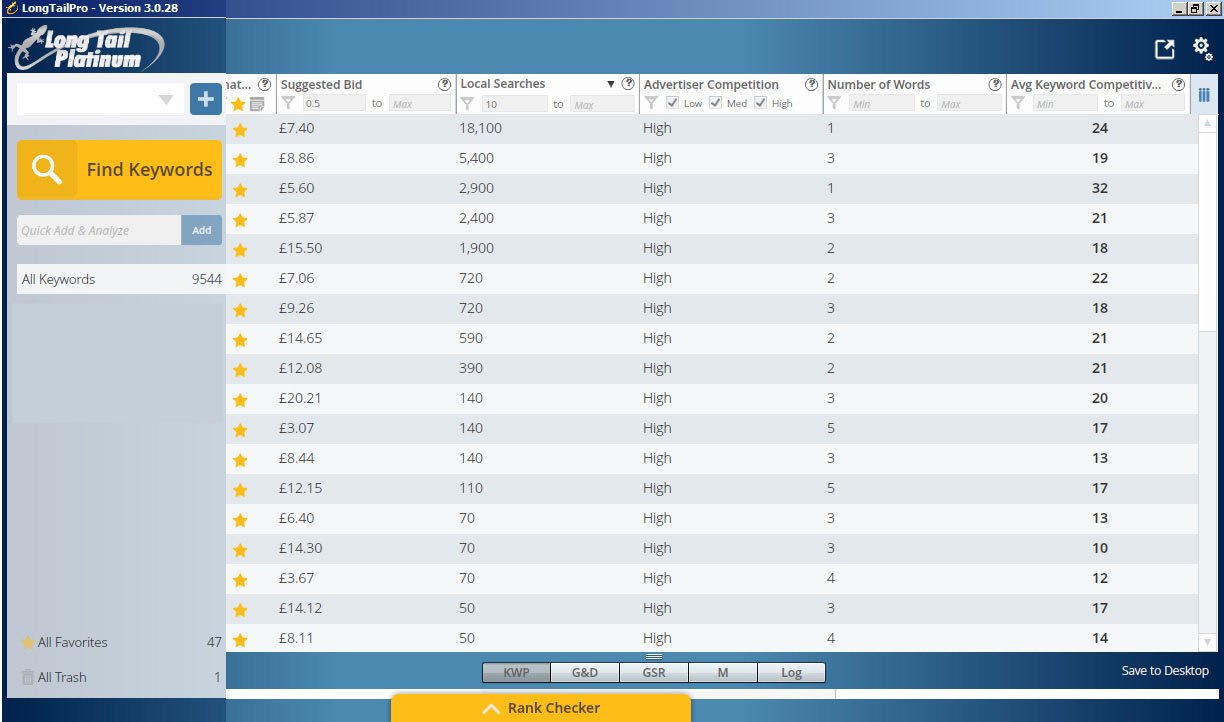
Niche 2 – Is entering into a niche where you would promote a service that other people are supplying. There are loads of really low competitive keywords in this niche, and most of the sites are obviously built by people who don’t know a lot about SEO. I’m not sure how much it helps either, but the Cost Per Click for these keywords is really high:

Long Tail Pro Screenshot
Long Tail Pro Screenshot screenshot showing keyword competitiveness in my niche

The only problem I can find with this niche is that it will be hard to write a lot of decent quality articles.

In the end, I have decided to go with Niche 2, just because the Keyword Competitiveness is so low and the major site in this niche is getting 40k visits per month!!!

Content Research

After choosing my niche I was really keen to crack on with content creation so this month I’ve started to do a lot more research into the niche to generate content ideas.

I’ve basically been reviewing other sites in the niche to ‘borrow’ content ideas, and this has proven to be a really useful exercise. From this exercise I have decided that I can expand my site into 3 main areas:

  • Helping visitors to find the niche service in their area
  • Helping businesses to find training for the niche service
  • Helping visitors find a related niche product

I really think there is potential to become an authority in this niche as well, and I’ve started creating a list of different content ideas to put on the site. I found the guys at Digital Marketer wrote this really great article

How I Nearly Bought a Website

Talking of distractions, well this month I nearly took a massive shortcut around the whole niche site building process and almost bought myself a ready made website, complete with WordPress plugins and 40 keywords focused articles.

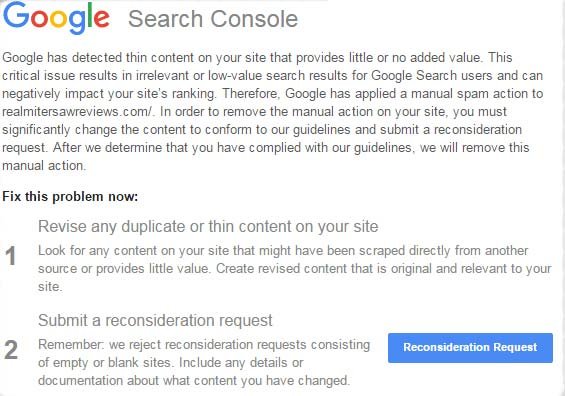
The opportunity arose when I was reading an article on Matthew Allen’s blog about the Google Thin Content Penalty. This is basically a new algorithm that Google introduced recently to penalise websites, which are perceived to add no value and are built for the sole purpose of generating Affiliate revenue ie Niche Sites. If you don’t have a lot of content on your site and you have a lot of affiliate links, then you’ve probably been penalised and received something like this from Google:

Google Thin Content Penalty

So, Matthew Allen had 2 of his sites hit with this penalty and had since then de-indexed the sites, put them on a new URL and was selling them through Human Proof Designs for $799. He claimed that these sites were making a few hundred pounds every month and with a bit of careful nurture could make even more money.

To me this sounded like a great opportunity, not just because they were tried and tested websites that had already made money, but because this would afford me a great opportunity to learn how he had set these specific niche sites up in WordPress. More than anything I was looking at this as a really good learning tool so I clicked on the ‘Buy Now’ button for the site about Organic Shampoo, and initially it looked like I was successful.

However, I was completely gutted to find out a few hours later that there had been an issue with the checkout flow, and that the site had already been sold. Matthew was extremely apologetic and offered me first refusal on the Fertility Kit site instead, but to be honest, that niche just wasn’t going to float my boat.

Looking back, it’s probably not such a bad thing as I want to go through this whole set up process myself, so I guess it’s back to the drawing board and time to focus on writing them articles!!!

NEXT MONTH’S GOALS

  • Write 3 articles for the niche site
  • Create a list of the niche services in London

LAST MONTH’S TASKS

  • Choose a niche for my website – COMPLETE
  • Publish 5 more articles – INCOMPLETE
  • Create a backlinking strategy – INCOMPLETE

TOOLS AND SITES USED

  • Ubersuggest.org
  • SEMrush
  • Long Tail Pro
  • Human Proof Designs
  • Dumb Passive Income

Filed Under: Website Monetization Tagged With: content, keyword research, niche websites, SEO

Martinos Digital Ltd - Dyne Road, London, England