
I’ve been working fairly intensively on Merch By Amazon for just over 9 months and have finally managed to find a repeatable process that I can use to research, create and list unique designs on Amazon and across multiple Print on Demand Platforms.
Initially when I started I spent most of my time stressing whether I’d done something right, or wondering if I was wasting my time on certain designs as I had no real way of telling if a design would be able to sell or not.
However, with a few tricks and a few tools (Some free, some paid for) I think I now have a process that takes away a lot of the mystery and should be a fairly simple step by step process that you can follow to expand your design portfolio.
WARNING: This is a pretty long article so I’ve split it into 7 separate steps, each with a video showing you the exact process I follow for Merch by Amazon.
Step 1 – Finding a Niche with Low Competition and High Demand
This is probably one of the most important steps for you to master, especially when you are in the lower tiers as you really want to make sure that your designs have a decent chance of ranking.
Keyword Analysis
For me the quickest way to do this is to use some software called Merch Mine.
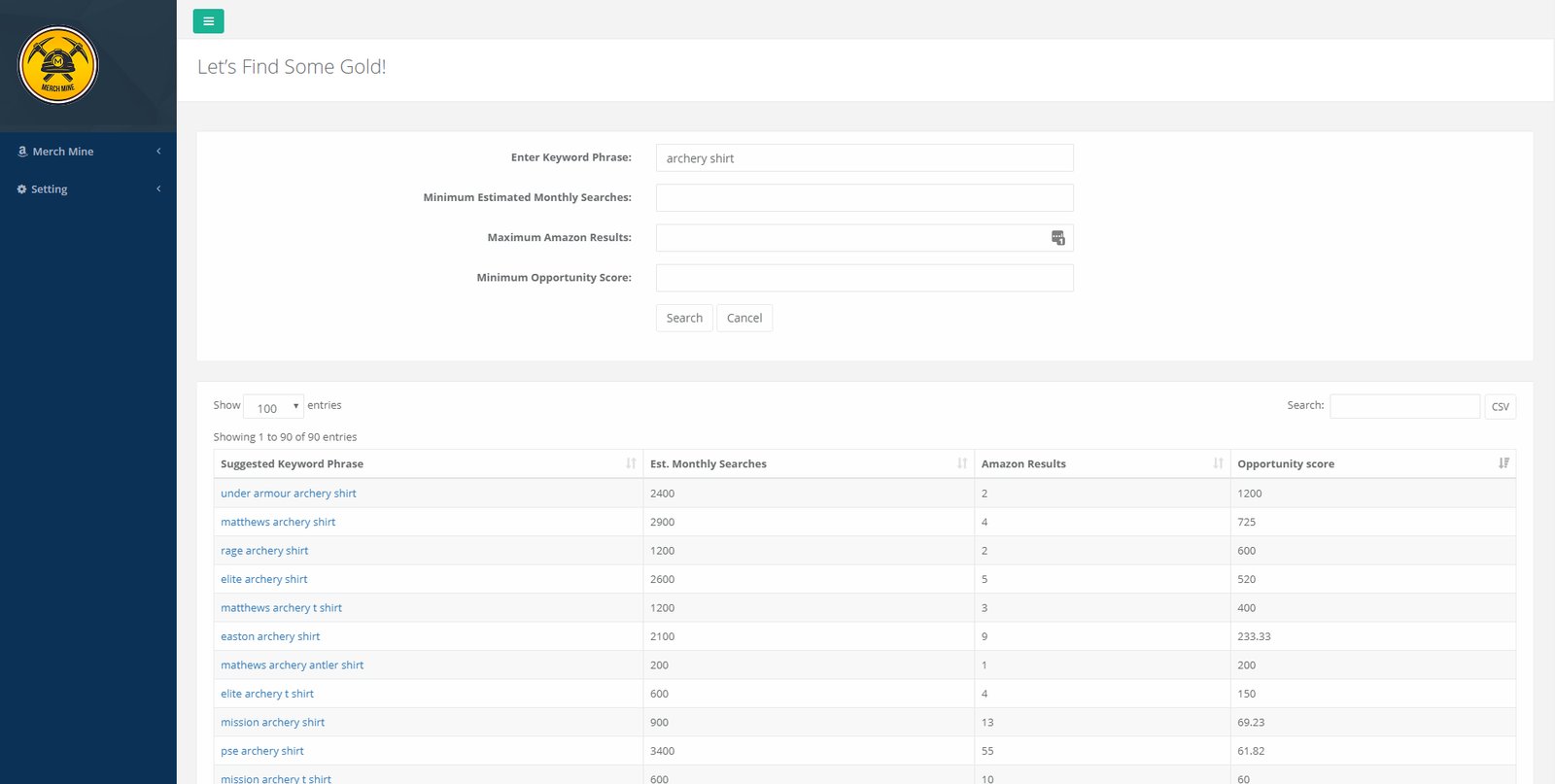
Simply put this allows you to add a seed keyword such as ‘Archery’ and it will return a list of similar keywords, with the following data as shown in the screenshot below:
- Estimated Monthly Searches – This is based on data from Merchant Words, which an estimated average monthly search volume. This doesn’t come from Amazon itself but is a good approximation. Read exactly how they calculate it here
- Amazon Results: Shows you the number of results that are presented in Amazon when you enter the given keyword
- Opportunity Score: Is a simple calculation of the 2 previous metrics to give you a number that you can glance at quickly to determine if the keyword is worth going for or not:
TIP: To ensure that you get a decent set of search results back I usually add the following values to pre-filter the search:
- Estimated Monthly Searches – 800 (Ensures that there is enough volume)
- Amazon Results: 400 (Ensures that the niche isn’t flooded yet and you could still rank with this number of shirts)
- Opportunity Score : 5
EXAMPLE : From the seed keyword of ‘archery shirt’ I found the keyword ‘Traditional Archery Shirt’ with the following stats, which look good to me:
- Estimated Monthly Searches – 1200
- Amazon Results: 144
- Opportunity Score : 8.33
Analysing Search Results in Amazon
The next thing you’ll need to do is make sure you have 2 Chrome extensions enabled:
DS Amazon Quick View
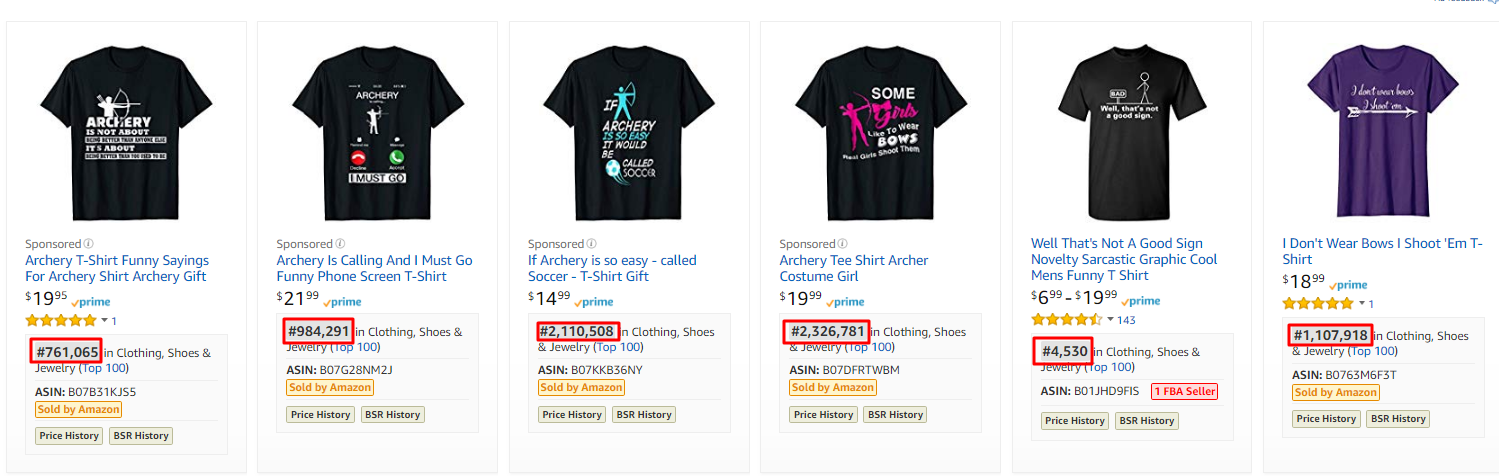
This is an essential plugin to use and will quickly help you determine whether any of the shirts on that page are selling or not.
Typically a BSR of 100,000 means that the product is selling once per day. A lot of people will only go after keywords where shirts have a BSR of less than 500,000 but my personal approach is to go for anything that shows some track record of sales.
My strategy:
If there are a few shirts with high BSRs then it’s still worth going for and my strategy is to have thousands of shirts selling once or twice a month rather than one shirt which sells a heap…. the main reason for this is that I won’t get the attention of the cheap scumbag copycats, who will just steal your best selling shirt design and sell it at a lower price. My experience so far shows that as soon as you get anywhere near to a BSR of 500,000 you are likely to have someone copying your shirt pixel for pixel.
Keepa

To get an even more accurate picture of how well a particular shirt is selling you’ll need to install the Keepa Chrome extension which is also free. It’s a little bit glitchy but for most products will show you a graph of the history of the BSR for that product.
This means that when there is a jump vertically down in the graph, a sale was made. As you can see in the image above the red spots I’ve highlighted are where this particular product made a sale and is a great way to determine demand in the marketplace.
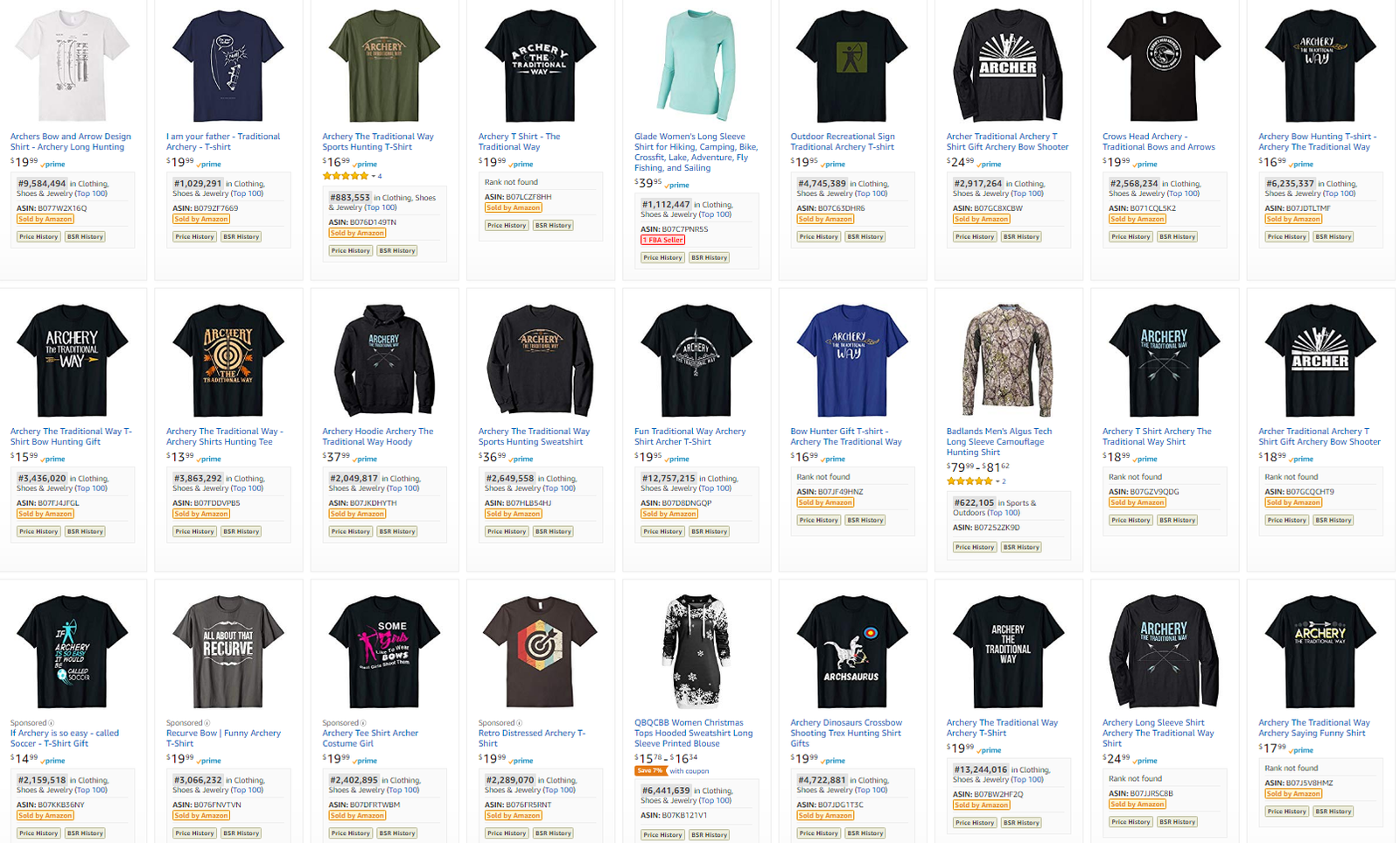
EXAMPLE: If you do a search for ‘Traditional Archery Shirt‘ in Google you’ll see a page of results as below.
Notice the key thing here is that there are lots of products with BSRs that range from 500,000 to 3 million.
This means that the products aren’t selling in massive numbers, however, there is definitely a demand that is worth us looking into.
Step 2 – Brainstorming Ideas in the Niche
So we’ve found a niche that looks promising, but we probably know nothing about that niche, so how can you come up with a design that is relevant to the audience and will ultimately make them want to purchase your shirt?
Well here’s 3 tips that I always use to brainstorm my ideas:
Search Google for Memes
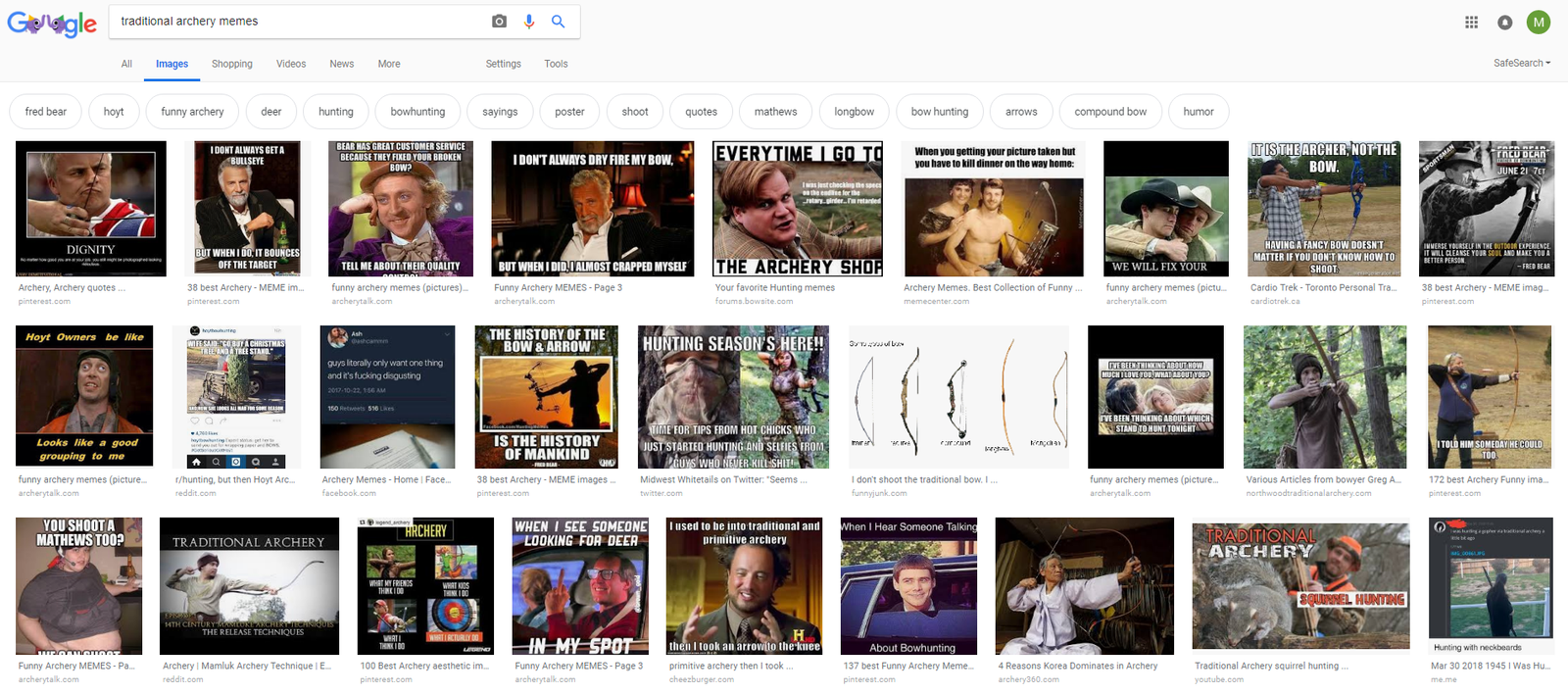
The first thing I’ll do is goto Google and do a search for memes. A lot of these will be trash and unusable but you will always find a few gems that you can use for your Tshirt ideas.
The things that you are looking for in a meme are:
- Text is short and punchy enough to fit onto a Tshirt
- The concept can be translated easily onto a Tshirt
- The concept is unique to your niche, or references niche specific terminology
Scan through all of the images that are shown and take screenshots of the images so that you can review later.
The good thing about this approach is most of these memes will have been created by people who have inside knowledge of the niche, which takes a lot of the research load off of your back!!!
Search Pinterest

Pinterest is another goldmine of ideas that you can use for your shirts. This is perhaps even better than the Google search because a lot of these boards would have been specifically curated by enthusiasts in the niche that you are trying to enter.
Just enter your search term and either search for specific boards related to the niche or just browse the hundreds of images that appear and screenshot any ideas you like for later.
Search for Jokes / Sayings
From my experience so far it’s pretty clear that the best selling shirts are ones that have a touch of humour or have a cool saying that is relevant to the niche that you are targetting.
Put yourself in the mind of the buyer and why they are buying the shirt. Most of the time what they are actually doing is saying to the rest of the world “Hey, I’m really interested in this niche and want you know that I am because I think it makes me look cool/interesting/exciting/intelligent“
I’ll always do a quick search in google for funny sayings / jokes and scan some of the forums in the niche, as they will usually have a funny jokes section as well.
This gives you great inside information from what people in the niche are actually finding funny…. which should translate to sales!
Again, remember that the jokes need to be pretty short and punchy where possible and be able to translate well to a Tshirt, so that other people will be able to read the pun and get the joke instantly.
EXAMPLE: You should now have created a single document that has collated all of your ideas from the sources mentioned above.
Here’s what mine looks like for Traditional Archery:

Step 3 – Creating your Design Briefs
So now that we’ve done a lot of research and got a good feel for the niche, we need to break some of these ideas down into actionable briefs that we can give to our designers or to work on ourselves.
The key here is not to copy the source designs but use them as inspiration to create your own unique or improved version, because these will likely sell more easily and you don’t want to become one of those copycat scumbags do you???
Check Amazon for Existing Designs
The first thing I always do is go to Amazon and search for the exact phrase to see if there is someone else who has already created designs with this phrase / theme.
You want to save yourself time and money and not create something that exists already.
EXAMPLE: From the options that I selected I did a quick search on the following phrase ‘My Idea of Group Therapy Shirt’ and found that 24 designs already exist for this phrase and none of them are selling particularly well, so there’s no point in going for this one:

Check for Trademarks
The next thing you want to do is to a quick check of the phrases on your shortlist of designs in case there are any trademarks.
I always put the terms and variants into http://tmhunt.com . We’ll do another Trademark search later on but it’s worth checking your main phrases at this stage.
Finalise Your Ideas
Now we need to take these basic ideas that we have and turn them into actionable pieces that a designer can create a design from.
This next phase is probably the most difficult phase and is something that is difficult to teach and is more of a skill that you acquire after creating numerous Tshirt designs.
However, there are some pointers that may help you:
- Keep Phrases short and sweet so they can be seen from a thumbnail
- If you are creating a text based design try to interlace the text with assets related to the niche. For example, swap out some of the letters with iconography from the niche or add a flourish that includes a niche related graphic.
- Don’t overcomplicate the design … try to base it on one simple concept that is instantly recognizable
- Think about the font that you want on the design. Some niches will naturally have a certain style and fonts that work eg Gothic, sports, kids niches all have different fonts that would work well for them
- Think about the person buying the design and the message they would like to portray by wearing your Tshirt on their chest
Submitting Your Design Brief
If you create your designs yourself then you don’t need to worry about this stage too much, but a lot of you will need to outsource work to designers (especially if you wish to scale your business) so creating a clear brief is a very important step and will save you time in the long run with less revisions the clearer you are up front.
Some tips from me to creating your brief:
- Use plain/simple English to explain your concept as often your designer will not be a native English speaker
- Provide examples of styles that you like – give as many screenshots and references to other pieces of work / Tshirt designs that you have seen and be clear what you like/dislike about them
- Ask for a couple of options. It’s always going to be difficult for a designer to get the brief right every time so give them a couple of ideas to try out
- Be prescriptive and clear about what you want. If you want them to create a design with a car then tell them what kind of car you want, what colour and which angle the car should be at
EXAMPLE: From the research we did previously I have created 4 final ideas that I will send to my designer in the next step, which you can view here
Design Pickle

In the video you see that I am using a service called Design Pickle. This is a paid service that you can pay for on a monthly basis.
The general idea is that you can submit as many designs and revisions as your designer can get through in the time that they have allocated to them…. another good reason to make sure you have clear briefs!!!
You will be allocated a designer who will stay on your account, which is a great thing because after a while they really get to understand what you like stlyewise.
Typically a designer will get through 2 design briefs a day, which will include 2 – 3 variations and the revisions that you submit. However, if you ask them to create a really complex design then this will a bit longer!
For me the massive benefit for using Design Pickle is that this also gives you access to Getty Images for use on your Tshirts with a commercial use license, which only costs you $25 a month….. that’s a bargain in anyone’s books!!!
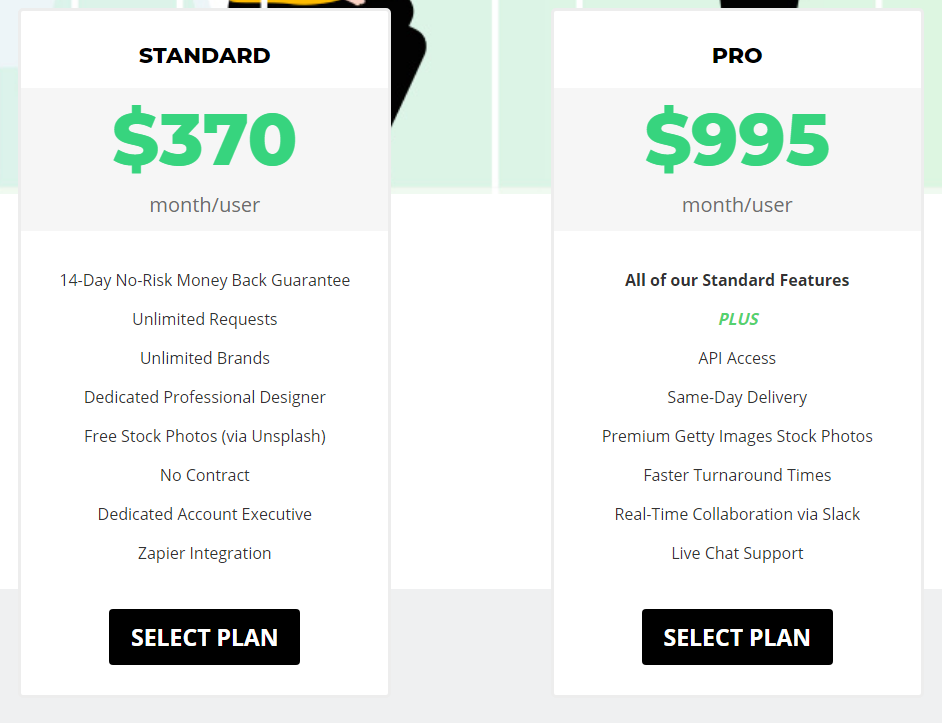
I bought an annual plan so it works out even cheaper than this but even for $370 a month you can break this down as follows:
- 21.62 = average number of working days per month
- 4 Unique Designs per day minimum (2 design requests with 2 variations)
- 83 Unique designs per month
- $4.45 Cost per design (370/83)
Upwork
Another good source for finding a designer is upwork.com where there are plenty of good designers available.
Simply add a job description and a price per design and you should get a number of replies back.
I posted the following job for $5 per design and managed to find 3 designers out of this:
I’m looking for a designer to work with me to build up my stock of designs for various print on demand services.
Will pay $5 per Tshirt
You must supply all layered files
You must own the rights to all fonts and imagery used
Designs must be unique for my use onlyPlease send examples of your work and you must be willing to submit a test design based on my criteria I submit.
Likely to be a longer term engagement for successful candidates
The main thing is that you will need to spend time going through the different applications until you can find a decent designer.
The downside to using Upwork however, is that your designers won’t have access to a lot of the source assets that you can get from Design Pickle and it’s harder to know that the designs they are creating for you are unique.
Step 4 – Writing your Product Listings
I’ve now got the finalised designs back from my designer and am ready to move ahead and create my product listing by performing keyword research and creating a product that stands out to potential customers.
This step is another extremely important step, because if you don’t write your listings correctly, no one is going to find your beautiful designs, which means less money in your piggy bank!!!
2 schools of thought…
There are lots of different schools of thought about the best way to write a product listing so that Amazon’s search algorithm will rank your product as highly as possible.
Some people are very minimalist with their keyword approach and will choose only a couple of keywords which they repeat in the title and bullet points. Their idea is that the fewer keywords you use, the more targetted the listings will be and the more search weight Amazon will give to the individual keywords you are targetting.
Other people try to cast their net as wide as possible and sneak in as many relevant keywords into their listings as they can, without making the listing look like it is spammy or untrustworthy.
Personally I lean towards the second approach slightly more but see which approach works best for you and most importantly, try out both approaches on different listings.
Anyway, I’ve found an approach that works for me and now have a series of repeatable steps that I go through as I build up my product listings:
Keyword Harvesting
The first thing that I do is open up a notepad file and start collecting as many relevant keywords that I can find that are related to the main keyword I am looking for.
The main thing to note here is the word ‘relevant’ because for each keyword you add, you need to think whether someone who uses that keyword in their search term would actually want to buy the T-Shirt that you are selling.
To help me create my list of keywords I use 3 sources:

Take your seed keyword eg ‘Traditional Archery’ and search for this in Google. Usually I just spend a couple of minutes scanning the page to pick out some of the main related keywords.
As you can see from the screenshot, the google snippet on the right is usually full of relevant keywords, but it’s also worth clicking into a few of the top results to see what you else you can find.
Relatedwords.org
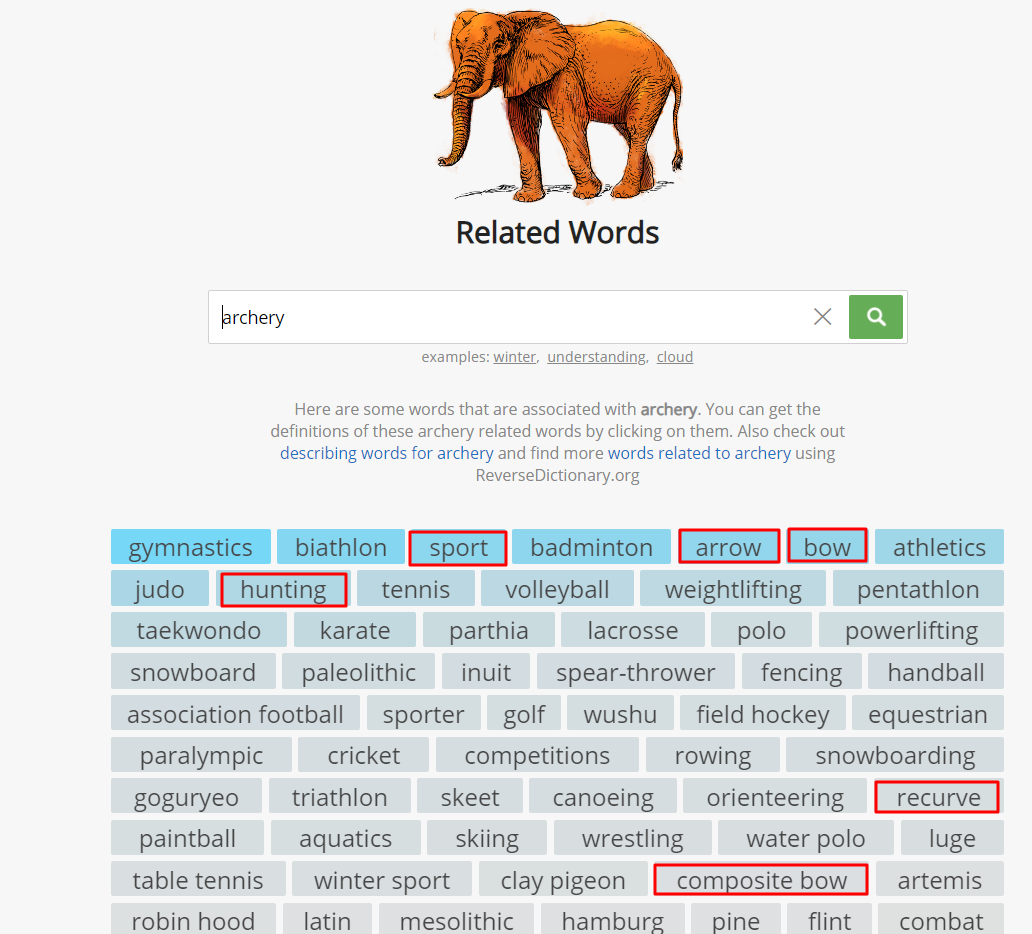
The relatedwords.org website is pretty much an online Thesaurus that allows you to enter search terms and will bring back a range of associated terms.
The results are a bit hit and miss, however, you will often find keywords in this list that you won’t come across in other searches.
Merch Informer – Product Search
Next you should hop on over to merchinformer.com and click on the ‘Product Search’ tab.
Enter your seed keyword and select ‘Search in title only’ and you’ll see a set of results like this:

What this shows us is a list of the most common keywords that people have used in their listings that are returned based on your seed keyword. Scan through this list and pick out keywords that you think will be relevant to your listings.
It’s also worth reading through the bullets and descriptions of some of the top selling shirts in the niche as well to give you some more ideas for writing your own listing later.
EXAMPLE: At the end of this process I now created the following list of keywords that I can use in my listing:
archers, archery, bowman, hunter, oldschool, oldfashioned, toxophilite, bowhunting, arrows, bullseye, target, longbow, recurve, simple, bow, hunting, sport, gift, practice, range
Writing your Listing
Now that you have all of your keywords prepared you just need to add these into a coherent product listing.
I keep all of my product listings in an excel sheet, which could become more difficult to manage over time, however, is my preferred tool at the moment.
I’ve created a file with some simple formulas to help you speed up the product listing process which you can download below:
To use this file simply fill in the following fields:
- T-Shirt Text – Any text you’ve used on the actual shirt
- Keyword – Your main keyword
- Person – Who you think would buy the shirt
- Where – Where the person is likely to wear this shirt
- Brand – Use the main keyword and 1 or 2 related keywords
- Title – Use the main keyword + “Gift” for the person who is buying the shirt
- Bullets 1 / 2 – The file will generate most of the sentence for you, but you should insert extra keywords from your list into these slots to make them read as clearly and as naturally as possible.
EXAMPLE: From the Traditional Archery designs I now have listings ready to add into Merch by Amazon that look like this:
Brand – Traditional Archery Bows and Arrows Tees
Title – Traditional Archery T-Shirt : Gift for Archers, Hunters and Bowman
Bullet 1 – This cool Traditional Archery T-Shirt is a great gift for an Archer or Bowman to wear to the Range and will look great when you are shooting a few arrows at the bullseye target with your favorite bow!
Bullet 2 – This cool tee features an image of a damaged arrow and a cool, vintage font saying “It’s just a fletch wound”, which every oldschool toxophilite bowman will be proud to wear to the next bowhunting competition.
Description – This cool Traditional Archery T-Shirt is a great gift for an Archer or Bowman to wear to the Range and will look great when you are shooting a few arrows at the bullseye target with your favorite bow!
This cool tee features an image of a damaged arrow and a cool, vintage font saying It’s just a fletch wound which every oldschool toxophilite bowman will be proud to wear to the next bowhunting competition.
This cool and fun Tshirt is sure to make your family, friends or colleagues smile from ear to ear! No longer be stuck searching for a souvenir birthday present for your Girlfriend, Boyfriend, Mum, Dad, Son and Daughter with this unique gift!
The best gifts are both personal and functional, and that is why this Humorous Tee is a fantastic choice.
To be honest the description is a bit over the top but it’s not used as part of the Amazon search algorithm. The main purpose of the description is to help with Google search, and also to give buyers confidence in your listing.
Step 5 – Uploading to Merch
OK, so the good news is that we’ve done most of the hard work now, or at least the majority of the work that involves thinking.
This next phase is the monotonous process of uploading your finished designs and listings into Merch, so I suggest you go and get some decent toooones to listen to as you hammer through the upload process.
To help us with the upload process there are a couple of tools that will speed things along a little.
Colour Profiles
Choosing the colour that you want to upload your Tshirt for and whether the shirt is for men, women and youth sizes can become a bit irritating if you have to do this repeatedly, but luckily there are a couple of extensions that you can get which condenses this process into the click of one button:
Merchlister Pro
This is a neat Chrome Extension that you can download from here for a cost of about £6/$10 per month.
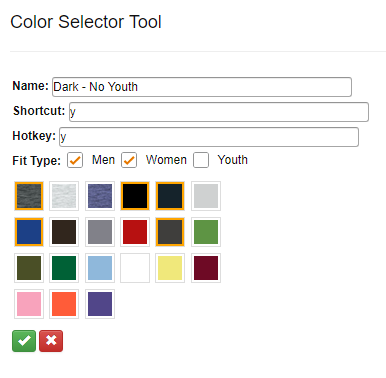
This extension becomes really useful if you have lots of designs in a similar niche with similar listings, so rather than copy/pasting everything you can just press one hotkey and it will populate the listing for you.
One of the other features is the color selector tool as shown below, which allows you to select the colors you want for your designs and set these up with one click.
Merchinformer Lister
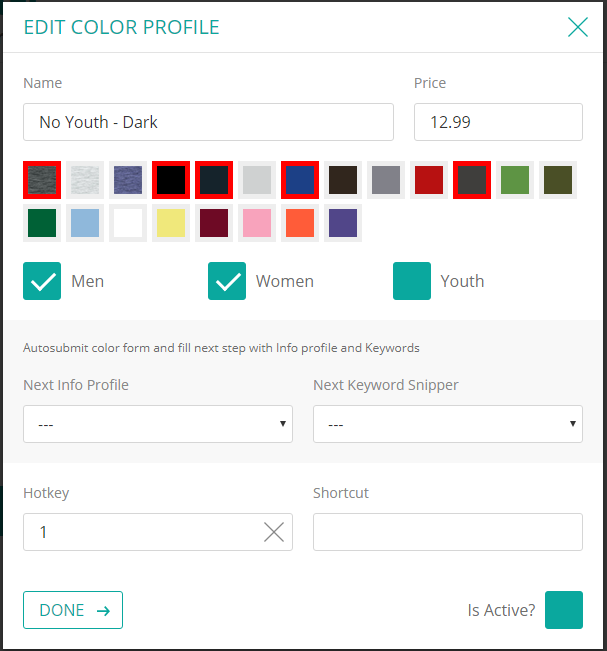
This extension comes free with the merchinformer.com subscription and does a lot of the same things that Merchlister Pro does:
Upload in Bulk
To make the most of my time I make sure that I always do a big batch of uploads rather than doing them one at a time.
I find it easiest to open up 10 tabs at a time then copy/paste my title, bullets and descriptions from the spreadsheet we prepared earlier. You’ll be suprised how quickly you can do this after a bit of practice.
Final Check for Trademarks
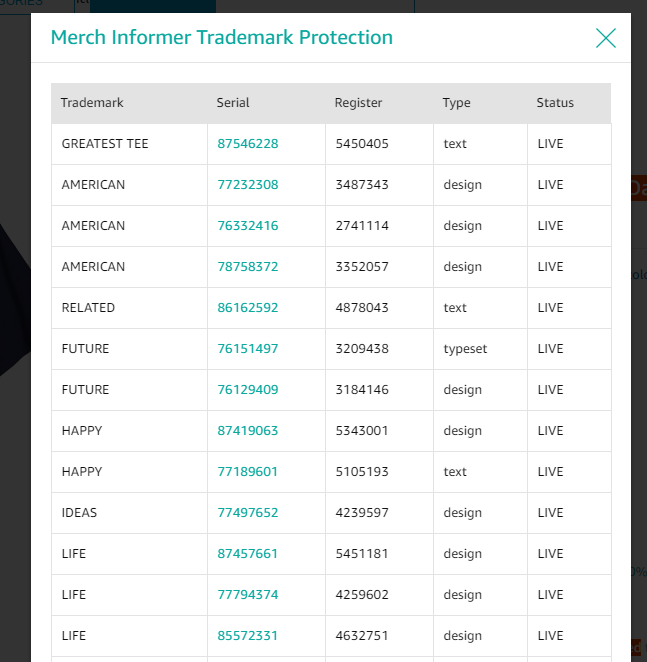
The final step before pushing your listing live is to check whether any trademarks have slipped into your listings and again this is another great tool that merchinformer.com gives you:
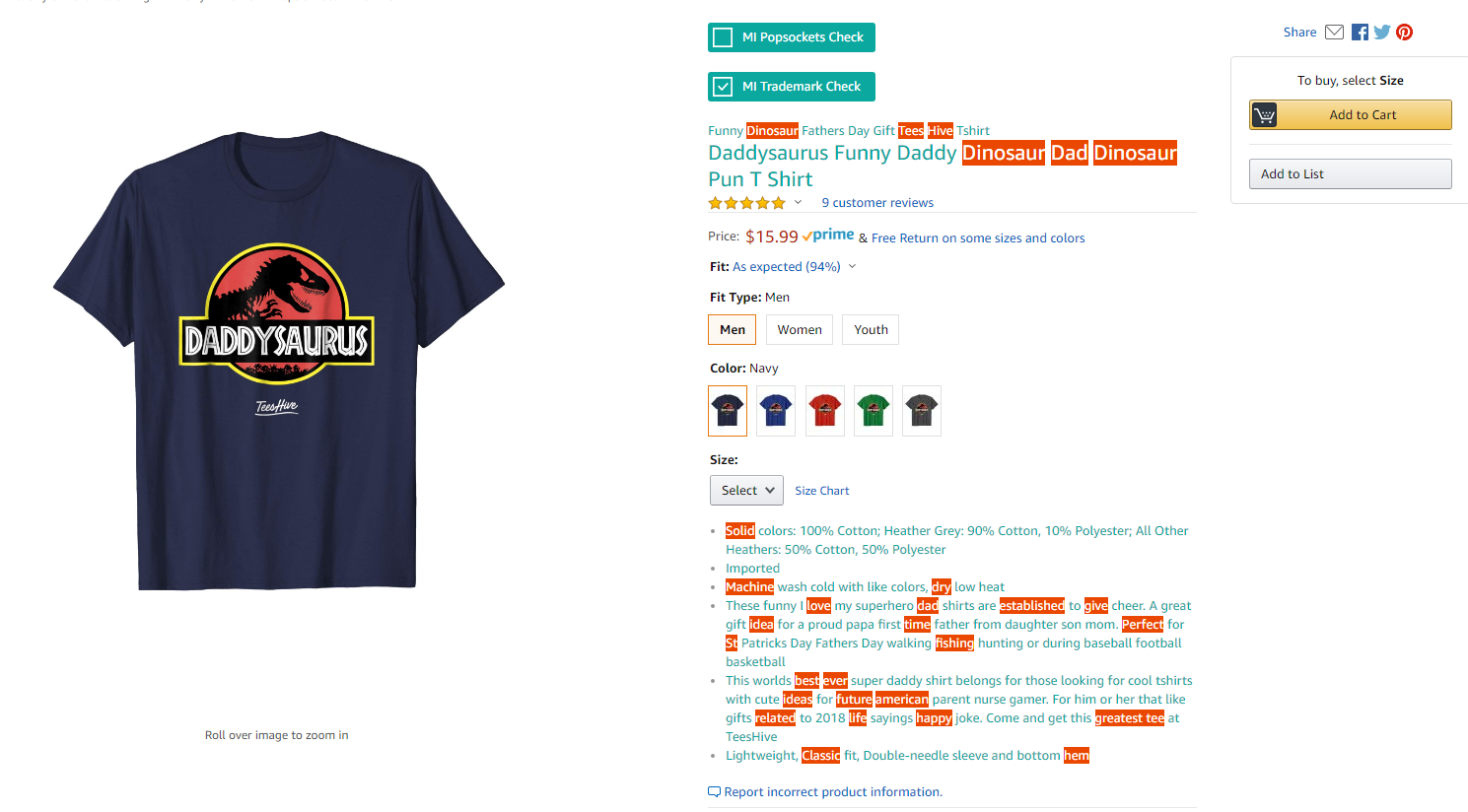
This shows you any words / phrases within your listing that are currently trademarked and if you click on the words, it will take you through to a page with more details on the trademarks and links through to the USPTO website
Step 6 – Setting up Your AMS Advertising Campaigns
So you thought you’d done all the hard work and could kick back and relax now that you’d uploaded your designs to Merch… well you’re wrong.
Even though you have well researched, well designed ideas, you want to make sure you give your shirts a bit of a foot up and help them to get the BSR as soon as possible to give them the maximum chance of selling on multiple occassions.
This step is completely optional and is something that you should only do if you have a little bit of extra cash to spare, because you can easily burn a lot of money if you haven’t properly optimised your ads.
If you haven’t signed up for AMS yet, then look on the bottom of your dashboard and you should see this kind of message, with a code and instructions on how to set up your account.

The AMS Dashboard
If you do have an account then when you login you should see something like this:
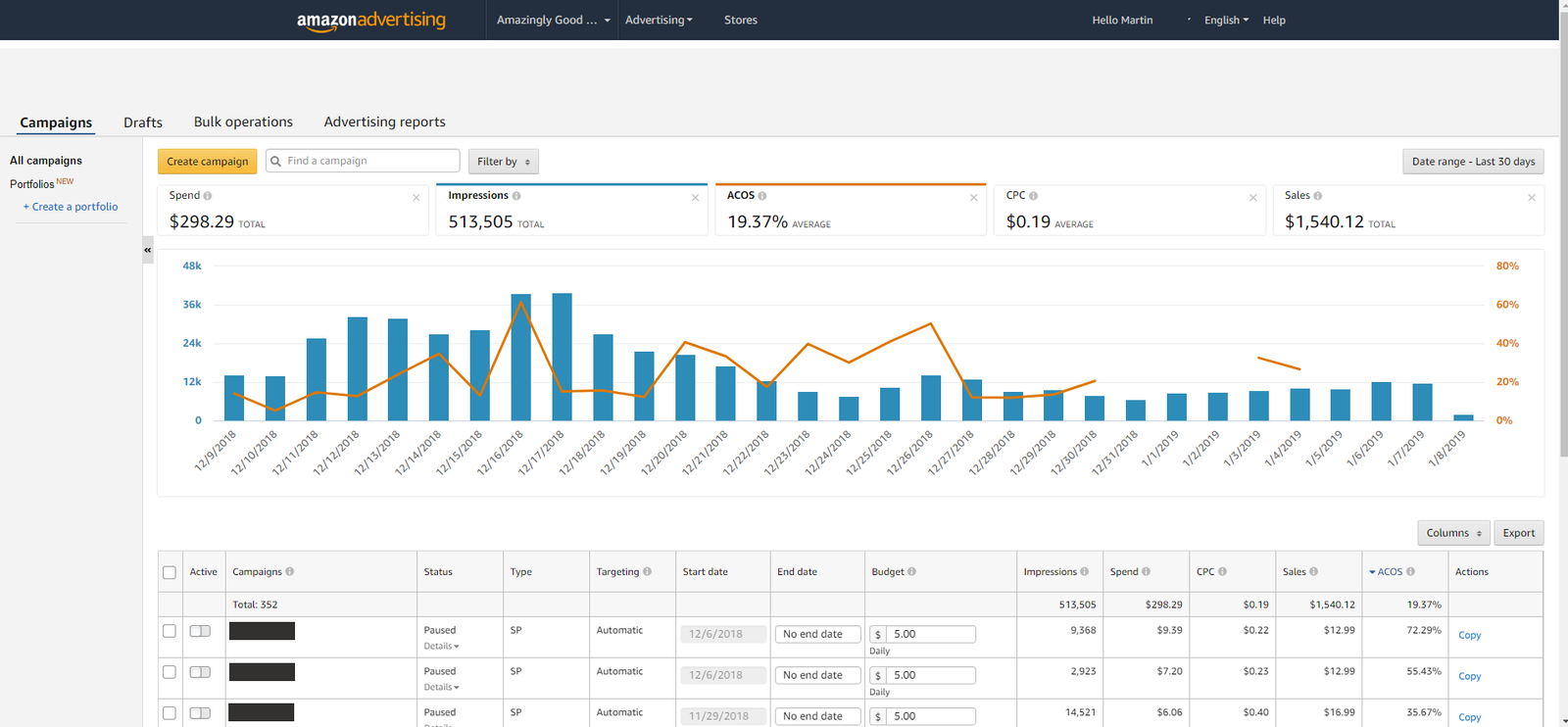
This dashboard gives you a snap shot of you total account statistics over a certain date range as well as stats for your individual campaigns, including:
- Spend – Total amount you have spent on the ads
- Impressions – the number of times that you ad has been shown when someone performed a search
- ACOS (Advertising Cost of Sales) – This is the most important figure which basically shows your advertising spend to sale ratio. You want this figure to be as low as possible and ideally under 10%. Anything over 20% realistically means you won’t be making much profit if any even if you are selling shirts.
- CPC (Cost Per Click) – This shows the average amount you are charged each time someone clicks on your ad
Creating a Sponsored Product Campaign
Setting up a campaign is really simple, you’ll want to click on ‘Create Campaign’ then select ‘Sponsored Product’ and you’ll see this interface:
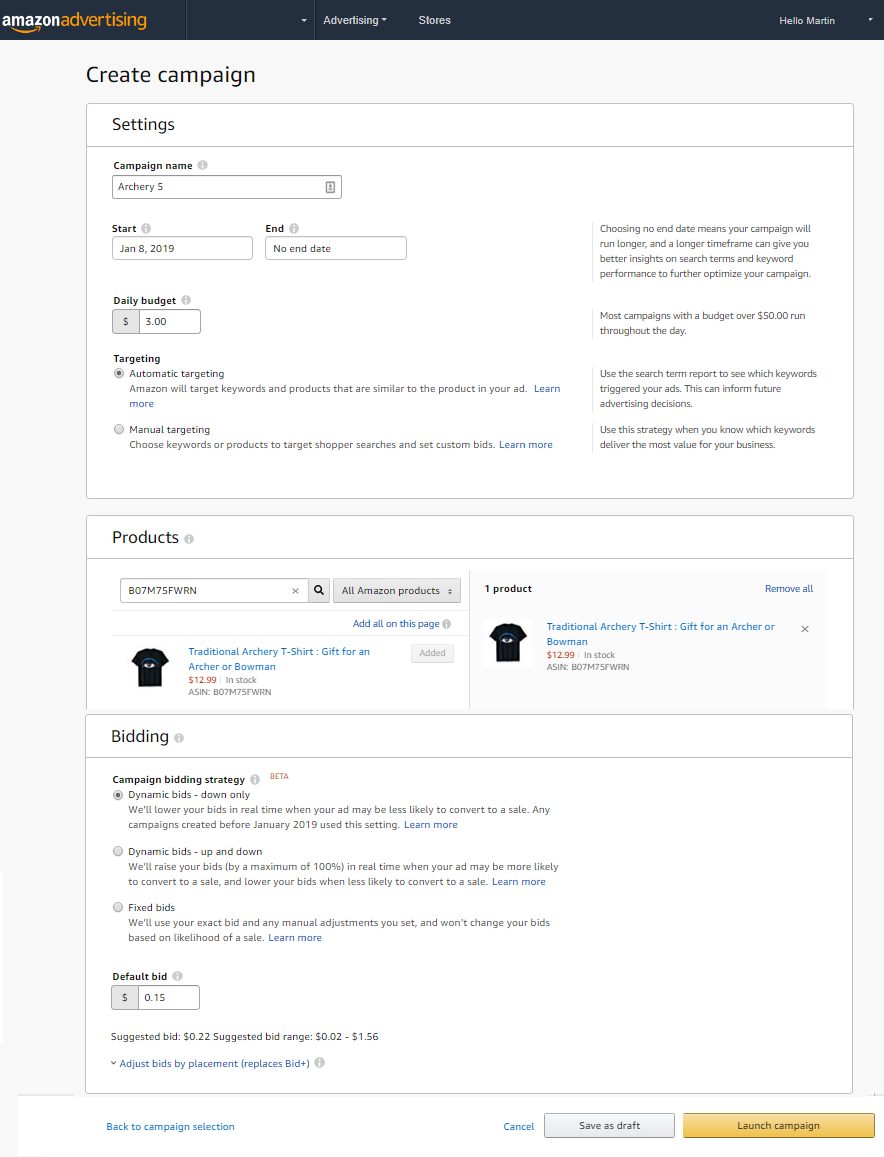
You’ll want to add the following:
Campaign Name – Make this something that will be easy for you to search for and identify because you could have hundreds of these campaigns running in the future… I just use the file name
Daily Budget – I always set this to $3 but this rarely gets reached
Targeting – You should always start this on automatic and it will show your product ad based on searches related to your keywords in the title and bullets of your listing. After time you can then goto the Advertising Reports section to see which keywords are most successful in selling your shirt, and can go back to change the campaign type to manual
You’ll then need to search for your shirt(s) and add this to the listing. I usually only add one shirt per ad that I am running, or if I have 2 variations of the same shirt, sometimes I will group these together…. just because it’s easier to review reports later on if you have these ads separated out.
Bid – Set this to ‘Dynamic Bids – Down Only’ and unless you have huge amounts of cash to risk then I’d typically only set your bid at between $0.15 and $0.35
Monitor Your Campaigns
The most important thing to do once you’ve set your campaign up is to make sure that you go back and review its performance a week later and then continually monitor your ads.
You need to make sure that you switch off underperforming ads and invest more in ads that are performing well.
I’m still new to AMS and it is a whole new thing to learn, review and tweak your strategy on, but in my opinion you should definitely utilise this where possible to help your shirts to get BSRs and ultimately to grow your account.
Step 7 – Going Multipod with Orbitkit
OK, so this is the final step, I really, really promise you!!!
Lets say you’re at T500 and you have 1000 designs locked and loaded and ready to go, well it can be quite frustrating that you’ve got nowhere to upload those designs to because of the Tier limit that Merch imposes.
The good news is that there is actually life after Merch and in fact there are tens of other Print on Demand Platforms that you can use (mostly for free) to market your designs.
The bad news is that uploading your designs individually to each new platform is a major pain in the ass and drain on your time. Additionally, these other platforms won’t have the same amount of traffic as Amazon does, so it’s going to be hard to get much money out of the input you put into it.
Really depressing eh????
Well, no actually, because there is some more GOOD NEWS and a service designed with this particular product in mind called Orbitkit
What is Orbitkit?
Orbitkit is basically a great piece of software that allows you to upload your Merch by Amazon 4500 x 5400 px png files into a central location, which will then publish this onto multiple print on demand platforms at the click of a button including:
- Redbubble
- Spreadshirt North America
- Spreadshirt Europe
- Zazzle
- CafePress
- Society6
- Inktale
- Fine Art America
- Teespring
It sounds like the Orbitkit team plan to keep adding to the list of integrations as well so this list should just expand over time.
How Does Orbitkit Work?

Simply upload your designs into Orbitkit and for each design you’ll need to add:
- Title
- Description
- Tags
You will have all of these items from spreadsheet we created earlier with you Merch designs so you just copy these over onto your Orbitkit listing.
Creating Blueprints
For each POD Platform that you register for, you will need to create a blueprint to use with Orbitkit
This sounds a lot more complicated than it actually is, but all you are doing is adding a sample design into the POD Platform and configuring it for all the different products you want to sell.
You only do this activity once, because it is then imported into Orbitkit and when you upload a new design you can select which Blueprints you want to publish your design to.
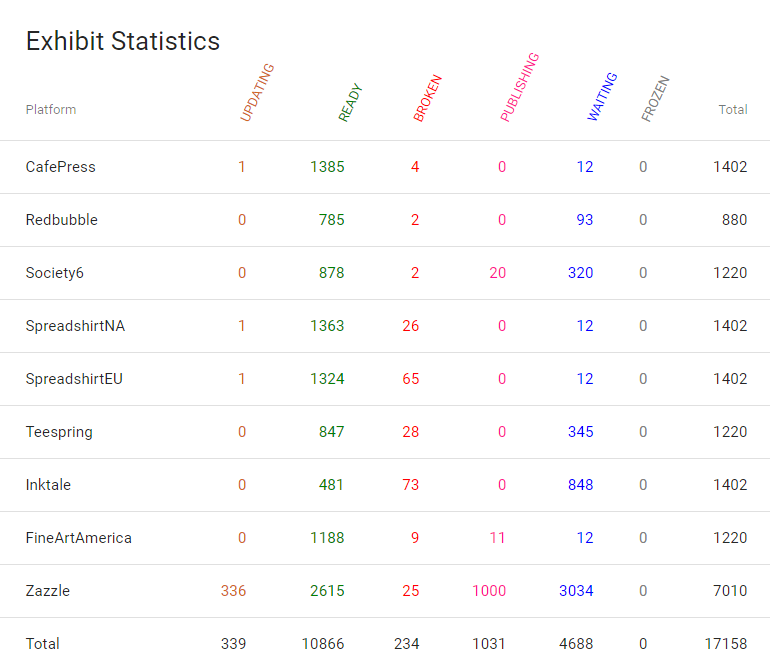
As you can see from my dashboard below this means that you can publish you designs at the click of a button to multiple PODS without too much hassle and means that you now have your designs on thousands of different products from yoga mats, to mugs, leggings, wall hangings and even fine canvas art!
What Does Orbitkit Cost?
The GREAT NEWS is that if you sign up using this link then you’ll get the first month for only $5 which is a MASSIVE BARGAIN!!!
There are now a couple of pricing plans available for Orbitkit which you can see in the screenshot below:
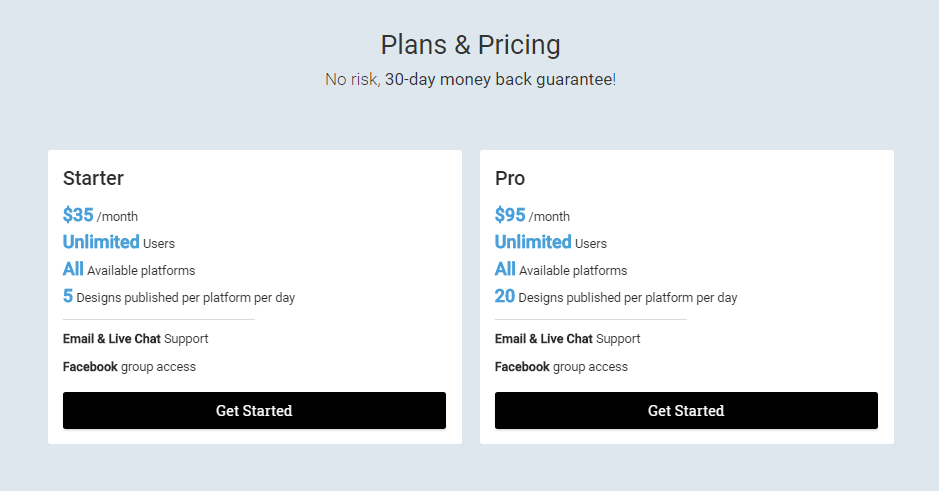
Whilst it isn’t the cheapest kit in the world, I think it is still a good investment for your Print on Demand Portfolio as it means you are exposing your designs in as many marketplaces as possible.
If we do the maths, then for a 2 month subscription at a cost of $190 you will be able to upload 1200 designs to 9 different platforms, and then if you like you can terminate you subscription until you have the next batch of designs ready.
Personally I think it’s a no-brainer because you will make that money back in sales over the duration of a few months anyway. The other options are to do this yourself (in which case your brain would be so frozen over with boredom that you’d want to rethink your whole life) or you’d have to hire a VA to do this (which would cost more money and impose an existential crisis for your VA instead).
Step 8 – Drink a Large Glass of Wine
There’s probably more things that you could be doing after this, but if you’ve managed to get this far and if you are actually still reading then I salute you, and you really should go and pour yourself a large glass of wine or whatever your favourite tipple might be right now.
Just to say that this is my process only and there are definitely better ways to do things and things that I’m probably doing wrong as well.
However, for me, especially when I started Merch the amount of information out there was overwhelming and I just got distracted every time I tried to do something, so having a repeatable process to follow was essential to me and has really helped me grow my account.
Have Your Say
If you have any tips on how I can improve this process, things you would do differently, mistakes you’ve made and how you’ve learned from them then I’d love to hear your feedback in the comments below…
Great post. Thank you!
No problems… hope it was helpful in some way!
Really precise, honest and humble. Thank you!
Really helpful, precise, honest and humble!