• Skip to primary navigation
  • Skip to main content

My Lifestyle Dream

The journey of a thousand miles begins with one small step

  • Home
  • Print on Demand
  • Website Monetization
  • Dropshipping
  • Matched Betting
  • Social Trading
  • Blog
  • Travel
  • About

Make Money Online

How to Get Instant Traffic to your Niche Site – 3 Unbeatable Tips

9th June 2017 By martinos74 4 Comments

Niche Site Traffic

You’ve finally chosen your niche and you’re ready to go and take action, but how can you really turn the dial and make rapid progress when you start?

The thing about working on niche websites is that you usually don’t get to see the benefits of your work for at least 6 months and usually not for over a year or potentially even longer. This is one of the main reasons why people give up, as they just can’t correlate the effort they are putting in with any type of reward, and in today’s ‘instant’ society, that’s just not good enough!

The good news is that I’ve found 3 shortcuts for you that will help you create a really solid base for your niche site and start to bring you your first traffic within weeks, if not days.

I’ve learned a lot of this from the training over at Human Proof Designs, so I’d definitely recommend signing up with their monthly membership, where you have access to over the shoulder video training as Dom builds out a couple of Niche sites, week by week.

For now, however, lets focus on these 3 massive tips:

Tip #1 – Blog Commenting

Now, you’ve probably heard that blog commenting is an old hat way of getting links and traffic to your site, and to a large extent that is still true. However, personally I still think this has massive benefit…

  • Firstly, you are building up a relationship with other blogs, who you may want to work with and outreach to at a later date.
  • Secondly, you are diversifying your link profile, so that it looks more natural to Mr Google.
  • Thirdly, you’ll probably get a tiny bit of traffic coming from the sites, where you left your comments

My advice would be write really detailed comments and if possible ask questions, rather than just saying something like “I really like your blog!” as this will give you a much greater chance of getting your blog published.

Make sure that you are commenting on blogs that are either in your own niche or in a related niche, so for example if you had a niche site promoting juicers, then you could comment on other blogs in the whole wider health niche.

The other thing that you want to do is make sure that the blogs have been updated fairly recently, as it would be a bit strange commenting on a blog that had its last comment in 2012.

How do you find blogs to comment on?
Niche Site Tip 1Well, you can either use a tool such as dropmylink.com but I found that a bit hit and miss.

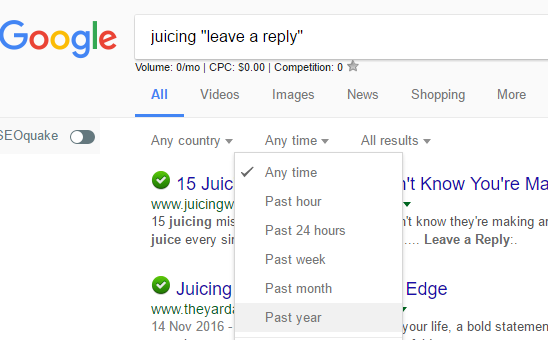
Instead I would add the following search criteria into Google : ‘Search term + “Leave a Reply“‘ so you would enter ‘Juicing + “Leave a Reply”‘

If you then goto ‘Tools’ you can select the time frame that the comments would be from:

I wouldn’t overdo this, but really think it’s a good way to start to get a bit of traction on your site.

Most of the links that you will get will be nofollow links, however, if you can get some dofollow links that would be a bonus.

Tip #2 – The Keyword Golden Ratio

This really is a gem of a tip, which was developed by Doug Cunnington over at Niche Site Project, which focuses on finding long tail keywords that are really low competition, which means you’ll be able to rank for a lot of them relatively easily.

So what’s the secret to this magical potion?

  • Look for Keywords that have less than 250 searches per month
  • Find out how many search results in Google have the exact search term in the title – Do this by using the following criteria: “allintitle: searchterm“
  • Divide the #of exact search terms in the title by #searches
  • If this number is less than 0.25 then you are in business and if it is less than 0.5 then it’s worth targeting as well

If you don’t have any Keyword Finding Software such as SECockpit then you can use the free Google extension ‘Keywords Everywhere‘  to find search volume

Example: ‘best apple juicer’
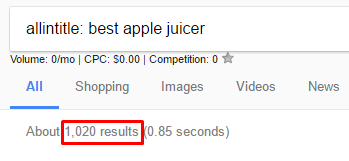
Niche Site TipsHas a search volume of 40 per month and looking at the below screenshot has 1,020 results with this keyword in the title

1020/40 = 25.5 so this is clearly not a good keyword to target using this technique

However, if you searched for ‘best juicer for apple cider’ this has only 10 searches per month and only 7 exact matches, so has a KGR value of 0.7 – this still isn’t great, but you get the idea.

The downside with this approach is that you’ll need to do a lot of manual work to plug the keywords into Google, however, the results are well worth it.

What do I do with the KGR Keywords? Once you have found a bunch of these keywords, then all you need to do is write an article of 600 – 1,000 words and maybe include a video and you’ll find that you’ll go straight to the top of the rankings for this keyword, as well as a bunch of other keywords that you might not even have though of before.

What is this so great? Well, within a very short space of time you’ll see visitors coming to your site from these search terms, and that really is encouragement in a bottle right away!!!

Tip #3 – Finding Forum Keywords

Last, but not least of our killer tips today is a technique where we will help you find keywords where forums are ranking on the first page in Google.

Why is this important? Well, a forum really is an easy target in the search results and something that you can easily beat with a half decent article.

To this you’ll need to

  • Find a list of forums that are in your niche, which you can do with a simple Google search with ‘keyword + “forum”‘
  • Get access to Semrush.com. Usually, this is a really expensive tool, however, if you do a quick search online you’ll usually find places where you can get a free 30 day trial and can use this time to do all your intense keyword research
  • Add the URL of the forum into Semrush.com and see the list of keywords that it is ranking for
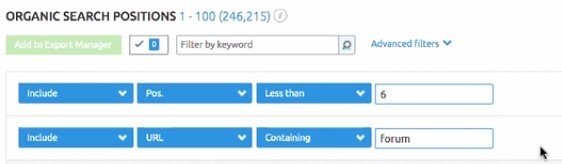
  • Use the advanced filter to filter down the keywords so that they are on the first page of Google and have the word ‘forum’ in the URL like this:Niche Site Tips

BOOM, there’s a list of great keywords that you can easily target and get instant traffic with.

To make this even better, use this in combination with Tip #2 to find a sure way of getting traffic to your site easily, whilst your site is still in the sandbox

Summary

If you use these 3 techniques then for sure you’ll be attracting visitors to your site in no time at all, and if you are clever with your keyword research this will be traffic, which is related to your niche and will potentially lead to sales further down the line!

Filed Under: Website Monetization

12 Killer Tips from 9 Months of eBay Dropshipping

8th May 2017 By martinos74 7 Comments

eBay Dropshipping Tips

I’ve been practising eBay dropshipping now for nearly a year so I thought it was time to look back and give you a bit of a progress update and reflective look at what I have achieved and some of the ups and downs from David Wu’s dropshipping technique.

If you haven’t heard about this before I explain the technique here and you can sign up to the course directly here.

Be sure to read all the way to the end of the article as the last tip is a bit of a gem and will save you hours on your listings.

I’ve now really expanded my eBay store and now have over 1000 products in my shop, so thought this as a great juncture to bring you my top tips:

1 – Manual vs Automated Listing Tools

Initially I started listing all of the products myself, which was a necessary evil to learn how to correctly format your listings and really understand the inner workings of the system.

This is incredibly time consuming as this takes about 10 minutes to create a decent listing, however, this is definitely worthwhile.

I then went to Upwork and decided to hire someone to do this task for me to free me up to more interesting tasks where I could add more value.

After a while my Virtual Assistant persuaded me to try out an automated eBay listing tool called Hydralister, where you input the URL of the product, and the software automatically pulls in the products images and attributes. This also gives you the opportunity to bulk list items, so dramatically reduces the amount of time needed to create a listing.

This was great news for my Virtual Assistant as I was paying them per listing, however, what I found was that the quality of the listings were a lot inferior to creating manual lisitings.

You really need to check each listing to make sure it pulled in the correct information, which is often as time-consuming as creating the listing manually in the first place.

In the end I found another Virtual Assistant from the Philippines on Upwork, and she is simply amazing. She can create listings really quickly, her attention to detail is excellent and her eBay listings are of great quality.

2 – Use SKUgrid to Track Stock Levels

One really useful tool that I’ve adopted as part of my business is SKUgrid, which easily allows you to track product prices and stock levels from your product source.

It’s simple to set up and all you need to do is add the source URL of your product, add the percentage markup that you want on each item and it will automatically update the prices on your eBay listing if they change on the product source and will move items in and out of stock on your eBay store as well.

This means that your prices remain as competitive as possible and means that you no longer have to send fiddly emails to customers making up excuses as to why your product has run out of stock. In the past I found this extremely frustrating as in one minute I was excited about making a sale and the next I would be annoyed as the product was out of stock.

You also run the risk of receiving negative feedback if this happens too often, and I’m sure cancelling a lot of orders doesn’t look good either.

The only downside with SKUgrid, is that if you are adding your listings manually then you have to manually add them into SKUgrid and you are also limited by the suppliers that the software supports.

I’ll give a full review of SKUgrid in due course, however, if you have a few hundred listings already, I highly recommend you switching.​

3 – Automate Your System

With a Virtual Assistant and the use of SKUgrid, I’ve really limited the amount of work that I need to put in to a few hours a week, where I am processing orders, responding to customer service enquiries and sourcing new products for my VA

4 – list Items that are not available within the Global Shipping Programme

About 70% of my sales come from UK customers, so I think it is absolutely worth listing products that don’t qualify for GSP, and in fact because other dropshippers may not be doing this, it gives you more chance to rank your product highly.

It’s often difficult to know if a product qualifies for the GSP before you list it, so I just let my VA list batches of products for me, then I check and see which products don’t qualify from them.

If they don’t qualify then I try not to add many more products in that category, as overall I still think its better to list products for the Global Shipping Programme simply because you have a broader reach.

5 – Add Seasonal Items

When I didn’t have an automated stock/repricing tool, I stayed away from adding seasonal items as they would quickly go out of stock, however, now that my system is more automated I think it pays to start looking at the seasons and understanding what is going to be hot soon.

Ideally you’ll have a list of products ready a month in advance so your VA can get these up on eBay.

For example, think about adding Outdoor Games and Barbeque equipment in May, just before the summer rush starts to hit

6 – Check your Sources

Having a solid, reliable supplier really is key to success and it’s quite easy to tell which suppliers will be good to work with from a few simple emails.

First of all, you want to check out the supplier to see if they have the credentials needed for your eBay business model ie do they send invoices, do they ship to the GSP.

To help this I use the email below:

Hi There,

​

I really love the range of products that you offer and want to buy some of your products for a friend of mine. I just wanted to know if you have the possibility of a Guest Checkout or something like this, where you wouldn’t include a copy of the invoice with the dispatch?

​

Is this a possibility, or could you send the invoice to me electronically as I will be paying for the product?

​

Can you also let me know if you’re happy to ship to freight forwarding addresses?

​

One final question is whether you provide a tracking number when your deliveries are dispatched?

​

Looking forward to hear from you soon,

​

Thanks,Martin

Send this to the customer service contacts for each of the suppliers just from how quickly they respond to you and how professional their replies are you’ll get a good initial impression of if you want to work with them or not.

When you’ve found a few suppliers that you think you can work with, add about 20 of their products to your eBay account and test what their sales process is like.

You could reduce the markup that you are asking to increases the likelihood of selling a product, or even better you could buy a product from them and then ask for a return.

This is a great test as you’ll find out what the packaging is like, if they send automated emails to you with tracking numbers, how quickly they dispatch the products and also how easy it is to make a return with them.

This is crucial information that you must find out before you start adding hundreds of products from one supplier.

Some suppliers also have a tendency to change products quite quickly, which I would avoid as well, as you’ll have a smaller window of opportunity to sell your product before it goes out of stock.

7 – January and February Suck

Yes, be prepared that some months of the year will be better than others and January / February simply suck.

January Blues

I had by far my worse months ever, at the same time that I was trying to build up the store, which was really discouraging.

However, if you keep the faith and keep on listing then your sales will recover.

8 – Diversify with Other Business Ideas

If eBay dropshipping is your only income or you want this to become your main source of income then you should be aware that at any moment this business could disappear.

  • You could receive negative ratings, which is a quick way to lose sales.
  • eBay could review your account and even though you are making money for them, they don’t look so favourably on dropshippers so could quite easily close your account.
  • Paypal could close your account as well. For example, this month they froze my account for a couple of weeks due to a fraudulent payment, which was nothing to do with me, but showed how fragile this business model is

Remember, the market and the business could change very quickly, for example both eBay and Paypal have increased their fees recently, which decreases the chunk of the pie that you can take.

As digital entrepreneurs we need to be able to adapt to change quickly and there are usually ways around obstacles, however, you should also be prepared for the fact that this business can quickly disappear as well.

9 – Invest in a Shop

Whilst it was great when I was starting out using free listings on my personal account to list items, there were a lot of downsides. For example, I couldn’t scale as quickly as I wanted and the free listings couldn’t be used as Good til Cancelled listings, which in turn meant I couldn’t use stock tracking tools.Investing in a shop is well worth the investment because:

  • You’ll get cheaper listing fees
  • You can add branding to your store and start to build out an identity. This in turn gives buyers more trust that you are a bonafide company and increases your chances of making a sale
  • You can use categories – Creating a decent taxonomy with well-defined categories and sub-categories will increase your sales as you’ll benefit from cross selling items and if buyers don’t like the product they were originally looking at, they can more easily navigate around your store and find similar products they like
  • You can create sales – Using the Markdown Manager functionality, I have a look at which products have a large number of people watching them and add a 5 or 10% sale for a few days. If you’re worried about your profit then increase the price before adding the 10% discount so your mark up stays the same! It’s a bit sneaky, but it works
  • The Seller dashboard is also a lot better if you use a shop and you’ll get a lot of other useful tools and statistics that you can use

10 – Buy a Responsive Theme

In 2017 if your store is not accessible on a handheld device then quite frankly you are crazy. Imagine if you had a queue of people outside of your shop and suddenly you decided to only let half of the queue enter your shop…You wouldn’t do it, right?

So, you don’t have any excuses and if your store is not using a responsive theme, then you’re cutting that queue in half.

You can buy a decent them for as little as $20 and adding this to your site and to your listings is really easy to do and well worth the effort.

11 – Use Good Til Cancelled Listings

Using 30 day listings has the advantage that your listing is featured immediately at the top of search results when it is a new listing and has the advantage of adding a bit of scarcity when your product’s listing is due to expire, however, I have now switched all my listings to Good Till Cancelled for the following reasons:

  • You keep a sales record of each product sold… When you sell an item it is shown on the listing and usually you’ll find that if you have sold one item, it is a positive signal to buyers that the product is of good quality and will help them choose you over other listings who haven’t previously sold
  • You get to see the cumulative number of views and people who have been watching your product, which helps you monitor products• You’re more likely to have your product listing ranking well in Google… A lot of visits will come directly from Google to your listing
  • You don’t need to continually re-list your products
  • GTC listings are more compatible with stock tracking software like SKUgridOf course, there are pros and cons for each of these options but I think more serious sellers usually prefer to go with Good Til Cancelled listings.

KEY TIP : 12 – Use an EAN /  UPC Generator

Trying to source the EAN / UPC for each products is a massive pain in the butt and also quite a time consuming activity.

You’ll often find a number of different EANs available for each product and in some cases none at all. I also find that for products that I have listed with an EAN, eBay will often add a ‘similar products’ carousel underneath your product listing, which shows other people on eBay selling the same products, which are usually going to be a lot cheaper and makes it difficult for you to make a sale.

An EAN number is simply a unique number that is given to identify a product.You will find a lot of services out there where you can buy EANs, however, I don’t think you need to use these at all and can generate them yourselves a lot more easily.I just use the attached spreadsheet and generate all of my own EANs from this list.

A word of caution however, is that eBay is on a bit of a mission to try and categorise products out there so that it makes it easier for you to list and buy in the future.

There is a rumour that in the future you may be penalised if you don’t list your products with the correct EANs, however, until I see more evidence of this I’ll continue to list with my own numbers.

EAN / UPC GENERATOR

Download our EAN / UPC spreadsheet for free here

WHAT ARE YOUR KILLER TIPS?

If you like these tips then please let us know in the comments below or if you have some more killer tips of your own then we’re keen to find out

Filed Under: Dropshipping, Make Money Online

The Pros and Cons of Working with a Virtual Assistant

20th March 2017 By martinos74 1 Comment

Portrait of friendly Virtual Assistant woman with headset

Filed Under: Dropshipping Tagged With: ebay Dropshipping

How to Use Oddsmonkey to Optimize your Winnings at the 2019 Cheltenham Festival

25th February 2017 By martinos74 2 Comments

With the 2018 Cheltenham Festival only a few weeks away we want to get ourselves as prepared as possible for the event.

I wrote a full article of my tips for the Cheltenham Festival 2018 but I wanted to compliment this with a guide showing how we can use the tools available at Oddsmonkey to really make our lives a lot easier.

If you don’t have a Oddsmonkey account yet, then you really should get one for the 2018 Cheltenham Festival alone, but I’ve also written a full Review of Oddsmonkey in a previous article.

I’ve tried to break down the process that each matched bettor will be going through during the festival and given examples of how the Oddsmonkey software is really going to help you during this period:

Finding Offers at the 2018 Cheltenham Festival

There will be hundreds of offers available with the different bookmakers over the 4 days of the 2018 Cheltenham Festival.

You won’t be able to play all of these offers so you need to focus on playing offers that match your current skill level, your risk tolerance and also the size of your bank.

Luckily the Oddsmonkey team have thought about this and laid all of the offers that are available on a Daily Offer Calendar 

Each of the offers has the following information:

  • Categorisation as Easy, Average or Hard to play
  • Indicator of whether the offer is potential or guaranteed profit
  • Link to discuss this offer on the forums
  • Link to the offer on the bookie’s website

​Understanding the Cheltenham Festival Offers

The next step is to fully understand the terms of each offer and understand how you should approach these offers.

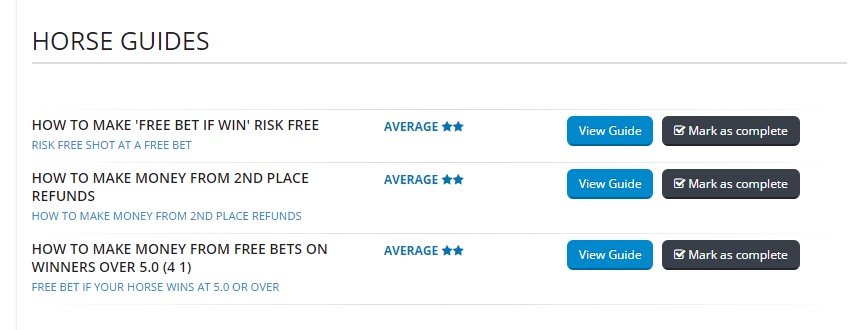
Again, Oddsmonkey have a Horse Racing Guides section, which gives you details of how to play each offer type:

How to Find Close Matches at the 2018 Cheltenham Festival

OK, so you’ve got a good understanding of the offers that you want to play, and you understand how to play them.

The next step is looking for close matches so you can quickly back/lay your bets for minimal qualifying losses.

The Oddsmonkey Racing Matcher really takes the pain out of this process for you:

2017 Cheltenham Festival Racing Matcher

I didn’t have this tool available last year so had to manually compare all of the odds between bookies, whereas in the Oddsmonkey Racing matcher all you have to do is scroll through the races available each day, choose a bookmaker and check if there is an option with a small qualifying loss.

Cheltenham Festival Calculator

If you click on one of the matches then the calculator will show you the back and lay stakes and also provide you with links through to the bookies/exchanges.

This whole process can take less than a minute, which is key when trying to find close matches.

If you prefer to do this more manually you can also use the Oddsmatcher and filter this to show races just at Cheltenham each day to show you all the matches across the bookies.

Use the Eachway Matcher to line your pockets at the 2018 Cheltenham Festival

The Eachway Matcher is going to be another major tool in your arsenal during the festival.​

Cheltenham Eachway Matcher

You can use this in 2 ways:

  • Keep an eye on the tool and use this to place bets which will give you a good profit regardless of the result- Use this to benefit from the extra place races.
  • Click on the ‘Extra Place Only’ filter, and if there is a close match get on this, and hope that the horse comes in that extra place to bring in the big bucks.

How Should I Use my Free Bets from the 2018 Cheltenham Festival

After the festival has finished, you’re going to find yourself with lots of free bets that you will need to use up in a short amount of time.

The general rule of thumb is that you should be looking to extract 80% from your free bet if possible.

The first tool that you can use to find good matches for your free bets is the Oddsmonkey Oddsmatcher

Sort the results by clicking on the ‘SNR %’ column.

The higher the number is here, the better for you, as it shows how much you can extract from your free bet.

Don’t go for a match that is over 100% as this was count as an arb and is likely to get you banned from the bookmaker.

You should be able to use up a lot of your bets using this filter, however, if you want to make sure you can extract 80% of you free bets each time and also stay under the bookies radar then you should read this post, which shows a technique that uses doubles or trebles to extract maximum value from the free bet.

Dutching Extra Place Races

OK, so this is a more advanced technique where you try to capitalise from the extra places that the bookies are offering and relies on you backing every horse in the race and not laying any of them.

Depending on the race, this can lead to big bucks for you and is really worth keeping an eye on the forums to see which races people are advising to look at.

Again, there is a handy guide that you can read, and also links to a number of spreadsheets to use for this technique.

Tracking Your Progress at the 2018 Cheltenham Festival

OK, this one isn’t provided by Oddsmonkey but is a spreadsheet that I put together based on my experiences last year and should help you to prep each day for the different races and also keep track of your free bets and winnings. Download the Spreadsheet for free here

​

Summary

Whilst you can do all of these different things manually, there is going to be a lot happening during Cheltenham so speed is really important and with the massive selection of tools that Oddsmonkey has to offer then you’d be crazy to miss out if you haven’t got an account yet.

The monthly fee for all of this is £15 and you can sign up hereOf course, if you have an account already, then you’re the clever ones and are going to have an easy time during this years Cheltenham Festival.

Have fun guys!!!

Filed Under: Matched Betting Tagged With: cheltenham festival, oddsmonkey

Cheltenham Festival 2017 : A Matched Bettor’s Festival Survival Guide

26th January 2017 By martinos74 2 Comments

Filed Under: Matched Betting Tagged With: cheltenham festival, free bets, oddsmonkey

SECockpit Review : Keyword Research and SEO Heaven

18th November 2016 By martinos74 Leave a Comment

SECockpit Review

SECockpit is an SEO and keyword research tool that dreams are made of. I used a 30 day trial of the product recently and this is my full review of SECockpit and it’s killer features.

Because this is a fairly long article we’ve given you 3 choices:​

Read the article:What is SECockpit?​SECockpit Key Features REviewedHow Much Does SECockpit Cost?What Do I need to Use SECockpit?SECockpit Review Summary

Watch the Video:

Try the software:

SECockpit by SwissMadeMarketing

What is SECockpit?​

Keyword Research Evolved

Anyone who is serious about blogging or making money online through websites will be interested in doing a decent amount of keyword research. Without this, you are just guessing at what is popular, valuable and easy to rank for.

There are a number of free tools that you can use to help you source keywords, gauge traffic volumes, find the cost per click and drill into the ranking of any site in the Google listings.

Usually you would use a combination of things like Google Keyword Planner, Mozbar, SEO Quake etc but you need to go through and arduous manual process to get the information that you are looking for, and this can take hours upon hours.

In this review you’ll see that SECockpit takes the pain away from these tasks and automates a lot of this process into a simple to read and easy to use interface, where you can quickly analyse the results and get detailed information on your keywords.

SECockpit Key Features REviewed

gENERATING kEYWORDS

The first cool feature that SECockpit gives you is the ability to generate a list of keywords from your seed keyword and allows you to control some of the inputs.

You start off every keyword search with the following dialogue box:

SECockpit Review Seeding Keywords

Seeding Keywords

  • Countries and languages – Allows you to do a local or global search
  • Google Adwords Synonyms – Will return a large number of results related to your keyword unless you check the ‘Only show ideas closely related’ checkbox, which refines this search.
  • You can choose to include or exclude terms from your search, for example you might want to add words like ‘best’ or ‘review’ to your search
  • Min monthly allows you to set the minimum number of searches that your keywords should have
  • Tag Results – You can use this feature to colour co-ordinate your search results

Analyse Keywords

You will then be taken to a search results page that looks something like this:

SECockpit Review Search Results

SECockpit Search Results Page

Now this is where it gets exciting because there are a huge number of columns that you can add to your search results page, to help you gauge the value of that keyword to you.

I wont go through every option available in SECockpit, but the key metrics that you have are:

Niche rating – This is a really cool feature, unique to SECockpit that gives you a rating of that keyword based on a simple calculation (Number of monthly searches / Top 1 – 10 Competition Bar). The fuller this bar is, the better for you. This is a great initial indicator, however, you really need to use that as a guide only and interrogate the rest of the data before you decide to try to rank for that keyword or not.

Monthly Searches is your standard measure, which is brought back from Google Keyword Planner

Rank 1 – 10 – this is a really useful measure and tells you how easy it is at a glance to rank in the top 10 for this keyword. The lower the bar, the better in this case. Will look at how this is calculated in a minute, but this feature alone makes SECockpit a great tool to use and in my opinion worth the money.

Domains – Lets you know whether the .net opr .com domain is available for that keyword

Adwords – Here we have the standard CPC value and advertisers competition value, but there’s also a ‘Adsense Value’ column, which multiplies these 2 together to give you a simple gauge. In this section you can also add other columns to see how many ads are displayed in the top, right and bottom section of the search results to give you a clear indication of the strength of the advertising competition for this keyword

Top 10 Sites – Again, this is another great feature where it will display an icon if any of the top 10 results for that keyword have a site which is either: Youtube, Ebay, Ezine, Squidoo, Hub Pages or Amazon. This is another good indicator for you to determine whether there’s any chance of you getting on that Top 10 list for that keyword

Analyse the Competition

Once you’ve found a keyword that you like the look of you’ll probably want to dive into a bit more detail and look at the sites that are ranking for that keyword.

All you need to do is click on the keyword and you’re taken to the following screen:

SECockpit Review Keyword Competitivenes

Keyword Competitivenes

Again, you can find most of this information elsewhere, but this compiles it quickly and neatly into one simple interface.

You’ll see that the SECockpit gurus have even colour coded the results for you so at a glance you can see if it is easy to knock any of those sites off of the top 10 (green being the easiest/lowest value)

The standard measures are all displayed here:

  • MozRank
  • Page Authority
  • Domain Authority
  • Juice Links
  • Total Links
  • Internal Links
  • FB Likes
  • FB Shares

If you scroll down the page as well, you’ll see that it pulls in the info about that keyword from Google Trends.

SE Cockpit Review Google Trends Data

Google Trends Data

Calculate Your Returns

SECockpit Review Conversion Calculator

Conversion Calculator

The final feature that I found really useful in this review was the SECockpit Conversion Calculator.

This simple tool takes the Traffic volume and cost per click for the keyword and allows you to play with a number of other inputs to help you gauge the revenue returns on your keyword, depending on:

  • How well you rank for the keyword
  • How well you convert from your site
  • Whether you are selling a product or earning money through Adwords

Any Other Features

SECokpit - Keyword Research Done Right

There are a load of other features available within SECockpit, but this review is only focusing on the keyword research and analysis functionality.

If you want to find out more hop on over to the SE Cockpit Site​

How Much Does SECockpit Cost?

OK, so the downside to this product is going to be its price, which is going to make it seem unaffordable to a lot of part time / amateurs.

The basic entry package, which limits you to 10 searches a day comes in at $40 a month, which goes all the way up to $120 a month for unlimited use.

However, my honest opinion is that if you are writing a lot of articles, want to have a bit of an edge over your competition and are really trying to push hard to get onto the top 10 results, then this tool really is worth every penny, as it’s going to save you hours and hours of time and if you use it correctly will reward you with more than the monthly fee in sales/commissions on your site.L

Latest Pricing structure:

Secockpit Pricing

What Do I need to Use SECockpit?

To use SECockpit you will need:

  • Google Adwords Keyword Planner Account
  • Paypal Account
  • SECockpit Login
  • Basic Understanding of Keyword Research

SECockpit Review Summary

SECockpit is an essential tool for any budding SEO enthusiast, blogger or anyone trying to make money online and monetize their website.

It has a number of cool features which help you to generate and analyse keywords and gain an understanding of how easy it will be to rank for those keywords and what your potential revenue will be.

Because it’s cloud based, SECockpit is incredibly fast and it also means you don’t need to install anything on your computer.

Features:

Ease of Use:

Price:

SECockpit Keyword Research Tool

Filed Under: Make Money Online, Website Monetization Tagged With: keyword research, niche websites, review, SEO

« Previous Page
Next Page »

Martinos Digital Ltd - Dyne Road, London, England