• Skip to primary navigation
  • Skip to main content

My Lifestyle Dream

The journey of a thousand miles begins with one small step

  • Home
  • Print on Demand
  • Website Monetization
  • Dropshipping
  • Matched Betting
  • Social Trading
  • Blog
  • Travel
  • About

martinos74

How to Find a Niche Market in Less than a Day

4th February 2016 By martinos74 4 Comments

How to Find a Niche Market in a Day

Choosing a niche for your online business can seem complicated, however, this guide will show you how to find a niche market right for you.

In this guide I’m going to give you the tips and the tools that you need to select your niche in less than a day!

Quick NavigationStage 1 – Creating a Shortlist of NichesStage 2 – Find a Niche Product Using Amazon SearchStep 3 – Find the Best Keywords for Your Niche Using Keyword ModifiersStep 4 – Sample Your Keywords for Keyword CompetitivenessSTEP 5 – Analyse the CompetitionStep 6 – How to Choose a Niche Market?SummaryTools Used

Stage 1 – Creating a Shortlist of Niches

Task Time : 1 Hour

If you’re looking to make money online, then finding potential online business ideas and understanding how to find a good niche are critical to your success. There are so many potential niches out there for you to choose from and getting started is going to be your biggest barrier.

My main advice to you is start with something that you’re interested in. After all you’re going to spend a lot of time researching, writing and being part of that niche community so it’s best that you are in some way interested in the subject.

Some of the most profitable niches are going to be hobby or passion niche’s where people are emotionally attached with the product so are a lot more willing to spend money, and therefore advertisers will be a lot more willing to pay for space on your site!

I had a number of ideas for niches that I was thinking of entering but wanted to broaden my reach a bit before entering into keyword research so I started with our good old friend Wikipedia. They have a really useful list of hobbies page, which lists pretty much every hobby you can think of.

My process was to simply run through this list and make a shortlist of niches that I was interested in. This took me about an hour to do but was a really useful brainstorming exercise as well as it generated a lot of potential online business ideas.

Once you’ve created a list of potential niches that you’d like to set up a business in you want to see what kind of keywords are available for that niche so you can interrogate them and see if there really is a business there.

In general we can split the keywords into 2 distinct groups:

  • Product Keywords – These will be useful for your website monetization strategy
  • Information Keywords – These will be useful to drive traffic to your website

Both sets of keywords are equally as important as they can bring revenue and traffic to your site.

Stage 2 – Find a Niche Product Using Amazon Search

Task Time : 10 Minutes per niche

If you’re going to make any money online you need to know how to find a niche product or a service to either sell or recommend. Without products in your niche, your bank account is going to remain very empty.

For each of the niches on you shortlist, spend 5 minutes brainstorming some products that are related to that niche. For example, if you’re really into walking then your first list of product keywords would be something like

  • Hiking boots
  • Hiking poles
  • Backpacks
  • Fleeces

Once you’ve got a small set of keywords together then I’d simply jump on over to Amazon.com and type these keywords into the search bar:
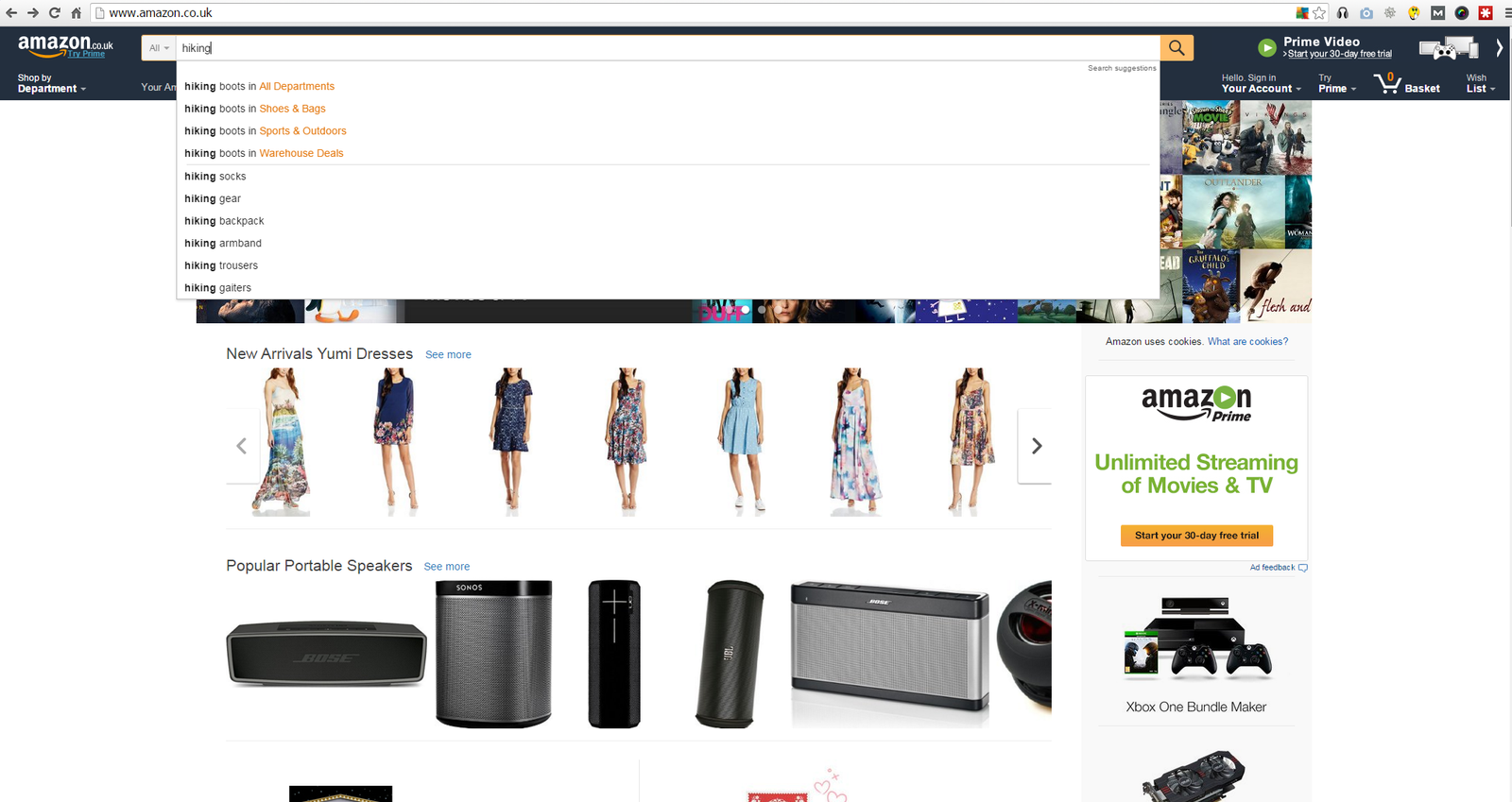
How to find a niche product using Amazon auto suggest

How to find a niche product using Amazon auto suggest

What you’ll find is that the auto-suggest kicks in and shows you a load of other related product keywords that you might not have thought about before.

In the case above we can now add the following keywords to our list:

  • Hiking socks
  • Hiking armband
  • Hiking trousers
  • Hiking gaiters

I also recommend clicking around the categories as well and you’ll probably find another few related products that you could add to your list.

Step 3 – Find the Best Keywords for Your Niche Using Keyword Modifiers

Task Time : 10 Minutes Per Niche

The next trick that we are going to use is a combination of keyword ‘modifiers’ and a free tool atUbersuggest.org to help you find profitable niche keywords.

Keyword modifiers are simply additional words that you put either before or after your keyword to help you find keywords in your niche with a stronger buying intent.

Examples of these are

  • Best eg ‘Best hiking boots’ or ‘best hiking boots for’
  • Reviews eg ‘hiking boot reviews’
  • Top eg ‘Top hiking boots’
  • where to buy eg ‘where to buy hiking boots’
  • versus eg ‘hiking boots vs sports shoes’
  • brand names eg ‘North Face hiking boots’

You can find a full list of these types of modifiers here

You should then take some of these sample keywords that you think will work and plug them in to the free ubersuggest tool. Ubersuggest basically uses Google’s autocomplete function and goes through every letter of the alphabet trying to find related search terms.
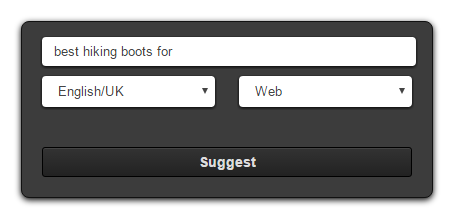
Ubersuggest Search Box

Ubersuggest Search Box

This won’t work in all cases but if you put open ended strings into the search box, then you’ll get better results back eg ‘best hiking boots for’ or ‘where to buy hiking boots for’ will bring you back much better results than ‘North Face hiking boots’:
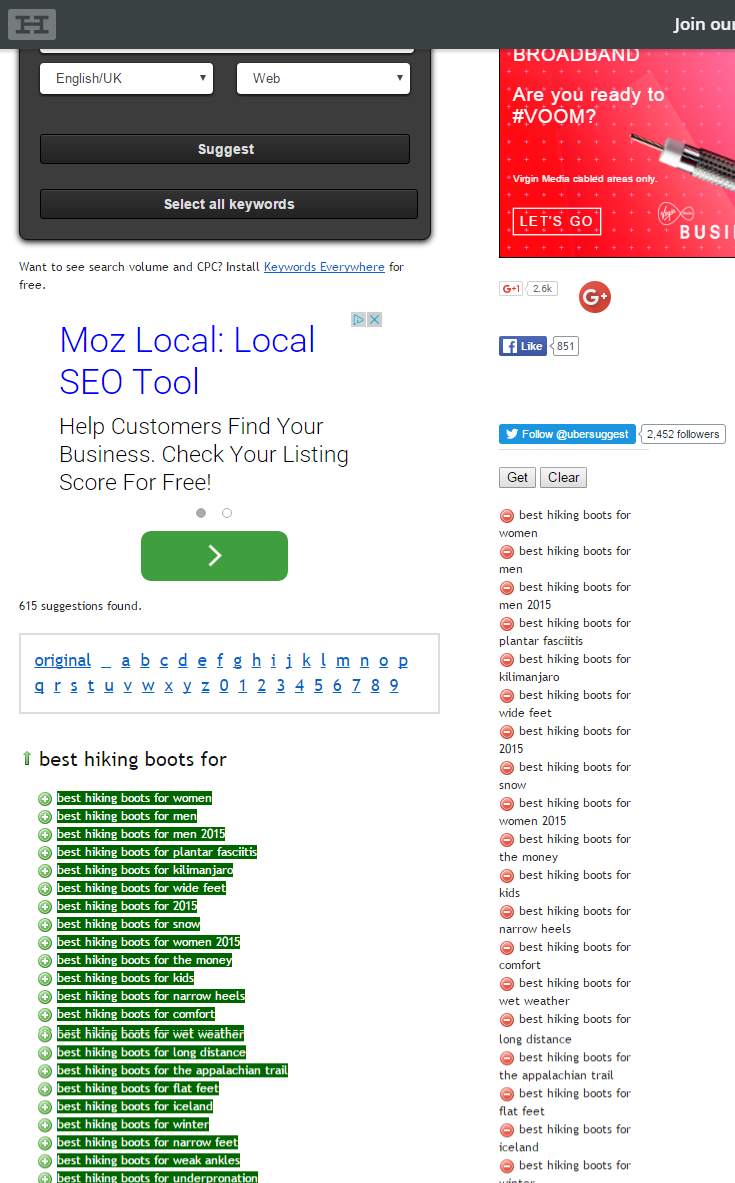
How to research keywords for a niche

Ubersuggest provides a list of related keywords

All you need to do next is to click on the ‘Select All keywords’ button and copy the keywords that you’ve created into a master list of keywords for that niche. I usually keep these in a spreadsheet, which has a tab for each of my niches like this one: How-to-Choose-a-Niche-Workbook
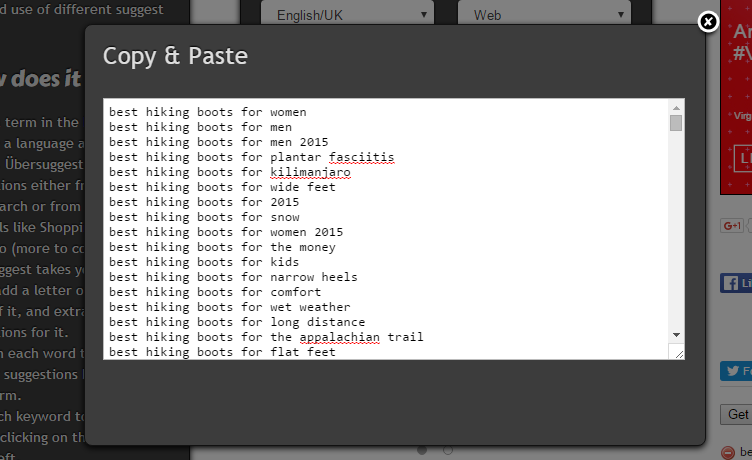
how do i find keywords for my website

Ubersuggest Keyword Suggestions

Step 4 – Sample Your Keywords for Keyword Competitiveness

Task Time : 20 Minutes Per Niche

When you’ve gone through this process a few times in Ubersuggest, copy all of your keywords and add them into Long Tail Pro. Add one of your main keywords like ‘best hiking boots’ as your seed keyword and add all the other entries into the ‘Add My Own Keywords’ section then just click the ‘Generate Keywords’ button and sit back and relax for a bit:
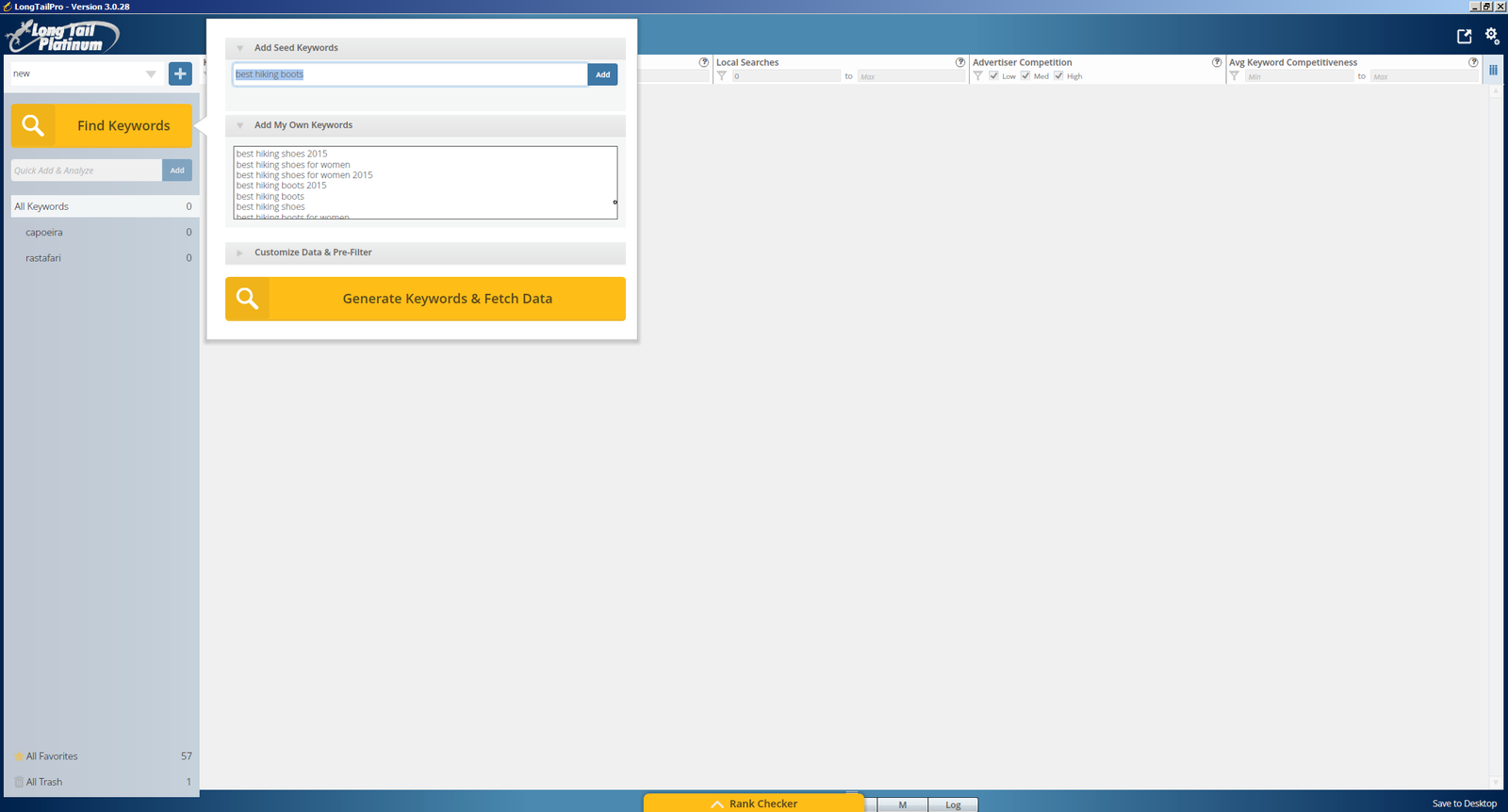
how to choose a keyword for website

how to choose a keyword for website

You’ll then be returned with a huge number of results from Long Tail Pro but to help you filter this list I would recommend the setting the following filters in Long Tail Pro

  • Suggested bid : £0.50
  • Local Searches : 10
  • Advertiser Competition : Set to Medium/High
  • Number of words : 4

Once you’ve done this then you’ll have a much smaller list that you can go through and check out the Keyword Competitiveness scores. Usually I’ll try this across a range of keywords, starting with the higher value and higher traffic keywords but sampling all the way down to keywords that have low CPCs and low traffic.

In the process that I went through I tried to sample about 50 keywords for each niche, which really gives you a good idea of how competitive the niche is. If there are hardly any keywords with a KC of under 30, then it’s going to be really hard for you to enter that niche, so probably best to move on to the next one in your list.

Here’s a real example of hiking boots that I looked at:
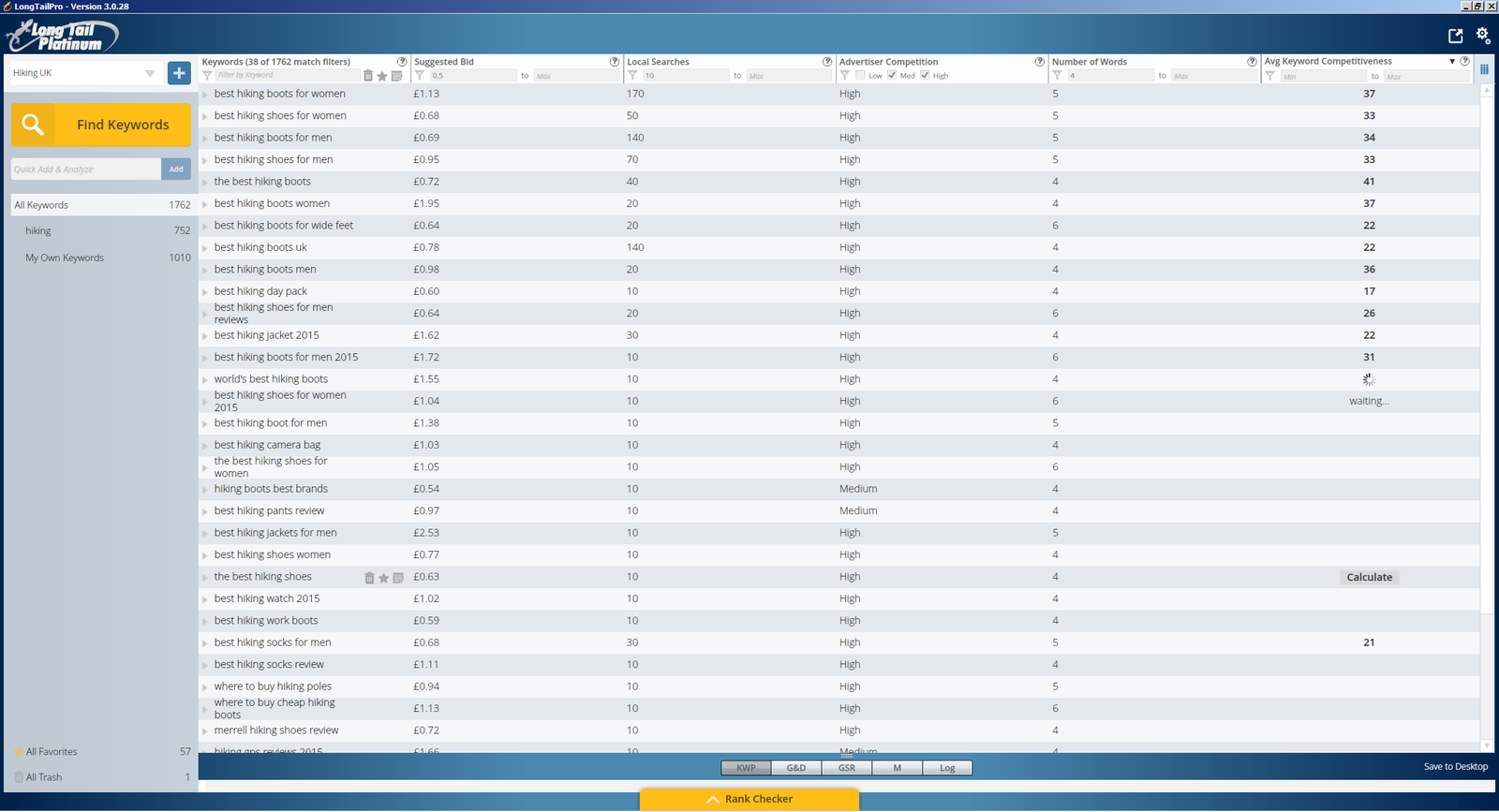
what are the best keywords for my website

what are the best keywords for my website

For each of your niches when you find a good keyword then add this to your favourites, which will help you when you come back to review them later on.

STEP 5 – Analyse the Competition

Task Time : 10 Minutes Per Niche

The next thing to do is to analyse some of the keywords in that niche, to see if you are going to be able to push your way onto that elusive first page of Google. You want to start by looking for keywords that have a high traffic, high competition and low KC score.

Click on the result and ideally you want to see a minimum of 2 sites that have a Domain Authority of less than 30, with a KC of less than 30. This gives you a good indication that if you write a good article and with a little bit of SEO loving you could probably get your site to rank in those top 10 results as well.

In the case of hiking boots I can see a keyword (best hiking boots UK) that gets 140 visits a month and has a KC of just 22 so lets click on that:
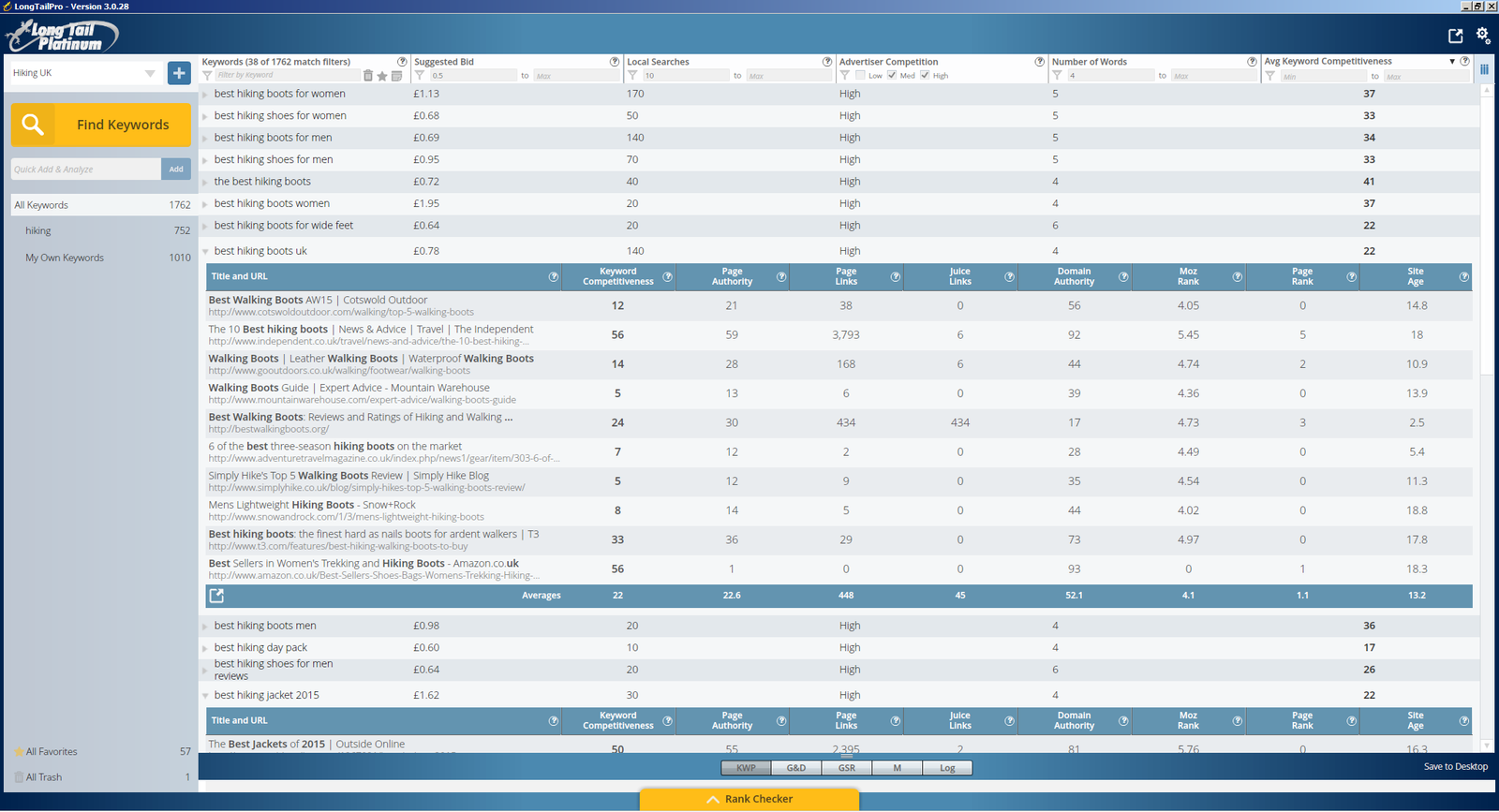
finding a niche in the market

finding a niche in the market

Unfortunately there’s only 1 site with a DA of less than 30, which has a pretty low KC of 24, so lets start by checking that site out. We can see straight away that it’s a niche site as it has a product comparison table, some reviews and a load of affiliate links : http://bestwalkingboots.org/
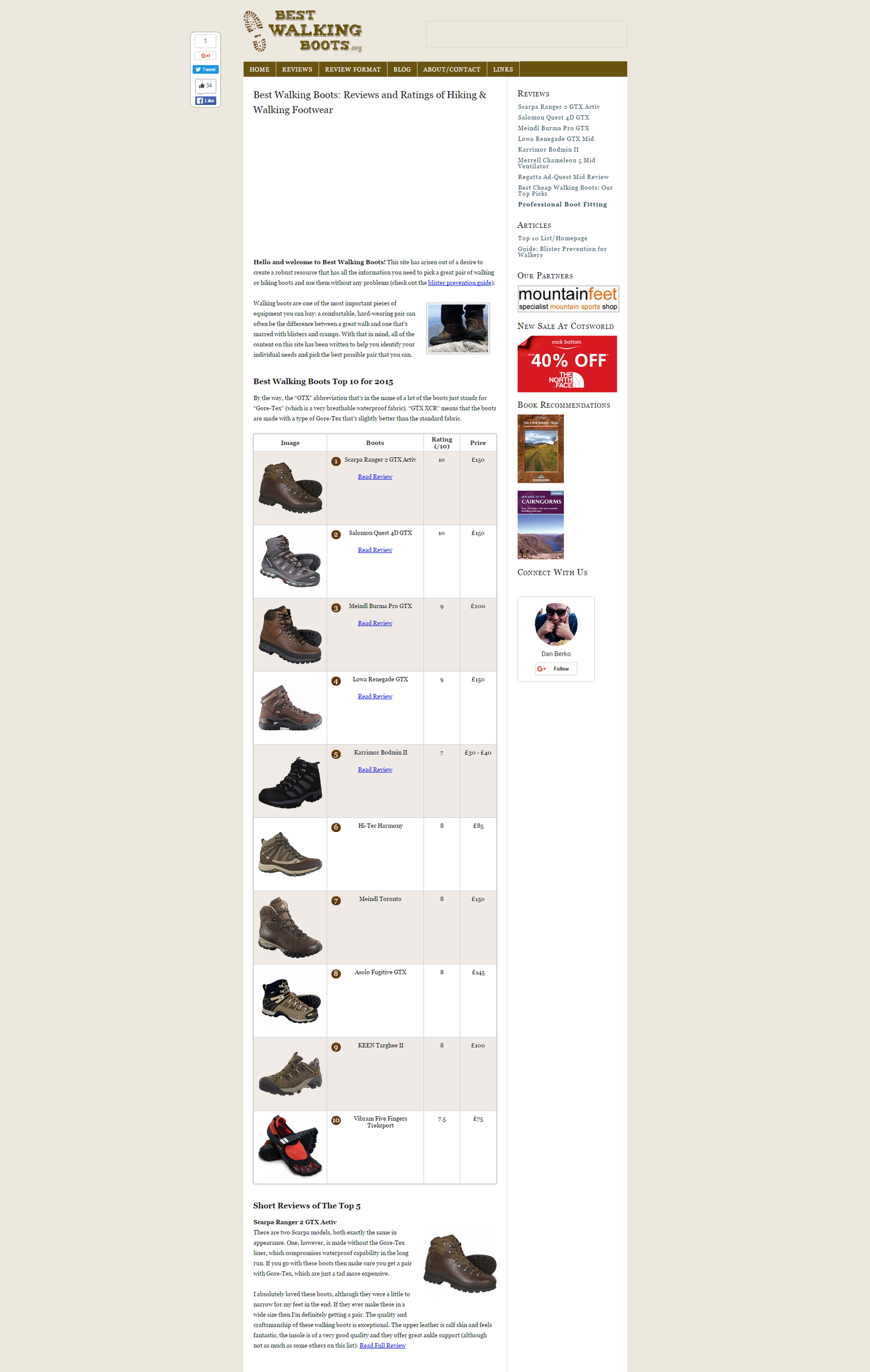
Best Walking Boots Reviews and Ratings of Hiking and Walking Footwear

Best Walking Boots Reviews and Ratings of Hiking and Walking Footwear

Now the next little trick uses a tool cool SEMrush, which really just helps you to spy on the competition, look at how much traffic they are getting and then eventually steal their keywords! After all, all’s fair in love and keywords!!!

You can get 10 free searches a day with SEMrush, so head over to semrush.com and plug the url of the site you’re looking at into the search bar:
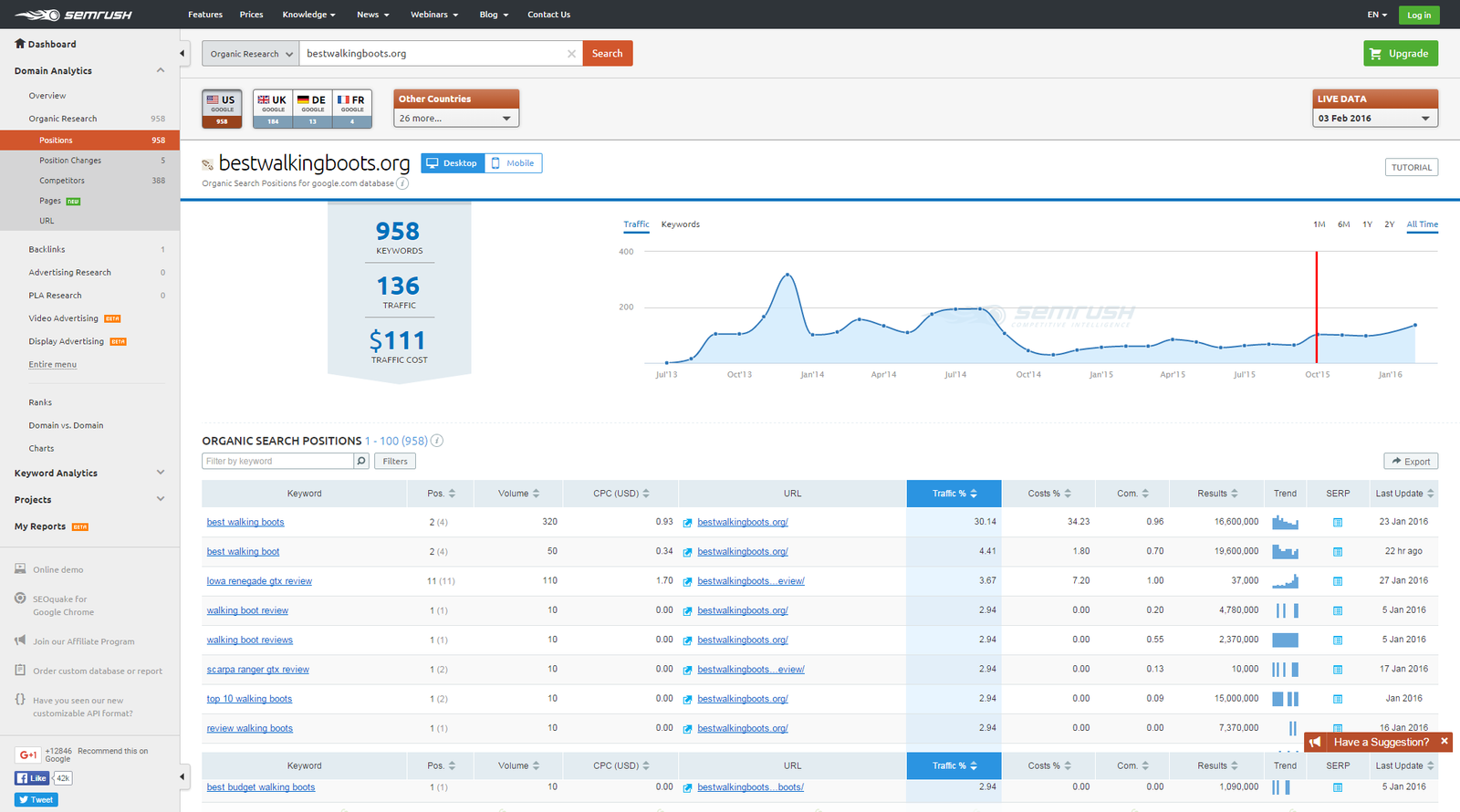
SEMrush : Organic Search Positions

SEMrush : Organic Search Positions

Straight away you can see that SEMrsuh provides you with an estimate of the traffic the site is receiving, in this case 136 visitors a day, and then even better than this it shows you a complete list of the keywords that this site is ranking for and how much of their traffic volume this makes up. Simply click on the ‘export’ button and these keywords can be yours as well!!!
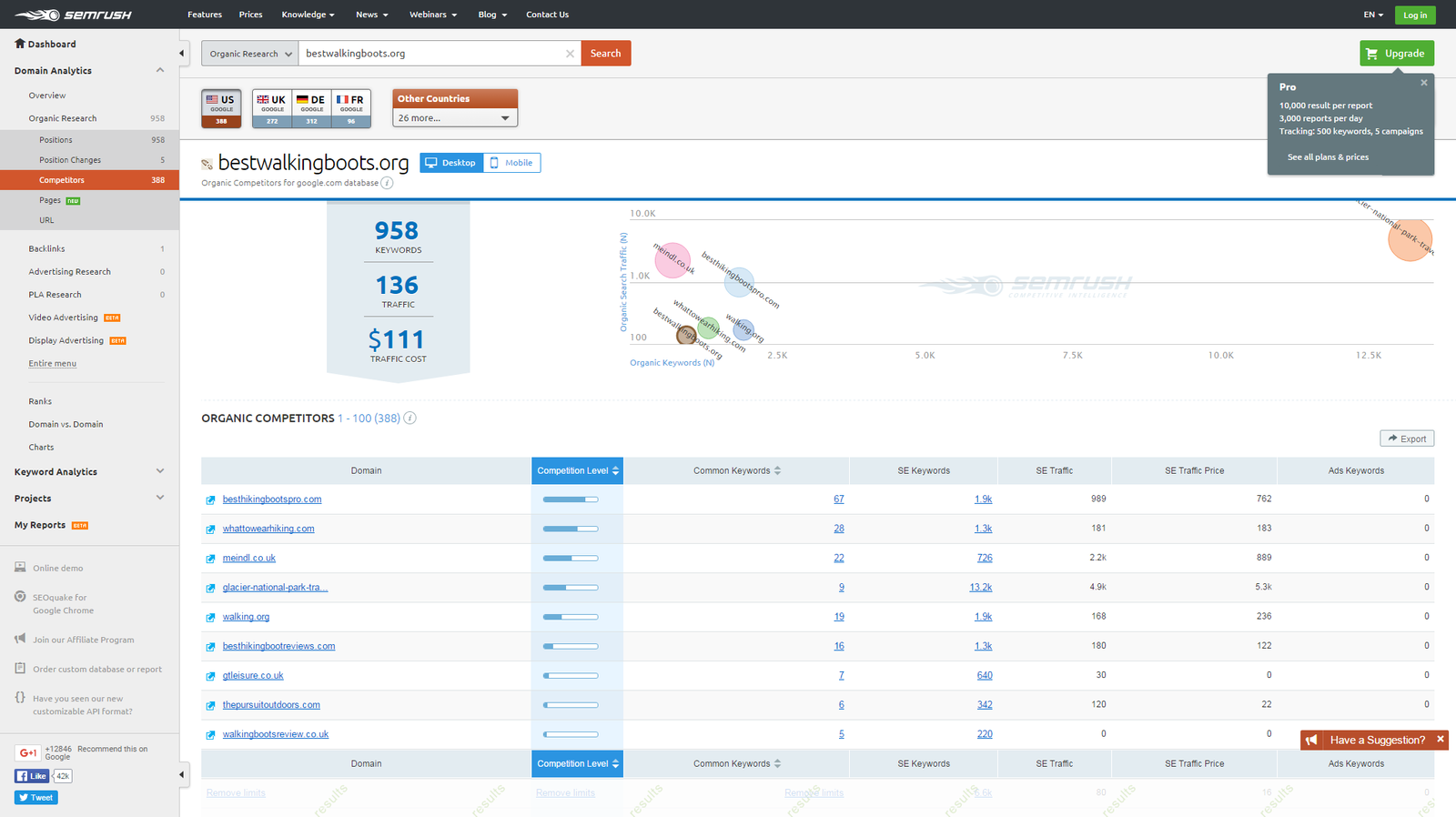
SemRush : Organic Competitors

How to get keywords from a website”

The other useful feature that you’ll see is the competitors graph, which gives you a list of related sites, and also plots them on a graph split between number of keywords and traffic. SEMrush has loads of great features and shows you how to find search volume for a keyword, how to find out keywords of a website and can really show you how to identify a niche market.

All of these things together give you a really useful insight into the competition and can help you understand whether this is a niche worth going into. When I went through this process it helped me to eliminate a number of niches, purely by the fact that the main competitors were getting so little traffic that it wouldn’t be worth my while entering that niche.

COPYCAT SITES

Another good tip is to try and find sites that are similar to how you imagine your site will become. If there are sites like this in the top ten then it’s a pretty good sign, so spend some time and analyse their sites as well.

Look at their traffic figures and check out their competition and keywords and this should give you a really good indication if you should go for this niche or not.

For each of your niches make a note of the number of sites that you found like this and jot down their traffic volume.

Step 6 – How to Choose a Niche Market?

Task Time : 10 Minutes Per Niche

Once you’ve gone through the above process for a number of different niches, you’ll quickly get a feel for whether there is any business value in the niche, whether it is easy to enter, and most of all whether it’s something you’re going to want to dedicate a lot of your time to in the next months.

My final check list for each niche that I looked at would be something like this:

  • Does the niche interest or excite me enough that I could commit a lot of my time to?
  • Are there a good range of products that I could create or promote in this niche?
  • Is there enough scope in the niche for me to write a decent amount of content about? (100 articles or more)
  • Out of my keyword sampling exercise, were there a decent number of keywords with KC scores of less than 30?
  • Did I manage to find a lot of copycat sites for keywords that had a KC of less than 30?
  • Was there a good volume of traffic in the market for my copycat sites?
  • How could I make my site stand out from others in this niche?
  • Is there potential to expand my niche into further markets/niches?
  • Would I be proud of talking about this niche to my friends/family?

Summary

  • Stage 1 – Create a shortlist of niches : 1 hour
  • Stage 2 – Finding Product Keywords using Amazon Search : 10 Minutes per niche
  • Step 3 – Use Keyword modifiers to expand your keyword list : 10 Minutes Per Niche
  • Step 4 – Sample your Keywords for Keyword Competitiveness: 20 Minutes Per Niche
  • Step 5 – Analyse the Competition: 10 Minutes Per Niche
  • Step 6 – Choosing a Final Niche : 10 Minutes Per Niche

Tools Used

  • How-to-Choose-a-Niche-Workbook
  • Long Tail Pro
  • http://ubersuggest.org
  • semrush.com

Filed Under: Website Monetization Tagged With: keyword research, niche websites, SEO

The Ultimate eToro Copy Trader Review Guide

2nd February 2016 By martinos74 1 Comment

eToro Best Traders

Filed Under: Social Trading Tagged With: copy trading, etoro, social trading

My Website Dream : Chapter 3 : Keyword Research and Choosing my Niche

24th January 2016 By martinos74 Leave a Comment

Website Dream Keyword Research

Through listening to the podcasts on Niche Pursuits and doing a lot of background reading, I’ve decided that I need to diversify my website monetization strategy. I had originally planned that I would focus my efforts on building out this website www.mylifestyledream.com and look at how I could monetize this site, however, I’ve switched my focus somewhat.

Through the initial keyword research that I’ve done it’s obvious that the ‘How to make money online’ niche is one of the most competitive niches out there and will take me a long time to rank for an ultimate build up an audience. Whilst I still want to pursue that avenue, I also want to try something that can bring back dividends in the shorter term, so I’ve decided that I also want to set up a niche site.

From what I’ve read so far, creating a niche site that brings back £500 to £1000 a month in recurring passive income, is not a dream, but actually a distinct possibility. There are loads of people out there doing this and making money from niche sites already, and most of them seem to be employing pretty similar methodologies and techniques. In the short term, I’m going to look at these approaches and start to apply them in practice as I build out my own niche site.

Detailed Keyword Research /  Choosing a Niche

I know I’ve banged on about it before but doing extensive keyword research before you start building a site is absolutely essential. There’s no point in spending hours and hours writing content that no-one reads, so this month my focus has been 100% on keyword research, evaluating market size and eventually, choosing a niche that I want to go into.

One of my money spinning plans has been to set up a niche website and monetize it with either Adsense or Amazon affiliate links. I’ve had a few ideas bouncing around in my head for months now, so I wanted to road test these ideas and find out whether there really was any business opportunity in developing a niche in those areas.

To come up with my shortlist of niches I simply went to Wikipedia and looked through their list of hobbies  to find potential niches that I might be interested in.

Then for each niche, I looked on Amazon for potential products and also used Ubersuggest to give me a list of keywords related to that niche.

I then plugged these keywords into Long Tail Pro and did a short sample of keywords to get an idea of keyword competitiveness in that niche. Some of these niches were clearly overly competitive with lots of keywords with keyword competiveness scores of over 30, so this helped me to start whittling down the list to about 5 niches.

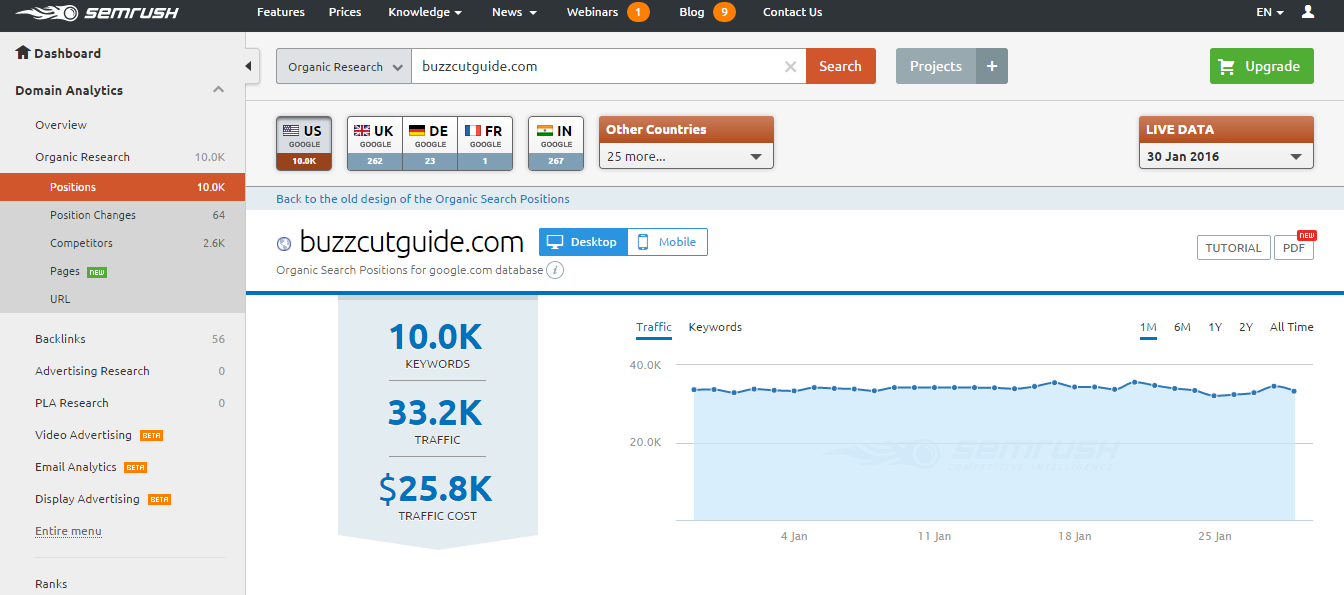
For each of these 5 niches I then used SEMrush to gauge how much traffic was in those markets. This was quite a simple process of looking at the top ten results for some of the keywords in the niche, and choosing sites, which were similar to what I would like to build ie Doppelgangers. I could then take their URLs and put into SEMrush, which gives you an indication of the traffic size:

SEMrsuh monthly traffic stats
Screenshot showing SEMrush monthly traffic stats

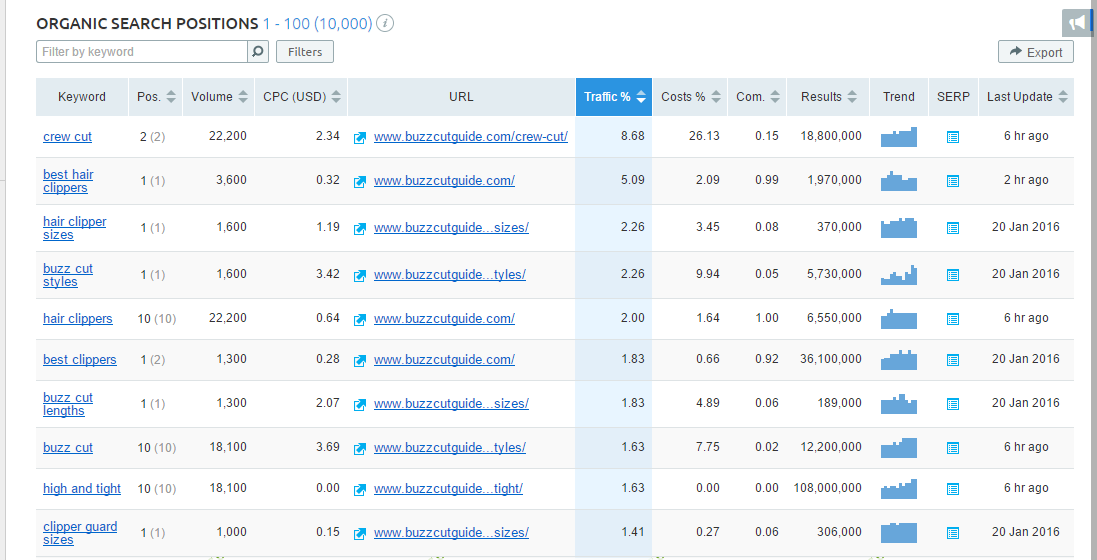
The other good thing about SEMrush, is that you can view the keywords that the specific site is ranking for and put these on your list of keywords you want to rank for:

SEMrush Competitors Keywords

This clearly showed that a couple of niches I was thinking of entering had very little traffic, so I removed them from my list.

In the end my choice was between 2 niches:

Niche 1 – This would be entering a sub-niche for a product that has taken off in the last few years, and I think will have great potential in the future. The sub-niche doesn’t have great traffic at the moment, however, is fairly easy to enter, and I think will grow in the future. I can also see potential that you could then expand into the main niche with time and become an authority site, even though that is quite a competitive niche.

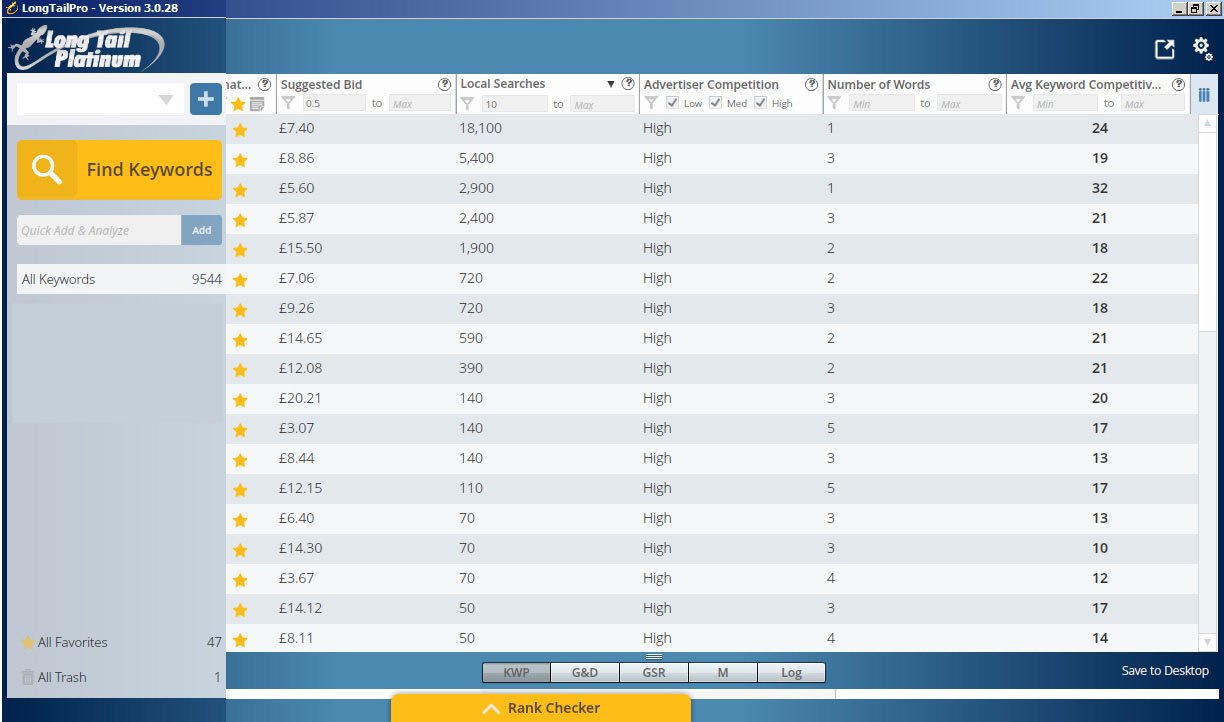
Niche 2 – Is entering into a niche where you would promote a service that other people are supplying. There are loads of really low competitive keywords in this niche, and most of the sites are obviously built by people who don’t know a lot about SEO. I’m not sure how much it helps either, but the Cost Per Click for these keywords is really high:

Long Tail Pro Screenshot
Long Tail Pro Screenshot screenshot showing keyword competitiveness in my niche

The only problem I can find with this niche is that it will be hard to write a lot of decent quality articles.

In the end, I have decided to go with Niche 2, just because the Keyword Competitiveness is so low and the major site in this niche is getting 40k visits per month!!!

Content Research

After choosing my niche I was really keen to crack on with content creation so this month I’ve started to do a lot more research into the niche to generate content ideas.

I’ve basically been reviewing other sites in the niche to ‘borrow’ content ideas, and this has proven to be a really useful exercise. From this exercise I have decided that I can expand my site into 3 main areas:

  • Helping visitors to find the niche service in their area
  • Helping businesses to find training for the niche service
  • Helping visitors find a related niche product

I really think there is potential to become an authority in this niche as well, and I’ve started creating a list of different content ideas to put on the site. I found the guys at Digital Marketer wrote this really great article

How I Nearly Bought a Website

Talking of distractions, well this month I nearly took a massive shortcut around the whole niche site building process and almost bought myself a ready made website, complete with WordPress plugins and 40 keywords focused articles.

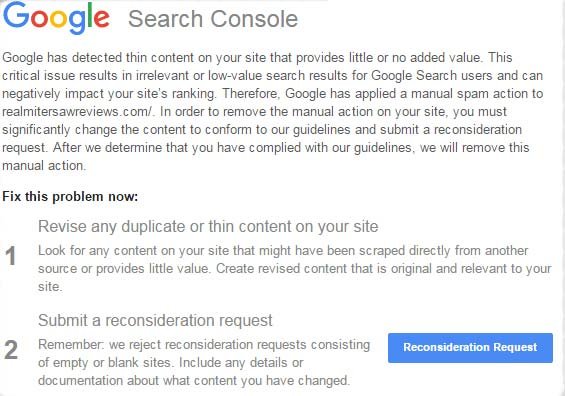
The opportunity arose when I was reading an article on Matthew Allen’s blog about the Google Thin Content Penalty. This is basically a new algorithm that Google introduced recently to penalise websites, which are perceived to add no value and are built for the sole purpose of generating Affiliate revenue ie Niche Sites. If you don’t have a lot of content on your site and you have a lot of affiliate links, then you’ve probably been penalised and received something like this from Google:

Google Thin Content Penalty

So, Matthew Allen had 2 of his sites hit with this penalty and had since then de-indexed the sites, put them on a new URL and was selling them through Human Proof Designs for $799. He claimed that these sites were making a few hundred pounds every month and with a bit of careful nurture could make even more money.

To me this sounded like a great opportunity, not just because they were tried and tested websites that had already made money, but because this would afford me a great opportunity to learn how he had set these specific niche sites up in WordPress. More than anything I was looking at this as a really good learning tool so I clicked on the ‘Buy Now’ button for the site about Organic Shampoo, and initially it looked like I was successful.

However, I was completely gutted to find out a few hours later that there had been an issue with the checkout flow, and that the site had already been sold. Matthew was extremely apologetic and offered me first refusal on the Fertility Kit site instead, but to be honest, that niche just wasn’t going to float my boat.

Looking back, it’s probably not such a bad thing as I want to go through this whole set up process myself, so I guess it’s back to the drawing board and time to focus on writing them articles!!!

NEXT MONTH’S GOALS

  • Write 3 articles for the niche site
  • Create a list of the niche services in London

LAST MONTH’S TASKS

  • Choose a niche for my website – COMPLETE
  • Publish 5 more articles – INCOMPLETE
  • Create a backlinking strategy – INCOMPLETE

TOOLS AND SITES USED

  • Ubersuggest.org
  • SEMrush
  • Long Tail Pro
  • Human Proof Designs
  • Dumb Passive Income

Filed Under: Website Monetization Tagged With: content, keyword research, niche websites, SEO

Chapter 3 : In-Play Betting

24th January 2016 By martinos74 Leave a Comment

Matched Betting Dream In-Play Bets

I’ve been doing a few offers a week this month and gradually building up my matched betting knowledge. I’ve been using the matchedbetting.guru site and the Matched Betting for Free Facebook Group, which has been particularly helpful.

Last weekend I decided to dedicate the whole weekend to Matched Betting and I ended up making a massive profit of £25!!! Doesn’t sound like a lot, and to be honest it completely stressed me out all weekend, but I think that is because I’m still learning some of the rules and techniques.

In fact, I think this weekend I think it’s fair to say that I graduated to phase 2 of the matched betting academy:

  • Stage 1 – Signing up to the bonus offers
  • Stage 2 – Placing in-play bets and making the most of weekly offers
  • Stage 3 – Laying off bets in an accumulator
  • Stage 4 – Expanding out into other sports
  • Stage 5 – Moving into trading / arbitrage

Placing In-Play Bets

I think the most stressful part of the weekend was getting used to the In-Play bets. For example Paddy Power gave an offer where if you bet £20 on a qualifying game, they will give you two £5 bets to use In-Play, ie when the game has started.

The main issue with In-Play bets is that you can’t use an odds comparison like Odds Monkey, so you have to check the odds between different bookmakers manually. That doesn’t sound too bad, but the problem is that the odds are constantly changing, so by the time you put your odds into a matched betting calculator to find the amount to lay your bet, the odds will have changed. I found this to be extremely stressful, and also meant I made a few mistakes.

TOP TIP: If you’re going to use In-Play bets then you should place your bets at half time when the odds are more stable.

Rollovers

The other thing that is worth learning is the concept of ‘rollovers’. These are the bane of the lives for matched betters as they can really spoil the amount you can extract from a free bet.

An example of this is with Bet Victor. They recently made an offer of Bet £20 and get a £10 free bet, however, you can only withdraw the free bet once you had bet 4 x the bonus amount ie you need to bet an additional £40. This means that on some offers it’s just not worth doing because the rollover just eats into the total you’ll get back from the free bet.

What odds should I place my Free Bet at?

A lot of people’s accounts were getting ‘gubbed’ or closed down this month, which happens when you bet in a suspicious way. Basically if they suspect that you are a matched better, then they will close you account immediately and sometimes even keep your balance.

For some offers I was placing my free bet of odds of over 10, so that I could extract as much as possible from the free bet. Looking back this was a little silly as it is likely to raise suspicion and after taking some advice from the Matched Betting for Free group, I found out that you should try to keep the odds to between 5 and 7, and not risk going any higher.

Matched Betting Balance Sheet

This month I’ve really struggled with understanding my finances and figuring out exactly how much money I won or lost with Matched Betting. I tried using the Ultimatcher Spreadsheet, but for some reason the numbers just weren’t stacking up so I’ve decided to go back to my own spreadsheet, where I can manually check how much I’ve won / lost on each match. In the long term I’ll probably need to switch to something else, but I think for now this will have to suffice!

LAST MONTH’S TASKS

  • Complete Bet365 Offer – COMPLETE
  • Place an Inplay bet offer – COMPLETE
  • Get an accurate balance sheet – COMPLETE

NEXT MONTH’S GOALS

  • Sign up to 3 more offers
  • Continue In-Play betting

TOOLS AND SITES USED

  • Matched Betting for Free
  • Matched Betting Assistant
  • Matched Betting Calculator
  • matchedbetting.guru

Filed Under: Matched Betting Tagged With: free bets, in-play betting, Matched Betting Dream

Keyword Planner for Beginners

4th January 2016 By martinos74 Leave a Comment

Keyword Planner for Beginners

This article provides a useful keyword planner, to help you understand and the principles of keyword research and start you finding great keywords for your blog.

So, by now you have your site up and running, but before you head off at full steam writing blog posts and articles, there is one key step to think about first… How are you going to attract visitors to your site?

I’m no SEO expert, but have spent the past few weeks learning all about keyword research for my site, so this post is a summary of what I have learnt so far. Feel free to feedback and comment, but I’m, hoping this post will serve as a great keyword planner to help you do perform your own keyword research, find some useful keyword planning tools and give you a few SEO hints and tips along the way.

  • What is Keyword Research?
  • Why is Keyword Research Important?
  • Martinos Keyword Planner
    • Step 1 – Choose your ‘Seed’ Keywords
    • Step 2 – Create a short list of commercially valuable keywords
    • Step 3 – Evaluate the Keyword Competition

What is Keyword Research?

Lets face it, most users are going to get to your website via a Google search. They’ll type in a phrase,  keyword or even a set of keywords into the Google search box and a heap of search results will be returned to them.

You want your site to be as near to the top of that list as possible to attract the biggest number of visitors to your site. There are a number of factors that help you get to the top of this list such as the number of links to your site, the age of your site, the quality of your content, but we’ll save that for another day.

Keyword research is simply the art of choosing relevant keywords that you think your potential users would type into Google to come to your site.

Think of it a bit like fishing…. your keywords are the bait that you’re going to use to hook your users, and the closer to the top of the list you are, the more likely you are to reel them in!

Why is Keyword Research Important?

If you’re serious about running a blog or website, then you’re going to be spending many hours in front of a computer creating content for your potential visitors. But unless, you just like ranting at the wind, you want to make sure that your efforts are not in vain and that you have a captive audience willing to listen to you.

Remember that the more visitors you get to your site, the more potential you have to convert those visitors into money in your back pocket.

Before you go any further you need to do your keyword research to learn the size of your potential market and to target specific segments of that market to increase the potential amount of visitors to your site.

Martinos Keyword Planner

Let me start by saying that getting your head around this topic is not going to be easy, and you will no doubt be swearing at your computer like I have for a while, but it is a necessary pain, and your efforts will bare fruit later.

To ease your pain, I have but together a keyword planner with a series of steps that I went through over the last couple of weeks to help me understand better which keywords I should target for my blog and websites.

Martinos Keyword Planner Step 1 – Choose your  ‘Seed’ Keywords

Start by having a brainstorm session and write down 5- 10 keywords that you would use to describe your blog or site. I would recommend keeping these to 1-2 words rather than long keyword strings.

I’m going to use my sample site www.martinosrecords.com as an example for this exercise. I’m passionate about reggae music have always wanted to create a site related to this, but have never been quite sure which angle to take, so I wrote down the following keywords:

  • records
  • vinyl
  • music
  • roots
  • reggae

These are called ‘seed’ keywords, which we will take to help us find other keywords that may be useful for our site.

Martinos Keyword Planner Step 2 – Create a short list of commercially valuable keywords

Now we’re going to use a bit of magic and turn these 5 keywords into a much bigger list, which we will then be able to review and find which are the most valuable keywords with the help of something called Google Keyword Planner.

This is a free tool for you to use, and all you need is a Google account to get started.

Set up Google Keyword Planner and enter your keyword search criteria:

ACTION:

  • Goto: https://adwords.google.com/KeywordPlanner
  • Login with your google account
  • IMPORTANT : Make sure you click the ‘skip the guided set up’, otherwise you won’t be able to access this tool without putting your credit card details in (this took me a few hours to get right!!!)
  • Goto the tools menu and select ‘keyword planner’
  • Fill out the following fields in the dialogue box that opens:
    • Your product or service
    • Your product category (you can fill this out but I prefer to leave it empty as it may give me some ideas that I hadn’t thought of before)
    • Targeting – Select United Kingdom
    • Keyword filter – Add ‘500’ for ‘average monthly searches’ and £0.50 for suggested bid. This tells you how many people did a search with this keyword each month and how much advertisers would pay if someone clicked on an ad on your site from this keyword.
    • Click on ‘Get Ideas’

Analyse the suggested keyword results

You’ll now be presented with a list of keywords that Google has generated for you, which were related to your original ‘seed’ keyword. You’re also provided some really useful information about these keywords, which will help you decide, which keywords you should target.

There are 3 key columns that you need to focus on:

  • Average monthly searches – Does what it says on the tin and says how many visitors search for that keyword each month
  • Competition – This is a metric that Google creates to show you how much competition there is amongst advertisers to promote their product/site with this keyword
  • Suggested Bid – This metric gives an indication of how much advertisers would need to pay, every time someone clicked on one of the ads (on your potential site)

For each of these metrics you want the score to be as high as possible, as that shows that both visitors and advertisers are interested in this keyword, which means it’s in demand.

Don’t forget to check out the ‘Ad group ideas’ tab as well as sometimes that has gems of suggestions for new keywords for you.

TOP TIP: What I usually do is go through the above steps with each ‘seed’ keyword and then download a csv file from Google Keyword Planner and combine all of the results into one master spreadsheet. This will help you to filter through the results more quickly so that you can arrive at your first set of keyword options.

Remember that this exercise is helping you to pick high volume, high value keywords that you can tailor your content around and will help you to shape your site. This is a great exercise for finding new angles to your business. For example through doing this exercise I notice that ‘record players’  or ‘record exchange’ receive a high volume of traffic, so it would probably be worth my while creating a section on the best record players for vinyl records or a forum to exchange records.

There are a bunch of other tools that will help you to find suitable keywords for your site such as soovle.com, ubersuggest.org, scrapebox.com etc, but I’m going to save them for a later post.

Martinos Keyword Planner Step 3 – Evaluate the Keyword Competition

We should now have a list of 5 – 10 keywords, which are both high in search traffic and are commercially valuable search terms.

That’s great, but you now need to understand whether there is an icecube’s chance in hell of ranking on the first page of Google for these keywords, otherwise you will be wasting a lot of time and effort creating content that will sit on the lower pages of Google and no one will ever review.

A listing on the first page of Google’s search results accounts for nearly 90% of all the click-throughs and the following numbers show how important it is for you to rank well up the charts for your chosen keywords:

  • Position 1 – 31.2%
  • Position 2 – 14.04%
  • Position 3 – 9.85%
  • Position 4 – 6.97%
  • Position 5 – 5.5%
  • Position 6 – 10 – 3.73%
  • All of the results on the second page total only 3.99%
  • The third page only 1.6%
  • and the rest is barely worth talking about

Now just by doing a simple search for your keyword in Google you will get a feel for whether the results page is full of big brands and top ranking site like the BBC, but luckily there are couple of other tools that can help us with our decision making.

ACTION: You’ll need to now enable 2 browser extensions:

  • SEO Quake – http://www.seoquake.com – (Chrome, Firefox, Opera or Safari)
  • Mozbar – https://moz.com/tools/seo-toolbar (Chrome and Firefox only)

Then type a search keyword into Google eg ‘record player’ and you will have a standard results page returned from Google with 2 helpful toolbars giving you great information about the results:

From these 2 toolbars you need to focus on the following:

  • Page Authority (PA) – This is Moz’s metric to measure the predictive ranking strength of a single page ie how likely is it that the page will show up in search engines
  • Domain Authority (DA) – This measures how important Moz ranks the domain. Sites like Twitter or BBC will always have a score of 100
  • Page Rank (PR) – This is a metric developed by Larry Page for Google, which measures the importance of web pages
  • Backlinks – Both toolbars also feature a count of the number of links to the page and to the domain in general

From what I have read the 2 most important factors are the Page Rank and Page Authority, so you want these to be as low as possible.

TOP TIP: Make sure that in the top 10 results there are sites with a PA of less than 30, which gives you a chance of pushing them off of the first page, if you play your cards right.

For each keyword I would recommend you make a list of:

  • Local Search volume
  • CPC
  • Advertiser Competition
  • Pages with exact match keyword
  • Pages with PA below 30
  • Pages with less than 30 juice links
  • Pages with site less than 1 year

Summary

Knowing your audience is extremely important if you are starting a new blog or website, however, understanding how to get your audience to your site is even more important.

  • Think carefully about the keywords that you are going to target
  • Check that the keywords are commercially valuable if you are planning to use your site as a revenue stream
  • Evaluate the competition and make sure that you are confident you can find yourself nudging up to the top of those search results pages

You can always go back and re-optimise your content later on, but my advice would be to think about this and try to head in the right direction to start with. It can be pretty frustrating as you are chomping at the bit, to get writing, but it can save you a lot of time in the long run.

Filed Under: Website Monetization Tagged With: Beginners, CMS, SEO

My Website Dream : Chapter 2 : WordPress Setup

24th December 2015 By martinos74 Leave a Comment

Website Dream WordPress Setup

So most of my time this month has actually been taken up with WordPress and getting www.mylifestyledream.com set up properly. It is amazing how much time you can sink into tinkering with WordPress or tools that you need to learn to power your website, and you constantly find yourself falling down rabbit holes. However, some of those holes are important, and spending the time to build a site on a solid foundation will pay dividends in the long term.

Anyway, here are just a few of the rabbit holes I fell down this month:

Choosing a WordPress Theme

Wowwwwwwww, there are soooo many themes out there how do I know where to start?

I initially started with a free WordPress theme called Atomic, which I chose because I liked the clean design and font styles. However, I read many articles this month about why you should really invest in a Premium WordPress theme.

The main reason for this is that most of the free WordPress themes are made by individuals, who can at any time decide not to support the theme any more. This means that sooner or later, when you upgrade your version of WordPress, you’re going to break your theme, leaving you in a whole world of pain.

There are lots of great premium themes out there costing as little as £20 – 30, so it’s worth investing the time and money to choose the right one. I was looking for a theme that had the following credentials:

  • Offered good support
  • Fully Responsive
  • Optimised for SEO
  • Quick Page Loads
  • Offered a variety of layouts
  • Could add custom headers
  • Ideally was available for a one off fee only, rather than an annual subscription

After doing lots and lots of research I came down to 2 candidates, which were completely different solutions to each other but both had things I wanted:

Elegant Themes – Divi Theme

This is basically a drag and drop, build your own theme kit, which has great reviews. This was a really attractive option to me as it required no coding and would give you a great looking theme, with loads of cool modules, however, the downsides were:

  • Creates bloated code = slower page performance
  • Once you have created your theme in divi, it adds lots of short codes, which means if you ever wanted to change themes in the future you would have a big problem
  • You have to pay a recurring fee for access to all of the available Elegant Themes

The Genesis Framework

Rather than just buying a theme, this is a whole framework that makes it really easy for developers to create their own ‘child’ themes from the sample theme. This is definitely a favourite amongst coders and has the following advantages:

  • Very lightweight code and little use of shortcodes
  • Uses the concept of a child theme, which means that when WordPress is upgraded, you won’t be able to break your site so easily
  • Has a big community and support network
  • Is one of the best options for SEO
  • Is relatively inexpensive at $49

The main issue with the themes that came with this framework was that they have very few modules or template combinations that come with them and you can do very little customisations, without coding. This is definitely something I wanted to avoid as I don’t want to spend hours getting back into coding.

In the end, however, I decided that it was better to go with a framework that can be extended rather than tying myself into one theme forever, as that could be a very costly mistake. I then did a little hunting around and found some free child theme options that go with this framework and found the ‘Winfield Theme‘ , which gave a look and feel to what I wanted.

Without much hassle at all I made a few adjustments and now have this on my site.

WordPress Posts vs Pages

Again, setting up the structure of your site is key to start with is key as changing it further downstream is going to take a lot of work.

The main thing that I’d been stressing about and actually spent hours deliberating was whether I should use WordPress ‘Posts’ or ‘Pages’ for most of the content on my site.

Using pages gives you a more traditional approach to a website, for articles which aren’t time-based and you would organise your content through your navigation elements. Your URLs would then be structured something like: www.mylifestyledream.com/make-money-online/social-trading/content

As you can see, using this approach would result in massive URL’s (although you could install a permalink shortener module to get around this)

With WordPress ‘posts’, however, you organise everything through your taxonomy using ‘categories’ and ‘tags’ rather than navigation. This allows the user to read an article and then they easily get led onto related articles, or click on the category or tag. The URL’s will then be simply: wwwmylifestyledream.com/content

I first opted to use pages, then switched to a combination of the two, then switched everything to using posts!!! I think it’s a more modern approach and means your content can easily be syndicated as well so I’m going to stick with this now. I’ve also figured out that I can create some custom menu’s with the top posts in anyway, so I can still get my traditional secondary navigation!

Niche Websites

I’ve spent a lot of time recently looking into the concept of Niche websites. These sites are usually built by internet marketeers, specifically with the intent to make money via either affiliate links such as Amazon or through Pay Per Click Advertising.

The standard approach is to do keyword research to find keywords that have a high cost per click value, with a lot of search traffic and most importantly, are easy enough for you to rank in the top 10 listings, with minimal effort.

There are a number of great resources out there, but I’ve been avidly studying the Niche Pursuits blog, and they have just launched the Niche Pursuits 3.0 Project.

This is a project where 3 experts take 3 aspiring users through a 6 month project to set up a successful Niche website. They give out weekly coaching calls, and you can follow step by step as these websites get set up.

The overall goal for these websites is to be able to earn $500 a month in recurring passive income, which is really in line with my overall goals, which would help me travel and cultivate my dream lifestyle.

Niche websites really rely on strong Keyword research, so I’ve spent this month trying to understand this better and using some of the tools like Long Tail Pro and SE Cockpit to do this research.

Adobe Premiere Pro 2.0

As part of my website I have been taking screen captures and will definitely need to know how to create great looking video content in the future.

I tried a few free video editors like Windows Movie Maker, which is great for simple movies and VSDC Video Editor, which is more advanced but a little bit clunky. Then I found that Adobe are giving out free downloads to some of their older products that they no longer support.

One of these products was Adobe Premiere Pro 2.0, so I jumped at the chance to get a free version of this and installed it right away.

Admittedly it is a little bit old, and a little bit buggy, however, it’s an amazing bit of kit to have for free. If you know how to use Photoshop then Adobe Premiere Pro 2.0 is the perfect companion.

I spent most of the day yesterday playing around with it and am really excited about using this in the future. I even made my first video with it: Google Keyword Planner Tool Set Up

DOWNLOAD ADOBE PREMIERE 2.0 FOR FREE HERE

Next Month’s Goals

  • Choose a niche for my website
  • Publish 5 more articles
  • Create a backlinking strategy

Last Month’s Tasks

  • Finalise structure of website – COMPLETE
  • Choose a theme – COMPLETE
  • Understand backlinking – COMPLETE
  • Learned Adobe Premiere Pro 2.0 basics – BONUS
  • Set up local test version of my WordPress site – BONUS

Tools and Sites Used

  • Genesis Framework 
  • Adobe Premiere Pro 2.0 
  • Niche Site 3.0 Project

Filed Under: Website Monetization Tagged With: niche websites, WordPress

« Previous Page
Next Page »

Martinos Digital Ltd - Dyne Road, London, England